---
title: "Automatisierung der S/MIME-Zertifikatsbestellung"
url: "https://help.internetx.com/de/api/processes-automatisierung-der-s-mime-zertifikatsbestellung/"
lang: "de"
section: "API-Referenz — API-Prozesse"
breadcrumb: "Automatisierung von Zertifikats-Prozessen"
updated: "2023-09-12"
---
# Automatisierung der S/MIME-Zertifikatsbestellung
Anleitung zur vollständigen Automatisierung des Bestellprozesses für S/MIME Zertifikate. Als Beispiel wird hier das Produkt GlobalSign - PersonalSign Class 1 verwendet. Bei S/MIME-Zertifikaten handelt es sich um Zertifikate für das Verschlüsseln und Signieren von E-Mails. Aktuell werden die S/MIME-Produkte von Globalsign angeboten.
## Grundlagen der JSON-und XML-API
Alle wichtigen Informationen für die Nutzung der JSON- und XML-API findest du bei den [API-Grundlagen,](/de/api/core-allgemeine-api-grundlagen/) den [XML](/de/api/core-xml/)\- und [JSON](/de/api/core-json/)\-Grundlagen.
Die spezifischen [SSL-Objekte](/de/api/core-objekte-fuer-ssl/) sind hier dokumentiert, die [SSL-Auftragstypen](/de/api/core-ssl-auftragstypen/) hier.
## Prozessübrsicht
### Ablaufdiagramm
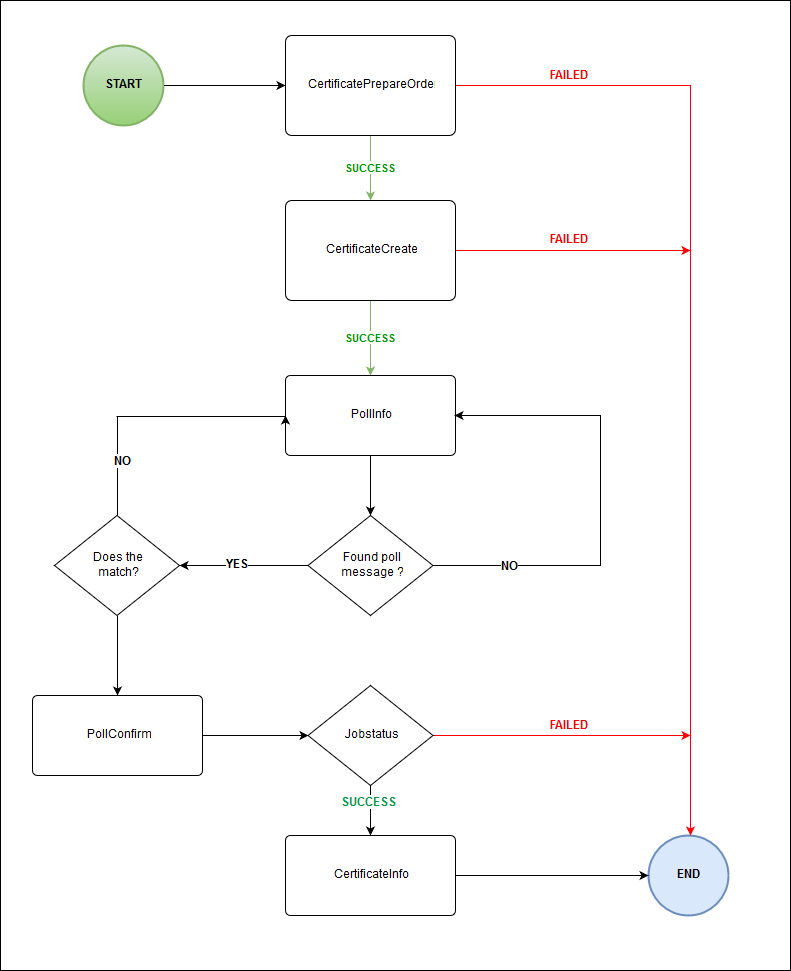
### Auftragstypen-Codes und Routen
| Auftragstyp | Code | Route |
| --- | --- | --- |
| [CertificateCreate](/de/api/core-certificate-create/) | 400101 | POST /certificate |
| [SSLContactCreate](/de/api/core-contact-create/) | 400201 | POST /sslcontact |
| [CertificateInfo](/de/api/core-certificate-info/) | 400104 | GET /certificate/$id |
| PollInfo | 0905 | GET /poll |
| PollConfirm | 0906 | PUT /poll/$id |
| [CertificatePrepareOrder](/de/api/core-certificate-prepare-order/) | 400110 | POST /certificate/\_prepareOrder |
## Vorbereitung der Bestellung
### Kontakt anlegen
Für die Bestellung eines S/MIME-Zertifikats benötigst du einen administrativen Kontakt (AdminC). Du kannst bereits vorhandene Kontakte verwenden oder neue Kontakte anlegen. Du kannst alle Kontakte für zukünftige Bestellungen verwenden.
#### ContactCreate - Beispiel
```
POST /sslcontact
{
"fname": "John",
"lname": "Doe",
"phone": "+49-123-12345",
"fax": "+49-123-12345",
"email": "john.doe@example.com",
"title": "Admin",
"organization": "Company",
"address": [
"123 Main Street"
],
"pcode": "12345",
"city": "Anytown",
"country": "DE",
"state": "BY"
}
```
```
{
"stid": "20180926-stid",
"status": {
"code": "S400201",
"text": "Kontakt wurde erfolgreich angelegt.",
"type": "SUCCESS"
},
"object": {
"type": "contact",
"value": "100"
},
"data": [
{
"fname": "John",
"lname": "Doe",
"phone": "+49-123-12345",
"email": "john.doe@example.com",
"title": "Admin",
"organization": "Company",
"address": "123 Main Street",
"pcode": "12345",
"city": "Anytown",
"country": "DE",
"state": "BY",
"owner": {
"user": "user",
"context": 9
},
"id": 100
}
]
}
```
```
USERCONTEXTPASSWORD400201MichaelMustermann+49-941-1234560michael.mustermann@example.comAdminBeispiel GmbH
Maximilianstrasse 36000
93047RegensburgDEBayern
```
```
S400201Kontakt wurde erfolgreich angelegt.success
```
## Ein S/MIME-Zertifikat bestellen
### Zertifikat bestellen
Mit dem Auftragstyp _CertificateCreate_ sendest du die Bestellung ans System. Dabei musst du bestimmte Werte setzen:
- Zertifikatstyp = Typ des Zertifikates für S/MIME "MAIL".
- Admin = Die ID des administrativen Kontaktes (AdminC).
- Name = Der Name des Zertifikates. Bei S/MIME-Zertifikaten ist dies die E-Mail-Adresse, für die das Zertifikat verwendet wird.
- Produkt = Wert des S/MIME-Zertifikates, für unser Beispiel ist dies GLOBALSIGN\_PERSONALSIGN\_1.
- Vorname = Vorname
- Nachname = Nachname
- Laufzeit = Die gewünschte Laufzeit. Die möglichen Laufzeiten hängen vom Zertifikats-Produkt ab.
- Passwort = Das Passwort zum Herunterladen des Zertifikates von Globalsign.
- Organisationseinheit = Die zuständige Organisationseinheit, z. B. "Marketing-Abteilung".
- CSR = Angabe, ob ein eigener CSR verwendet wird oder nicht. Tag mit den Werten "True" oder "False".
#### CertificateCreate - Beispiel
Route: POST /certificate
```
{
"adminContact": {
"id": 100
},
"technicalContact": {
"id": 100
},
"name": "john.doe@example.com",
"lifetime": {
"unit": "MONTH",
"period": 36
},
"csr": "-----BEGIN CERTIFICATE REQUEST-----MIICujCCAaICAQAwdTELMAkGA1UEBhMCREUxDzANBgNVBAgMBmJhdmFyaTETMBEGA1UEBwwKcmVnZW5zYnVyZzERMA8GA1UECgwIc3VwZXJkZXYxFDASBgNVBAsMC2RldmVsb3BtZW50MRcwFQYDVQQDDA5qdW5rZHJhZ29ucy5kZTCCASIwDQYJKoZIhvcNAQEBBQADggEPADCCAQoCggEBAMSMhi30bENDqWeXp7SfHhi2epocJeuI6bBeqGYyQCM5yuoUyAC6wuQ5xudC+hJ6dnDp8p8l8ObkcLrU8/vZJCVmfHxkQpOy6oIsz8uvNA7VcLqOQfxINxe0lqAD0SAWYUaB2W+4CVqyFxaKIn/1c2Isg+8d8Y/3l/t0lI0CF7Y4Q/EmIh1Rl2cr1ONQd4P+3mx2V0ExYN69zPRIsEHt1bV9Mo3l7QpMybHKANMK4BHVL+F5oL8vyGElLCScm3ryrl4W+C0N5V1SSGLNTfNiDxkPx9dwCc5iBy/X8FfhZ7z3+JdjluWo513wvdwZH+jbWhvQ7wsmnV0lGQoe4jHwF+UCAwEAAaAAMA0GCSqGSIb3DQEBCwUAA4IBAQCzQXKkBJWdaGtHLdI9/pqJ/zVCISGsH8lXo8tMBUyZk9cCYdH0hvsVduqNJRpBzNi07ivK/T3+Ru3SUYl0DKlsfHm5IEjf2lYJgJORXS5SRMkr7sYfYSAeGsoUIXc1GC4hBnSFmKN6NoLLbHaAItNDo9AWKVr/1ZqPy9v5vaJpTSzYidrTcZth4lF+i4QqcchorIPq4hSMKWkhZs5tzd/+hAR0XV2hcH1RGcuHTWOJmAvk0Nw2eVxUgNJSmiU0OneyRO4qQoWC/1khDFI0/xt0apn0OeYpcu8rA3aXsHCbcCqpjLUSBZ45szn60KL5sW9/S4y2oUjUbUQb3NW4TFgw-----END CERTIFICATE REQUEST-----",
"product": "GLOBALSIGN_PERSONALSIGN_1",
"firstname": "Jon",
"lastname": "Doe",
"password": "Hello1"
}
```
```
{
"stid": "20190702-app3-dev-10171",
"status": {
"code": "N400101",
"text": "Zertifikats-Auftrag wurde erfolgreich gestartet.",
"type": "NOTIFY"
},
"object": {
"type": "Certificate",
"value": "john.doe@example.com"
},
"data": [
{
"id": 4297543967
}
]
}
```
```
USERCONTEXTPASSWORDMAILGLOBALSIGN_PERSONALSIGN_136admin@example.com****MaxMustermannmarketingfalse100400101
```
```
123456RUNNINGN400101Zertifikatsauftrag wurde erfolgreich gestartet. notify
```
### Benachrichtigungen erhalten
Der Auftragstyp _CertificateCreate_ erzeugt automatisch einen Auftrag für die Bestellung des Zertifikats. Ist der Auftrag abgearbeitet, wird eine Benachrichtigung generiert, mit Informationen über den Auftrag. War der Auftrag erfolgreich, so erhälst du unter anderem die ID des bestellten Zertifikates. Die Benachrichtigung kann mit den Methoden [Polling und Push abgerufen bzw. zugesendet](/de/api/core-benachrichtigungen-erhalten-polling-und-push/) werden.
### Zertifikats-Daten ermitteln
Der Auftragstyp _CertificateInfo_ ermittelt alle Zertifikatsdaten. Die Daten können mit Hilfe der ID aus dem Schritt Benachrichtigungen erhalten abgefragt werden.
#### CertificatInfo - Beispiel
```
GET /certificate/$id
```
```
{
"stid": "20180926-stid",
"status": {
"code": "S400104",
"text": "Zertifikatsdaten wurden erfolgreich ermittelt.",
"type": "SUCCESS"
},
"object": {
"type": "certificate",
"value": "example.com"
},
"data": [
{
"created": "2018-09-26T00:00:00.000+0200",
"updated": "2018-09-26T11:38:08.000+0200",
"id": 13258,
"owner": {
"user": "user",
"context": 9
},
"orderId": "2695961",
"adminContact": {
"id": 100
...
},
"technicalContact": {
"id": 100
...
},
"name": "john.doe@example.com",
"lifetime": {
"unit": "MONTH",
"period": 12
},
"csr": "-----BEGIN CERTIFICATE REQUEST----- ... -----END CERTIFICATE REQUEST-----",
"server": "-----BEGIN CERTIFICATE----- ... -----END CERTIFICATE-----\n",
"serialNumber": "750C3006B23B90D0F396A3D153EB4C8",
"product": "GLOBALSIGN_PERSONALSIGN_1",
"expire": "2019-09-26T12:00:00.000+0200",
"certificateTransparencyPrivacy": "PUBLIC",
"domain": "example.com"
}
]
}
```
```
USERCONTEXTPASSWORD400104100
```
```
1003396954MichaelMustermann+49-941-1234560michael.mustermann@example.comAdminBeispiel GmbH
Musterstrasse36000
93047MusterstadtDEBayernUSERCONTEXTUSERCONTEXT203982017-01-01 10:35:222017-01-01 01:05:07MichaelMustermann+49-941-1234560michael.mustermann@example.comAdminBeispiel GmbH
Musterstrasse 36000
93047MusterstadtDEBayernUSERCONTEXTUSERCONTEXT203982017-01-01 10:35:222017-01-01 01:05:07example.com12APACHE2SERIALNUMBERQUICKSSLPREMIUMSHA22030-01-01 23:59:59ICA1DNSexample.com. 300 IN TXT "201704071405295z34is5g0jjairsdu0v5opdw8512td8kixzvtaacu4ebrkry5q"USERCONTEXTUSERCONTEXT1002017-01-01 00:00:002017-01-01 14:30:36S400104Zertifikatsdaten wurden erfolgreich ermittelt.success
```