---
title: "Automation of certificate renews"
url: "https://help.internetx.com/en/api/processes-automation-of-certificate-renews/"
lang: "en"
section: "API reference — API processes"
breadcrumb: "Certificate process automation"
updated: "2023-09-27"
---
# Automation of certificate renews
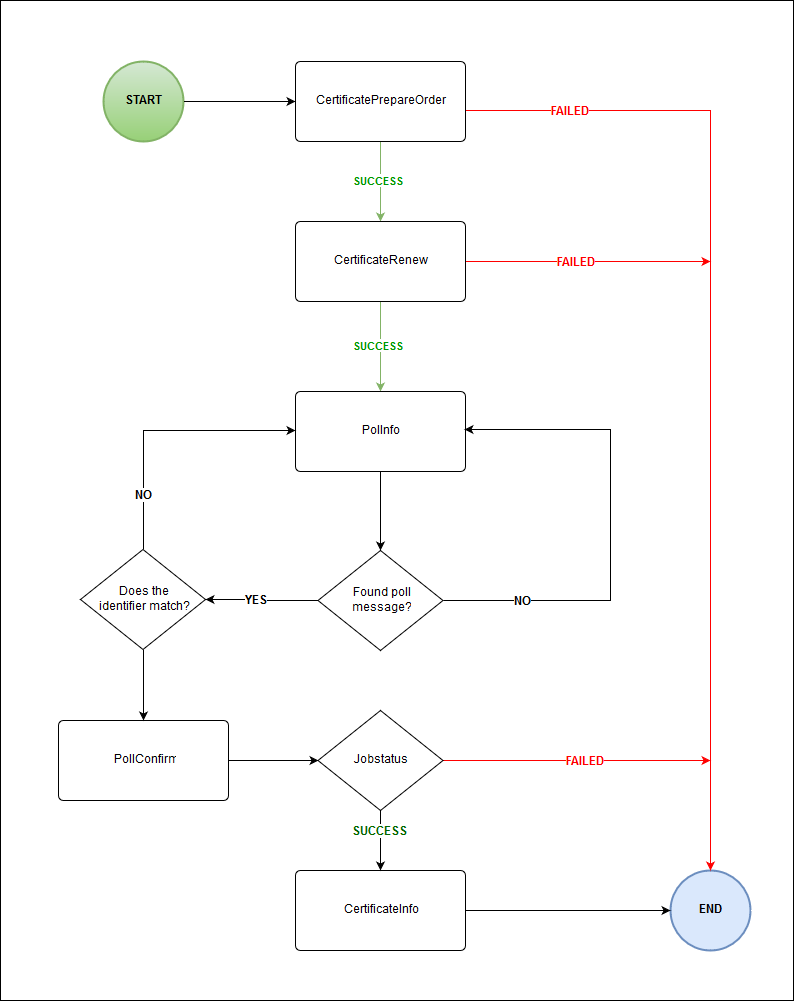
Instructions für complete automation of the certificate renewing process. The QuickSSLPremium product is used here as an example and DNS is used as the authentication method.
## Basics of the JSON and XML API
All important information for the use of the JSON and XML API you can find in the [General API Basics](/en/api/core-general-api-basics/) and the [XML API Basics](/en/api/core-xml-api-basics/) and [JSON API Basics](/en/api/core-json-api-basics/). The specific [SSL objects](/en/api/core-ssl-objects/) are documented here, the [SSL tasks](/en/api/core-ssl-tasks/) here.
## Process overview
### Flow chart
#### 
### Tasks names, codes and routes
| Task | Code | **Route** |
| --- | --- | --- |
| [CertificatePrepareOrder](/en/api/core-certificate-prepare-order/) | 400110 | POST /certiicate/prepareOrder |
| [CertificateRenew](/en/api/core-certificate-renew/) | 400106 | PUT /certificate/$id/\_renew |
| PollInfo | 0905 | GET /poll |
| PollConfirm | 0906 | PUT /poll/$id |
| [CertificateInfo](/en/api/core-certificate-info/) | 400104 | GET /certificate/$id |
## DNS validation
DNS validation, i.e. validation by zone entry, is supported by many domain-validated certificates. To do this, for some CAs you must store a specific TXT or CNAME record in the zone belonging to the certificate name. This is checked for validity by the issuing certificate authority. For zones managed by InterNetX, the provisioning of the zone takes place automatically.
## Preparation
If the two systems are already linked, this step can be skipped.
### Connect SSLManager to AutoDNS
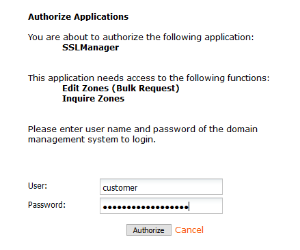
For the automatic provisioning of the zone, you have to connect the SSLManager to your AutoDNS access once. In the SSL Manager go to the **User Configuration** and click on the menu item **Connect SSL Manager to the Domain Administration System**.
If necessary, you must enter the URL to your AutoDNS yourself.

You will then be redirected to the AutoDNS login page. Enter your AutoDNS credentials here to establish the connection.
#### 
## Prolong the validity of a QuickSSL Premium certificate
### Create DNS record and check CSR
QuickSSLPremium certificates are verified by TXT entries. A new TXT record with specific values must be stored in the zone belonging to the common name (CNAME). With the _CertificatePrepareOrder_ task, the CSR key provided is checked for the correct bit length, for example, and the required authentication data is generated.
Example .TXT :
example.com. 300 IN TXT "201704071405295z34is5g0jjairsdu0v5opdw8512td8kixzvtaacu4ebrkry5q"
#### Certificate prepare order - example
```
POST /certificate/prepareOrder
{
"plain": "----BEGIN CERTIFICATE REQUEST----- .... -----END CERTIFICATE REQUEST-----",
"product": "QUICKSSLPREMIUM"
}
```
```
{
"stid": "20180926-stid",
"status": {
"code": "S400110",
"text": "CSR key was checked successfully.",
"type": "SUCCESS"
},
"data": [
{
"plain": "-----BEGIN CERTIFICATE REQUEST----- ... -----END CERTIFICATE REQUEST-----",
"name": "example.com",
"keySize": 2048,
"countryCode": "DE",
"state": "BY",
"city": "Regensburg",
"organization": "Company GmbH",
"organizationUnit": "Entwicklung",
"product": "QUICKSSLPREMIUM",
"authentication": [
{
"method": "EMAIL",
"approverEmails": [
"admin@example.com",
"administrator@example.com",
"hostmaster@example.com",
"webmaster@example.com",
"postmaster@example.com"
]
},
{
"method": "DNS",
"dns": "example.com.\t\t300\tIN\tTXT\t\"2018092608362142n4sbul8rv8ttv7zkhjgzvyim8n1kpa9lys0uqdszxzs0pa0l\""
},
{
"method": "FILE"
}
],
"algorithm": "RSA",
"signatureHashAlgorithm": "SHA256"
}
]
}
```
```
USERCONTEXTPASSWORD400110QUICKSSLPREMIUM
```
```
2048DEEntwicklungemail@example.comQUICKSSLPREMIUMDNSexample.com. 300 IN TXT "201704071405295z34is5g0jjairsdu0v5opdw8512td8kixzvtaacu4ebrkry5q"1FILERSASHA256S400110CSR key was checked successfully.success20180926-stid
```
### Renew certificate
With the _CertificateRenew_ task you send the actual order to the system. You must set certain values:
- Authentication: The generated authentication data
- Term: Specify a term allowed for the certificate. For QuickSSLPremium, this is 12 or 24 months.
- Id: The ID of the certificate. If necessary, you can determine the ID using a CertificateInfo request.
- XML: The ID is set in the payload of the order.
- JSON: the ID is set via the path.
If data is also to be updated when the runtime is extended, for example, the CSR, you can include the new data in the order.
#### Certificate renew - example
```
PUT /certificate/$id/_renew
{
"lifetime": {
"unit": "MONTH",
"period": 12
},
"authentication": {
"method": "DNS",
"dns": "example.com.\t\t300\tIN\tTXT\t\"201809281426510apdrobvvzyjdsvqnd80x25u1ljxfcm9oz6hsjhecyt7owh6j4\"",
"provisioning": true
}
}
```
```
{
"stid": "20180928-stid",
"status": {
"code": "N400106",
"text": "Certificate renew was started successfully.",
"type": "NOTIFY"
},
"object": {
"type": "Certificate",
"value": "example.com"
},
"data": [
{
"id": 123456
}
]
}
```
```
USERPASSWORDCONTEXT400106123456DNSexample.com. 300 IN TXT "201704071405295z34is5g0jjairsdu0v5opdw8512td8kixzvtaacu4ebrkry5q"1
```
```
123456RUNNINGN400106Certificate renew was started successfully.notify20180407-stid
```
### Receive notifications
The _CertificateCreate_ task automatically generates a request for ordering the certificate. Once the request has been processed, a notification is generated with information about the request. If the order was successful, you receive, among other things, the ID of the certificate ordered. The system notification can be retrieved using the Polling and Push methods.
### Inquire certificate data
The _CertificateInfo_ task inquires the certificate data. The data can be queried and confirmed using the ID from the Check and Confirm Notifications step.
#### Certificate info - example
```
GET /certificate/$id
```
```
{
"stid": "20180926-stid",
"status": {
"code": "S400104",
"text": "Certificate data were inquired successfully.",
"type": "SUCCESS"
},
"object": {
"type": "Certificate",
"value": "example.com"
},
"data": [
{
"created": "2018-09-26T00:00:00.000+0200",
"updated": "2018-09-26T11:38:08.000+0200",
"id": 13258,
"owner": {
"user": "user",
"context": 9
},
"orderId": "2695961",
"adminContact": {
"id": 100
...
},
"technicalContact": {
"id": 100
...
},
"name": "example.com",
"lifetime": {
"unit": "MONTH",
"period": 12
},
"software": "APACHESSL",
"csr": "-----BEGIN CERTIFICATE REQUEST----- ... -----END CERTIFICATE REQUEST-----",
"server": "-----BEGIN CERTIFICATE----- ... -----END CERTIFICATE-----\n",
"serialNumber": "750C3006B23B90D0F396A3D153EB4C8",
"product": "QUICKSSLPREMIUM",
"expire": "2019-09-26T12:00:00.000+0200",
"authentication": {
"method": "DNS",
"dns": "example.com.\t\t300\tIN\tTXT\t\"2018092608362142n4sbul8rv8ttv7zkhjgzvyim8n1kpa9lys0uqdszxzs0pa0l\"",
"provisioning": true
},
"certificateTransparencyPrivacy": "PUBLIC",
"domain": "example.com"
}
]
}
```
```
USERCONTEXTPASSWORD400104100
```
```
1003396954JohnDoe+49-941-1234560j.doe@example.comAdminExample GmbH
Maximilianstrasse 36000
93047RegensburgDEBayernUSERCONTEXTUSERCONTEXT203982017-01-01 10:35:222017-01-01 01:05:07JohnDoe+49-941-1234560j.doe@example.comAdminExample GmbH
Maximilianstrasse 36000
93047RegensburgDEBavariaUSERCONTEXTUSERCONTEXT203982017-01-01 10:35:222017-01-01 01:05:07example.com12APACHE2SERIALNUMBERQUICKSSLPREMIUMSHA22030-01-01 23:59:59ICA1DNSexample.com. 300 IN TXT "201704071405295z34is5g0jjairsdu0v5opdw8512td8kixzvtaacu4ebrkry5q"USERCONTEXTUSERCONTEXT1002017-01-01 00:00:002017-01-01 14:30:36S400104Certificate data were inquired successfully.success20181015-app1-7763
```