---
title: "Automation of domain renews"
url: "https://help.internetx.com/en/api/processes-automation-of-domain-renews/"
lang: "en"
section: "API reference — API processes"
breadcrumb: "Domain process automation"
updated: "2023-09-27"
---
# Automation of domain renews
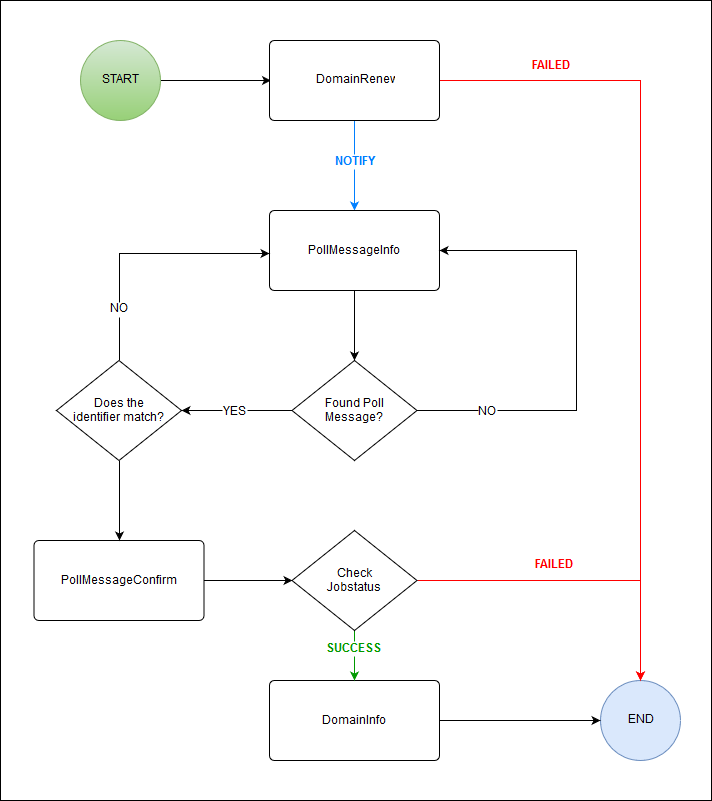
Instructions for the complete automation of the prologation of the domain registration period _(DomainRenew)._
## Basics of the JSON and XML API
All important information for the use of the JSON and XML API you can find in the [General API Basics](/en/api/core-general-api-basics/) and the [XML API Basics](/en/api/core-xml-api-basics/) and [JSON API Basics](/en/api/core-json-api-basics/).
## Process Overview
### Flow Chart
### Task names, codes and routes
| Task name | Code | Route |
| --- | --- | --- |
| [DomainRenew](/en/api/core-domain-renew/) | 0101003 | PUT /domain/ {name} /renew |
| PollInfo | 0905 | GET /poll |
| PollConfirm | 0906 | PUT /poll/$id |
| [DomainInfo](/en/api/core-domain-info/) | 0105 | GET / domain/$name |
## Requirements
### Inquire domain data
For the _DomainRenew_ request, the due date of the domain is required. It can be retrieved with a _DomainInfo_ request. The due date is indicated in the `payable` field.
In the example it is 2020-12-31 12:00:00.
```
GET /domain/example.com
```
```
{
"stid": "20180926-stid",
"status": {
"code": "S0105",
"text": "Domain data has been inquired successfully.",
"type": "SUCCESS"
},
"object": {
"type": "domain",
"value": "example.com"
},
"data": [
{
"created": "2018-09-26T14:54:03.000+0200",
"updated": "2018-09-26T14:54:10.000+0200",
"owner": {
"user": "USER",
"context": CONTEXT
},
"updater": {
"user": "USER",
"context": CONTEXT
},
"name": "example.com",
"payable": "2020-12-31T00:00:00.000+0200",
"ownerc": {
"id": 100
},
"adminc": {
"id": 100
},
"techc": {
"id": 100
},
"registryStatus": "LOCK",
"nameServers": [
{
"name": "a.ns14.net"
},
{
"name": "b.ns14.net"
},
{
"name": "c.ns14.net"
},
{
"name": "d.ns14.net"
}
],
"trustee": false,
"privacy": false,
"authinfo": "J/w0Xpn66I87YVty",
"domainsafe": false,
"validCertificate": false,
"autoRenewStatus": "TRUE",
"registrarStatus": "ACTIVE",
"rddsOptIn": "NOT_SET"
}
]
}
```
```
USERPASSWORDCONTEXT0105example.com
```
```
example.com2020-12-31 00:00:00100100100LOCKa.ns14.netb.ns14.netc.ns14.netd.ns14.net1SUCCESSfalsefalseJ/w0Xpn66I87YVtyfalsefalsetrueACTIVENOT_SETUSERCONTEXTUSERCONTEXT2018-09-26 14:54:032018-09-26 14:54:10S0105Domain data has been inquired successfully.success20180926-stid
```
## Process
### Renew domain
The _DomainRenew_ task is used to start the domain prologation of the domain registration period. The previously determined due date is required in the request, e.g. to prevent an accidental double prolongation.
#### Domain renew - example
```
PUT /domain/$name/renew
{
"period": {
"period": 1,
"unit": "YEAR"
},
"payable": "2020-12-31T12:00:00.000+0200",
"removeCancelation": false
}
```
```
{
"stid": "20180928-stid",
"status": {
"code": "N0101003",
"text": "Domain renew has been started successfully.",
"type": "NOTIFY"
},
"object": {
"type": "domain",
"value": "example.com"
},
"data": [
{
"id": 4295611341
}
]
}
```
```
USERPASSWORDCONTEXT0101003example.com12020-12-31 12:00:00no
```
```
123456RUNNINGN0101003Domain renew has been started successfully.notify20180928-stid
```
### Receiving notifications
The _DomainCancelationCreate_ task creates a cancelation request. This triggers the creation of a second cancelation request, which is processed later at the time defined in the request (=asynchronous processing).
Once this second request has been processed, a system notification is generated, indicating whether the deletion was successful or not. The notification can be retrieved using the Polling and Push methods.
### Inquiring domain data
After a successful renew, you can determine the new due date of the domain (payable field) with a _DomainInfo_ request. Since the domain registration period in this example was extended by one year, the payable field has the new value 2021-12-31 00:00:00.
```
GET /domain/example.com
```
```
{
"stid": "20180926-stid",
"status": {
"code": "S0105",
"text": "Domain data has been inquired successfully.",
"type": "SUCCESS"
},
"object": {
"type": "domain",
"value": "example.com"
},
"data": [
{
"created": "2018-09-26T14:54:03.000+0200",
"updated": "2018-09-26T14:54:10.000+0200",
"owner": {
"user": "USER",
"context": CONTEXT
},
"updater": {
"user": "USER",
"context": CONTEXT
},
"name": "example.com",
"payable": "2021-12-31T00:00:00.000+0200",
"ownerc": {
"id": 100
},
"adminc": {
"id": 100
},
"techc": {
"id": 100
},
"registryStatus": "LOCK",
"nameServers": [
{
"name": "a.ns14.net"
},
{
"name": "b.ns14.net"
},
{
"name": "c.ns14.net"
},
{
"name": "d.ns14.net"
}
],
"trustee": false,
"privacy": false,
"authinfo": "J/w0Xpn66I87YVty",
"domainsafe": false,
"validCertificate": false,
"autoRenewStatus": "TRUE",
"registrarStatus": "ACTIVE",
"rddsOptIn": "NOT_SET"
}
]
}
```
```
USERPASSWORDCONTEXT0105example.com
```
```
example.com2021-12-31 00:00:00100100100LOCKa.ns14.netb.ns14.netc.ns14.netd.ns14.net1SUCCESSfalsefalseJ/w0Xpn66I87YVtyfalsefalsetrueACTIVENOT_SETUSERCONTEXTUSERCONTEXT2018-09-26 14:54:032018-09-26 14:54:10S0105Domain data has been inquired successfully.success20180926-stid
```