---
title: "Automation of S/MIME certificate ordering"
url: "https://help.internetx.com/en/api/processes-automation-of-s-mime-certificate-ordering/"
lang: "en"
section: "API reference — API processes"
breadcrumb: "Certificate process automation"
updated: "2023-09-27"
---
# Automation of S/MIME certificate ordering
Instructions for the complete automation of the ordering process for S/MIME certificates. The product GlobalSign - PersonalSign Class 1 is used here as an example. S/MIME Certificates are certificates for the encryption and signing of Email. Currently the S/MIME products are offered by Globalsign.
## Basics of the JSON and XML API
All important information for the use of the JSON and XML API you can find in the [General API Basics](/en/api/core-general-api-basics/) and the [XML API Basics](/en/api/core-xml-api-basics/) and [JSON API Basics](/en/api/core-json-api-basics/). The specific [SSL objects](/en/api/core-ssl-objects/) are documented here, the [SSL tasks](/en/api/core-ssl-tasks/) here.
## Overview
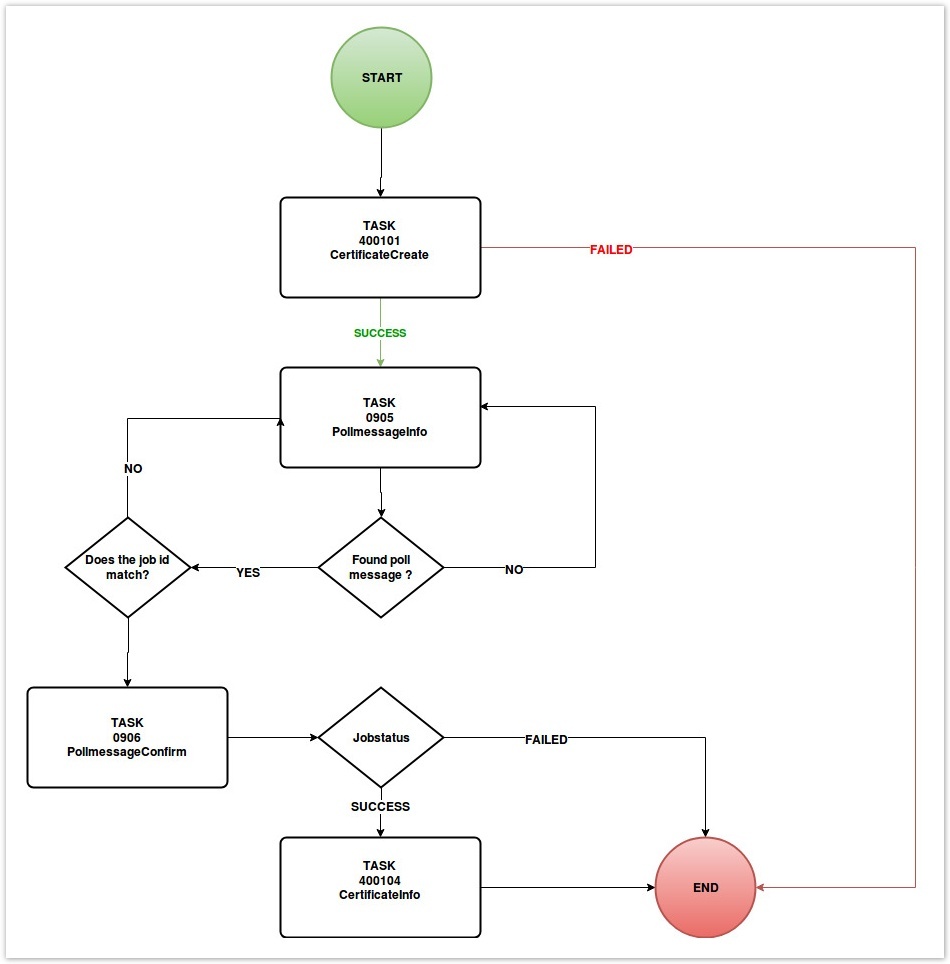
### Flow chart
### Task names, codes and routes
| Task | Task code | Route |
| --- | --- | --- |
| [CertificateCreate](/en/api/core-certificate-create/) | 400101 | POST /certificate |
| [SSLContactCreate](/en/api/core-certificate-contact-create/) | 400201 | POST /sslcontact |
| [CertificateInfo](/en/api/core-certificate-info/) | 400104 | GET /certificate/$id |
| PollInfo | 0905 | GET /poll |
| PollConfirm | 0906 | PUT /poll/$id |
| [CertificatePrepareOrder](/en/api/core-certificate-prepare-order/) | 400110 | POST /certiicate/prepareOrder |
## Order preparation
### Contact create
To be able to order a S/MIME certificate, a technical and administrative contact is required. These must be created beforehand and can then be used for future orders. In case one or more contacts is already present, you can skip this step and use the contact for future tasks.
#### Example for contact create
```
POST /sslcontact
{
"fname": "John",
"lname": "Doe",
"phone": "+49-123-12345",
"fax": "+49-123-12345",
"email": "john.doe@example.com",
"title": "Admin",
"organization": "Company",
"address": [
"123 Main Street"
],
"pcode": "12345",
"city": "Anytown",
"country": "DE",
"state": "BY"
}
```
```
{
"stid": "20180926-stid",
"status": {
"code": "S400201",
"text": "Contact was created successfully",
"type": "SUCCESS"
},
"object": {
"type": "contact",
"value": "100"
},
"data": [
{
"fname": "John",
"lname": "Doe",
"phone": "+49-123-12345",
"email": "john.doe@example.com",
"title": "Admin",
"organization": "Company",
"address": "123 Main Street",
"pcode": "12345",
"city": "Anytown",
"country": "DE",
"state": "BY",
"owner": {
"user": "user",
"context": 9
},
"id": 100
}
]
}
```
```
USERCONTEXTPASSWORD400201JoeSample+49-941-1234560joe.sample@example.comAdminExampleGmbH
Example Street 36000
12345Example CityDEBayern
```
```
S400201Contact was successfully created.success
```
Ordering a S/MIME Certificate
### Certificate create
With the _CertificateCreate_ task you send the order to the system. You have to set certain values:
- Certificate Type = The attribute MAIL must be used for S/MIME certificates.
- Admin = ID of the administrative contact.
- Name = The name of the certificate. For S/MIME certificates, this is the email for which the certificate is used.
- Product = Value of the S/MIME certificate, for our example this is GLOBALSIGN\_PERSONALSIGN\_1
- First Name = First name
- Last Name = Last name
- Term = Desired certificate runtime. The possible runtimes depend on the certificate product.
- Password = Password to be used to download the S/MIME certificate from Globalsign.
- Organisational Unit = The responsible organizational unit, e.g. "marketing department".
- CSR = Value which indicates whether an own CSR is used. The XML tag must be set to true.
#### Example for certificate create
Route: POST /certificate
```
{
"adminContact": {
"id": 100
},
"technicalContact": {
"id": 100
},
"name": "example.com",
"lifetime": {
"unit": "MONTH",
"period": 36
},
"software": "APACHESSL",
"csr": "-----BEGIN CERTIFICATE REQUEST-----MIICujCCAaICAQAwdTELMAkGA1UEBhMCREUxDzANBgNVBAgMBmJhdmFyaTETMBEGA1UEBwwKcmVnZW5zYnVyZzERMA8GA1UECgwIc3VwZXJkZXYxFDASBgNVBAsMC2RldmVsb3BtZW50MRcwFQYDVQQDDA5qdW5rZHJhZ29ucy5kZTCCASIwDQYJKoZIhvcNAQEBBQADggEPADCCAQoCggEBAMSMhi30bENDqWeXp7SfHhi2epocJeuI6bBeqGYyQCM5yuoUyAC6wuQ5xudC+hJ6dnDp8p8l8ObkcLrU8/vZJCVmfHxkQpOy6oIsz8uvNA7VcLqOQfxINxe0lqAD0SAWYUaB2W+4CVqyFxaKIn/1c2Isg+8d8Y/3l/t0lI0CF7Y4Q/EmIh1Rl2cr1ONQd4P+3mx2V0ExYN69zPRIsEHt1bV9Mo3l7QpMybHKANMK4BHVL+F5oL8vyGElLCScm3ryrl4W+C0N5V1SSGLNTfNiDxkPx9dwCc5iBy/X8FfhZ7z3+JdjluWo513wvdwZH+jbWhvQ7wsmnV0lGQoe4jHwF+UCAwEAAaAAMA0GCSqGSIb3DQEBCwUAA4IBAQCzQXKkBJWdaGtHLdI9/pqJ/zVCISGsH8lXo8tMBUyZk9cCYdH0hvsVduqNJRpBzNi07ivK/T3+Ru3SUYl0DKlsfHm5IEjf2lYJgJORXS5SRMkr7sYfYSAeGsoUIXc1GC4hBnSFmKN6NoLLbHaAItNDo9AWKVr/1ZqPy9v5vaJpTSzYidrTcZth4lF+i4QqcchorIPq4hSMKWkhZs5tzd/+hAR0XV2hcH1RGcuHTWOJmAvk0Nw2eVxUgNJSmiU0OneyRO4qQoWC/1khDFI0/xt0apn0OeYpcu8rA3aXsHCbcCqpjLUSBZ45szn60KL5sW9/S4y2oUjUbUQb3NW4TFgw-----END CERTIFICATE REQUEST-----",
"product": "QUICKSSLPREMIUM",
"authentication": {
"method": "EMAIL",
"approverEmails": [
"admin@example.com",
"administrator@example.com",
"hostmaster@example.com",
"webmaster@example.com",
"postmaster@example.com"
]
}
}
```
```
{
"stid": "20190702-app3-dev-10171",
"status": {
"code": "N400101",
"text": "Certificate order was started successfully.",
"type": "NOTIFY"
},
"object": {
"type": "Certificate",
"value": "example.com"
},
"data": [
{
"id": 4297543967
}
]
}
```
```
USERCONTEXTPASSWORDMAILGLOBALSIGN_PERSONALSIGN_136****JoeSampleDevelopment Departmentfalse100400101
```
```
123456RUNNINGN400101Certificate orderwas started successfully.notify
```
### Receiving notifications
By using the _CertificateCreate_ task a job is automatically generated which takes care of the certificate order. If the job was successful, the ID of the ordered certificate is returned. The system notification can be retrieved using the Polling and Push methods.
### Inquiring certificate information
The _CertificateInfo_ task displays all the certificate details. The information can be inquired by sending the ID from the step Receiving Notifications.
#### Certificate info - example
```
GET /certificate/$id
```
```
{
"stid": "20180926-stid",
"status": {
"code": "S400104",
"text": "Certificate data were inquired successfully.",
"type": "SUCCESS"
},
"object": {
"type": "certificate",
"value": "example.com"
},
"data": [
{
"created": "2018-09-26T00:00:00.000+0200",
"updated": "2018-09-26T11:38:08.000+0200",
"id": 13258,
"owner": {
"user": "user",
"context": 9
},
"orderId": "2695961",
"adminContact": {
"id": 100
...
},
"technicalContact": {
"id": 100
...
},
"name": "example.com",
"lifetime": {
"unit": "MONTH",
"period": 12
},
"software": "APACHESSL",
"csr": "-----BEGIN CERTIFICATE REQUEST----- ... -----END CERTIFICATE REQUEST-----",
"server": "-----BEGIN CERTIFICATE----- ... -----END CERTIFICATE-----\n",
"serialNumber": "750C3006B23B90D0F396A3D153EB4C8",
"product": "QUICKSSLPREMIUM",
"expire": "2019-09-26T12:00:00.000+0200",
"authentication": {
"method": "DNS",
"dns": "example.com.\t\t300\tIN\tTXT\t\"2018092608362142n4sbul8rv8ttv7zkhjgzvyim8n1kpa9lys0uqdszxzs0pa0l\"",
"provisioning": true
},
"certificateTransparencyPrivacy": "PUBLIC",
"domain": "example.com"
}
]
}
```
```
USERCONTEXTPASSWORD400104150
```
```
PC201607129800Joedoe+49-0-0+49-0-0joe.doe@example.comHerrexample company
example street 6
93047example cityDEBayernUSERCONTEXTUSERCONTEXT1002015-11-25 10:35:412015-11-25 10:50:28joe.doe@example.comjoe.doe@example.com36NOT_SET-----BEGIN CERTIFICATE----- ... -----END CERTIFICATE-----GLOBALSIGN_PERSONALSIGN_1SHA22017-12-31 23:59:59test1234JoedoemarketingUSERCONTEXTUSERCONTEXT150CREATEDUPDATED<
S400104Certificate data were inquired successfully.success
```