---
title: "The ACME protocol - automated SSL certificate management"
url: "https://help.internetx.com/en/domains/acme-protocol-automated-ssl-certificate-management/"
lang: "en"
section: "Domains"
---
# The ACME protocol - automated SSL certificate management
## What is ACME?
ACME (Automatic Certificate Management Environment) is an open protocol (RFC 8555) that fully automates the issuance, renewal, and revocation of SSL/TLS certificates. Originally developed by Let's Encrypt, it has become the standard for modern certificate management.
## Why ACME?
Previously, SSL certificates had to be requested, downloaded, and installed on the web server manually – an error-prone process that becomes increasingly time-consuming with shorter validity periods. With ACME, this manual effort is eliminated entirely:
- Fully automated issuance and renewal
- No manual downloads or configuration steps required
- Compatible with all common ACME clients (Certbot, acme.sh, win-acme, and more)
- Support for multiple Certificate Authorities (CAs) via a single unified interface
- Ideal for environments with a large number of certificates or short validity periods
- Thanks to the exclusive use of DNS-01 challenges, no file validation is required – no additional dependencies need to be managed
**Background: Shorter certificate validity periods**
Major browser vendors (Google, Apple, Mozilla) are pushing for increasingly shorter certificate validity periods. After 2026, the maximum validity will be further reduced to 100 days, and potentially as low as 47 days by 2029. Without automation via ACME, this means significantly more manual effort. InterNetX therefore provides an ACME interface for full automation.
## Which certificates are available via the ACME interface?
The following DV certificates can currently be ordered via the ACME interface:
- BASIC\_SSL (incl. WWW-SAN if requested)
- RAPID\_SSL (incl. WWW-SAN if requested)
- RAPID\_SSL\_WILDCARD
- SSL123 (incl. WWW-SAN if requested)
- SSL123WILDCARD
**InterNetX ACME Integration**
InterNetX provides an ACME server through which SSL certificates from all supported CAs can be obtained automatically. Integration is handled via a standard ACME client – no connection to third-party systems is required.
Requirement for using the InterNetX ACME interface: The associated DNS zones of the domains must be managed by InterNetX in AutoDNS (ns14.net infrastructure).
### Challenge methods
The InterNetX ACME interface supports the DNS-01 method for proving domain control.
**Requirement**
Using the InterNetX ACME interface requires that the associated DNS zones of the domains are managed by InterNetX (on [ns14.net](http://ns14.net/) infrastructure) in AutoDNS.
## ACME configuration in AutoDNS
### **ACME bindings**
The overview displays all currently active ACME account bindings and allows new ACME bindings to be created.
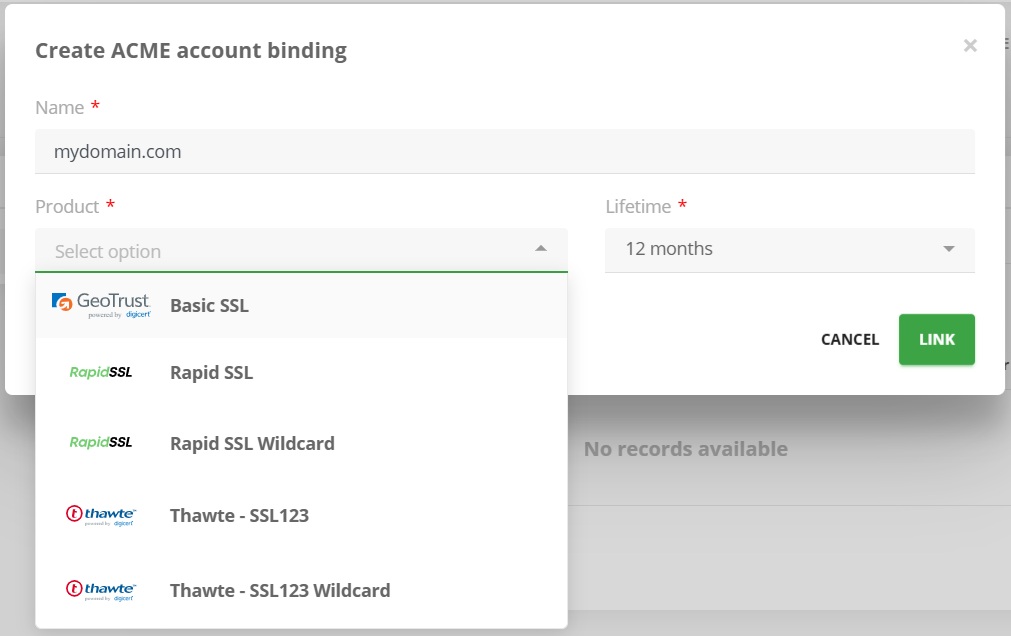
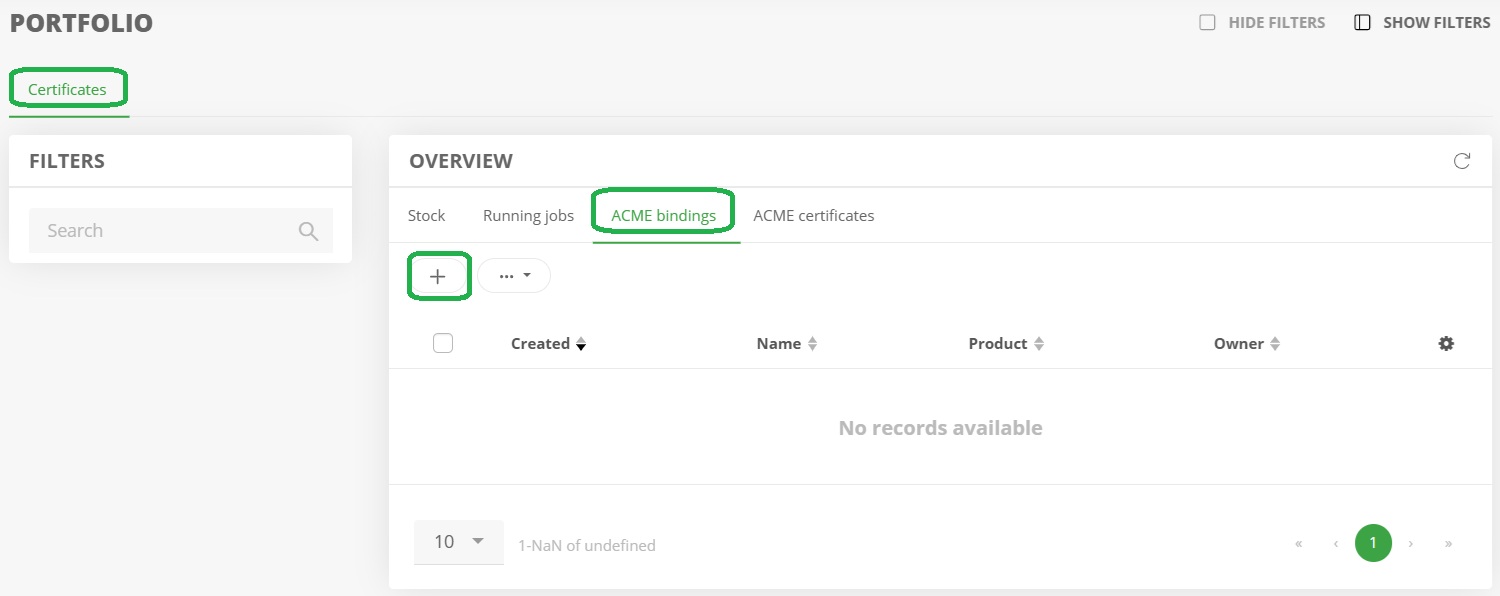 ### **Creating an ACME account binding**
Multiple certificates can be ordered via a single account binding. The Common Name of each certificate must be unique.
### **Creating an ACME account binding**
Multiple certificates can be ordered via a single account binding. The Common Name of each certificate must be unique.
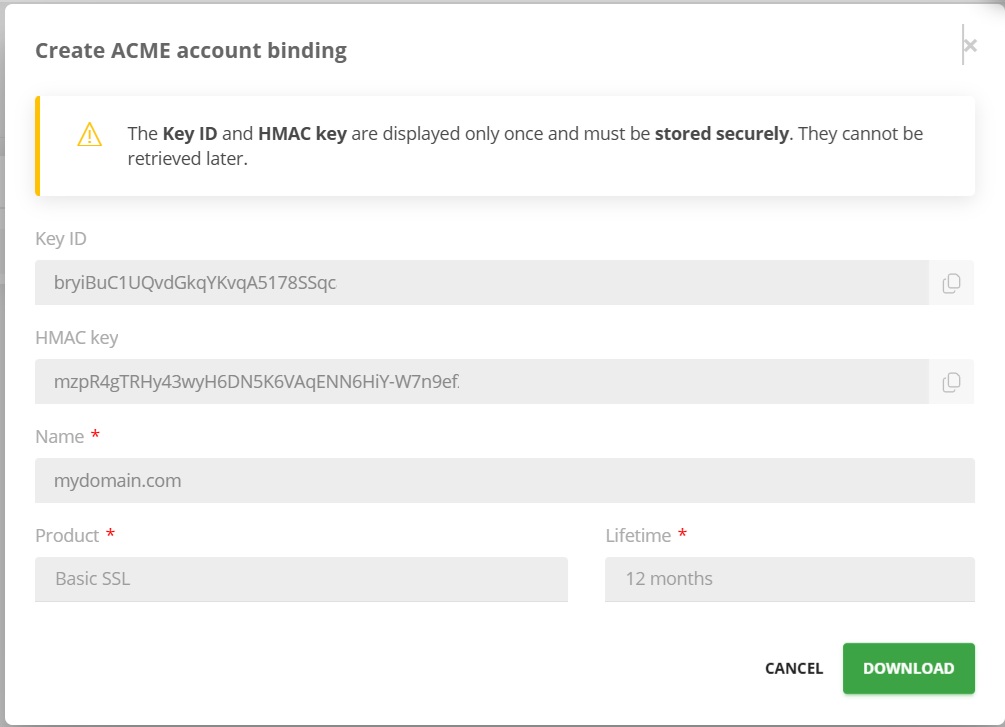
 The credentials received should be carefully noted or saved locally using the "Download" link, as they cannot be retrieved again for security reasons. If the credentials are lost, a new ACME account binding must be created and a new certificate must be ordered.
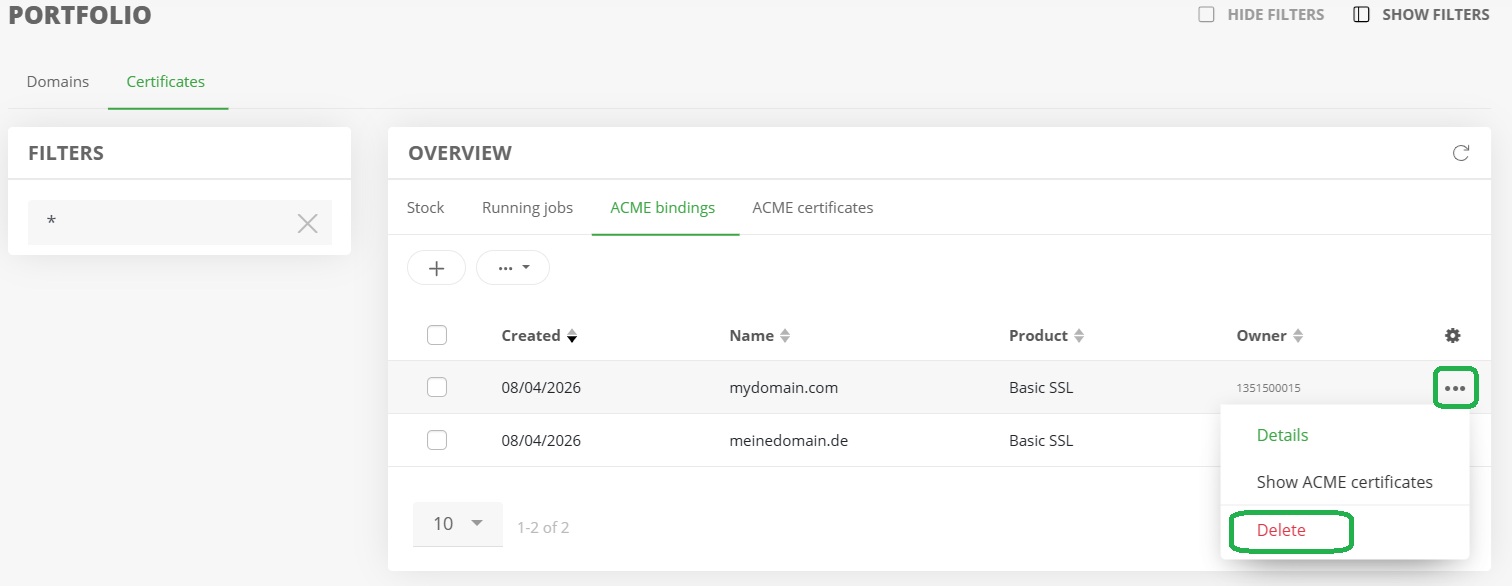
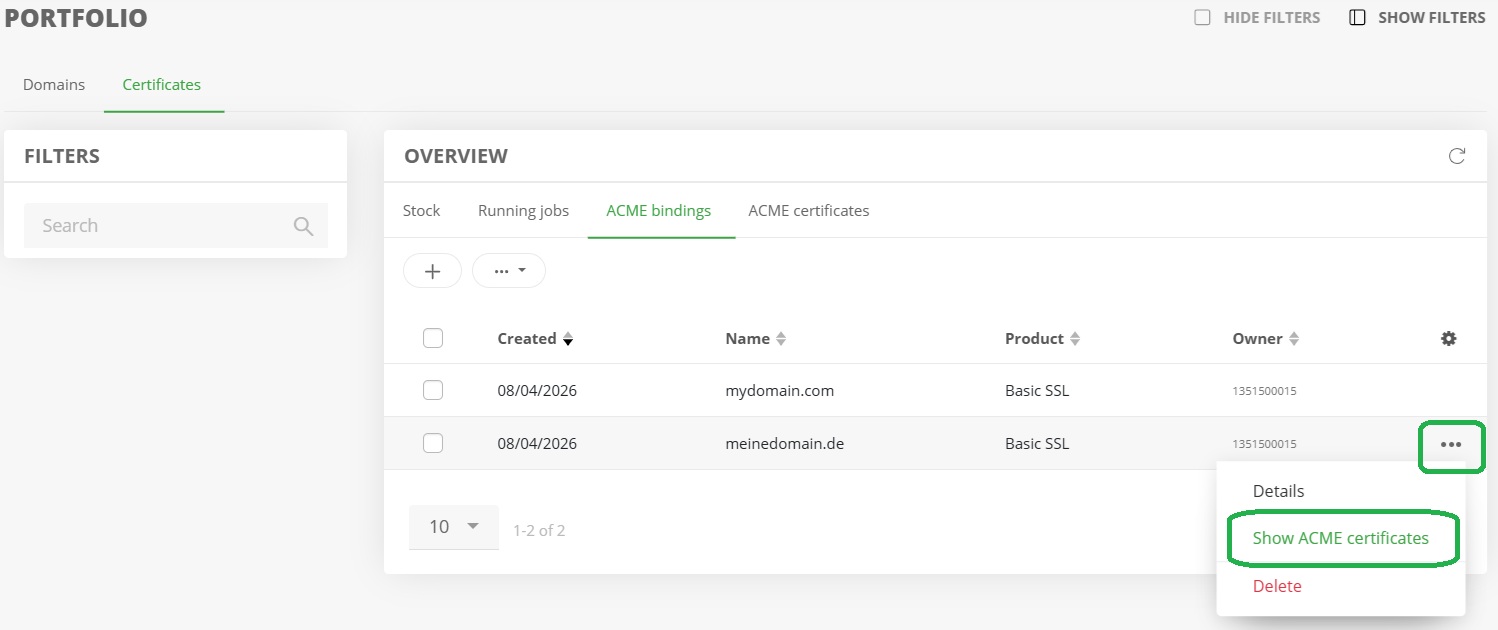 The ACME bindings overview lists all existing configurations. The associated certificates for each account binding can be individually retrieved and filtered.
### **Deleting an ACME account binding**
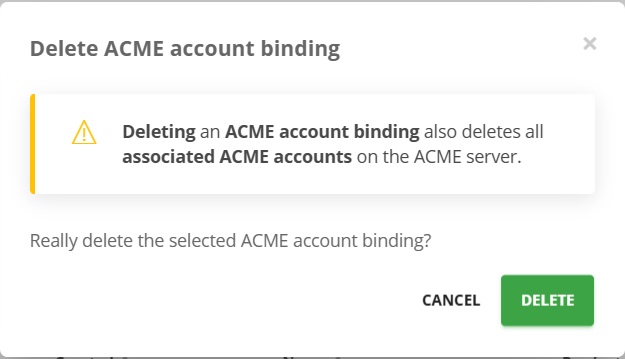
After an account binding is deleted, existing ACME certificates are transferred to the regular certificate inventory and can continue to be used manually.
**Note**
Restoring ACME automation is not possible after deletion.
###
The ACME bindings overview lists all existing configurations. The associated certificates for each account binding can be individually retrieved and filtered.
### **Deleting an ACME account binding**
After an account binding is deleted, existing ACME certificates are transferred to the regular certificate inventory and can continue to be used manually.
**Note**
Restoring ACME automation is not possible after deletion.
###  ###
###  ### **ACME certificates**
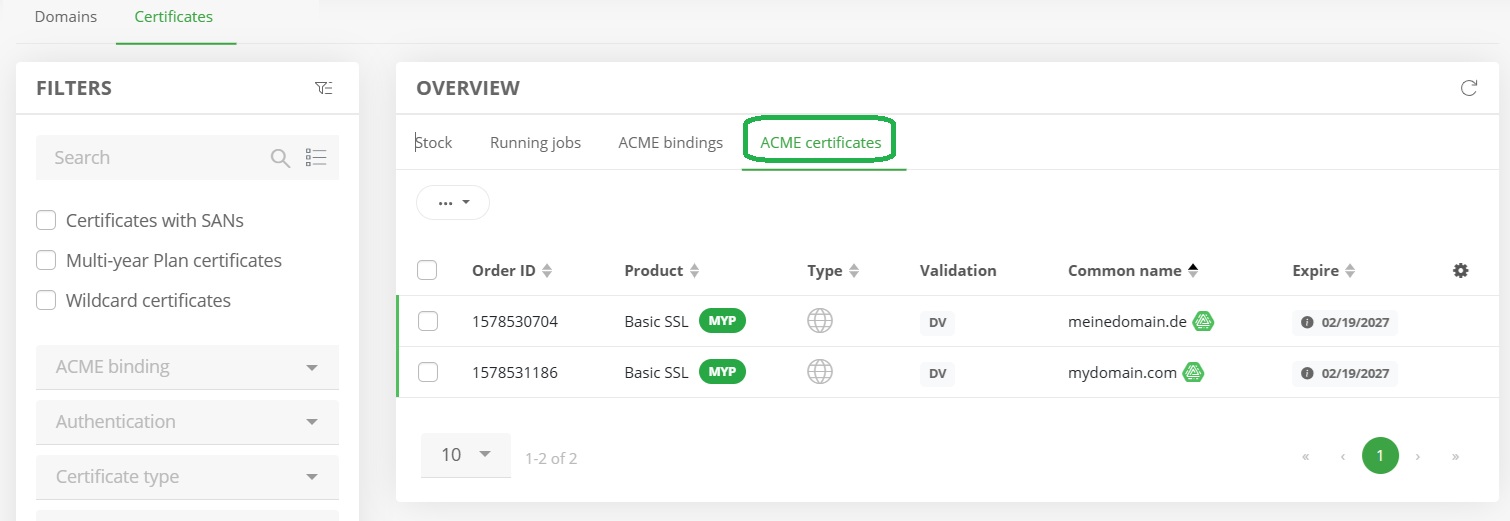
The overview displays all currently available ACME certificates. Changes to ACME certificates are not possible, as this would disable the automation. Editing certificates in the regular inventory is only possible after the ACME account binding has been deleted.
### **ACME certificates**
The overview displays all currently available ACME certificates. Changes to ACME certificates are not possible, as this would disable the automation. Editing certificates in the regular inventory is only possible after the ACME account binding has been deleted.
 ### Certbot on Linux/Plesk
`certbot certonly \\`
`--server acme.domain-robot.org/directory \\`
`--eab-kid XXX \\`
`--eab-hmac-key XXX \\`
`--manual \\`
`--preferred-challenges dns \\`
`--work-dir XXX \\`
`--config-dir XXX \\`
`--logs-dir XXX \\`
`-d example.com \\`
`-d www.example.com`
The additional WWW SAN is only available for certificates that support it. For automated renewal with Certbot, please refer to the additional documentation below.
**Using Multiple Parallel ACME Account Links on a Server**
If multiple account bindings are operated in parallel on a server, separate directories should be used for --work-dir, --config-dir, and --logs-dir for each ACME account binding to ensure a clear separation of certificates. Only one account binding is allowed per directory.
### AutoRenew with Certbot
With the certbot installation usually a certbot cronjobs is automatically set that performs "certbot renew" twice a day.
But certbot will not automatically renew cerificates with --manual and dns challenge without adjustments.
To achieve an automated renewal of the certificate upon expiration an additional hook is required to override the usual DNS challenge cerbot is expecting.
`certbot certonly \\`
`\--server https://acme.domain-robot.org/directory \\`
`\--eab-kid XXX \\`
`\--eab-hmac-key XXX \\`
`\--manual \\`
`\--preferred-challenges dns \\`
`\--manual-auth-hook /bin/true \\`
`\--manual-cleanup-hook /bin/true \\`
`\--non-interactive \\`
`\--work-dir XXX \\`
`\--config-dir XXX \\`
`\--logs-dir XXX \\`
`\-d example.com \\`
`\-d www.example.com`
#### **Was hat sich geändert?**
What has changed?
`\--manual-auth-hook /bin/true`
Instead of waiting for the Enter key, Certbot runs a script that does nothing and returns a success immediately (/bin/true always returns exit code 0).
Since the InterNetX ACME-API has already set the DNS TXT record automatically, "doing nothing" is the correct action here.
`\--manual-cleanup-hook /bin/true`
The same principle applies to the cleanup step after validation.
`\--non-interactive`
Prevents Certbot from waiting for text input at any other point (required for Cron/systemd timer operation).
This ensures that certbot renew (the cron job/timer automatically set up by certbot) runs fully automatically, without you having to build your own DNS provider plugin.
After the successfull ACME order certbot confirms the autorenew in his response:
`"These files will be updated when the certificate renews.`
`Certbot has set up a scheduled task to automatically renew this certificate in the background."`
## The AutoDNS ACME server
The AutoDNS ACME server is available at:
[acme.domain-robot.org](https://acme.domain-robot.org)
### **Certbot on Linux/Plesk**
`certbot certonly \\`
`--server acme.domain-robot.org/directory \\`
`--eab-kid XXX \\`
`--eab-hmac-key XXX \\`
`--manual \\`
`--preferred-challenges dns \\`
`--work-dir XXX \\`
`--config-dir XXX \\`
`--logs-dir XXX \\`
`-d example.com \\`
`-d www.example.com`
The additional WWW-SAN is only available for certificates that support it.
**Using multiple parallel ACME account bindings on one server**
If multiple account bindings are used in parallel on a single server, separate directories for --work-dir, --config-dir, and --logs-dir should be used for each ACME account binding to ensure a clear separation of certificates. Only one account binding is possible per directory.
### **acme.sh on Linux/Plesk (beta)**
`acme.sh --issue \\`
`--server acme.domain-robot.org/directory \\`
`--eab-kid XXX \\`
`--eab-hmac-key XXX \\`
`--dns \\`
`--config-home XXX \\`
`--cert-home XXX \\`
`--log XXX/acme.sh.log \\`
`-d example.com \\`
`-d www.example.com \\`
`--yes-I-know-dns-manual-mode-enough-go-ahead-please`
The additional WWW-SAN is only available for certificates that support it.
Unlike Certbot, acme.sh operates in a two-step process in manual DNS mode: the command above first outputs the TXT records to be set (\_acme-challenge.example.com). After setting the DNS records, validation is completed with the following command:
`acme.sh --renew -d example.com --yes-I-know-dns-manual-mode-enough-go-ahead-please`
**Using multiple parallel ACME account bindings on one server**
As with Certbot, a separate --config-home and --cert-home should be used for each ACME account binding when multiple account bindings are to be operated in parallel on the same host.
### Certbot on Linux/Plesk
`certbot certonly \\`
`--server acme.domain-robot.org/directory \\`
`--eab-kid XXX \\`
`--eab-hmac-key XXX \\`
`--manual \\`
`--preferred-challenges dns \\`
`--work-dir XXX \\`
`--config-dir XXX \\`
`--logs-dir XXX \\`
`-d example.com \\`
`-d www.example.com`
The additional WWW SAN is only available for certificates that support it. For automated renewal with Certbot, please refer to the additional documentation below.
**Using Multiple Parallel ACME Account Links on a Server**
If multiple account bindings are operated in parallel on a server, separate directories should be used for --work-dir, --config-dir, and --logs-dir for each ACME account binding to ensure a clear separation of certificates. Only one account binding is allowed per directory.
### AutoRenew with Certbot
With the certbot installation usually a certbot cronjobs is automatically set that performs "certbot renew" twice a day.
But certbot will not automatically renew cerificates with --manual and dns challenge without adjustments.
To achieve an automated renewal of the certificate upon expiration an additional hook is required to override the usual DNS challenge cerbot is expecting.
`certbot certonly \\`
`\--server https://acme.domain-robot.org/directory \\`
`\--eab-kid XXX \\`
`\--eab-hmac-key XXX \\`
`\--manual \\`
`\--preferred-challenges dns \\`
`\--manual-auth-hook /bin/true \\`
`\--manual-cleanup-hook /bin/true \\`
`\--non-interactive \\`
`\--work-dir XXX \\`
`\--config-dir XXX \\`
`\--logs-dir XXX \\`
`\-d example.com \\`
`\-d www.example.com`
#### **Was hat sich geändert?**
What has changed?
`\--manual-auth-hook /bin/true`
Instead of waiting for the Enter key, Certbot runs a script that does nothing and returns a success immediately (/bin/true always returns exit code 0).
Since the InterNetX ACME-API has already set the DNS TXT record automatically, "doing nothing" is the correct action here.
`\--manual-cleanup-hook /bin/true`
The same principle applies to the cleanup step after validation.
`\--non-interactive`
Prevents Certbot from waiting for text input at any other point (required for Cron/systemd timer operation).
This ensures that certbot renew (the cron job/timer automatically set up by certbot) runs fully automatically, without you having to build your own DNS provider plugin.
After the successfull ACME order certbot confirms the autorenew in his response:
`"These files will be updated when the certificate renews.`
`Certbot has set up a scheduled task to automatically renew this certificate in the background."`
## The AutoDNS ACME server
The AutoDNS ACME server is available at:
[acme.domain-robot.org](https://acme.domain-robot.org)
### **Certbot on Linux/Plesk**
`certbot certonly \\`
`--server acme.domain-robot.org/directory \\`
`--eab-kid XXX \\`
`--eab-hmac-key XXX \\`
`--manual \\`
`--preferred-challenges dns \\`
`--work-dir XXX \\`
`--config-dir XXX \\`
`--logs-dir XXX \\`
`-d example.com \\`
`-d www.example.com`
The additional WWW-SAN is only available for certificates that support it.
**Using multiple parallel ACME account bindings on one server**
If multiple account bindings are used in parallel on a single server, separate directories for --work-dir, --config-dir, and --logs-dir should be used for each ACME account binding to ensure a clear separation of certificates. Only one account binding is possible per directory.
### **acme.sh on Linux/Plesk (beta)**
`acme.sh --issue \\`
`--server acme.domain-robot.org/directory \\`
`--eab-kid XXX \\`
`--eab-hmac-key XXX \\`
`--dns \\`
`--config-home XXX \\`
`--cert-home XXX \\`
`--log XXX/acme.sh.log \\`
`-d example.com \\`
`-d www.example.com \\`
`--yes-I-know-dns-manual-mode-enough-go-ahead-please`
The additional WWW-SAN is only available for certificates that support it.
Unlike Certbot, acme.sh operates in a two-step process in manual DNS mode: the command above first outputs the TXT records to be set (\_acme-challenge.example.com). After setting the DNS records, validation is completed with the following command:
`acme.sh --renew -d example.com --yes-I-know-dns-manual-mode-enough-go-ahead-please`
**Using multiple parallel ACME account bindings on one server**
As with Certbot, a separate --config-home and --cert-home should be used for each ACME account binding when multiple account bindings are to be operated in parallel on the same host.