---
title: "Automatic zone purge"
url: "https://help.internetx.com/en/domains/automatic-zone-purge/"
lang: "en"
section: "Domains"
---
# Automatic zone purge
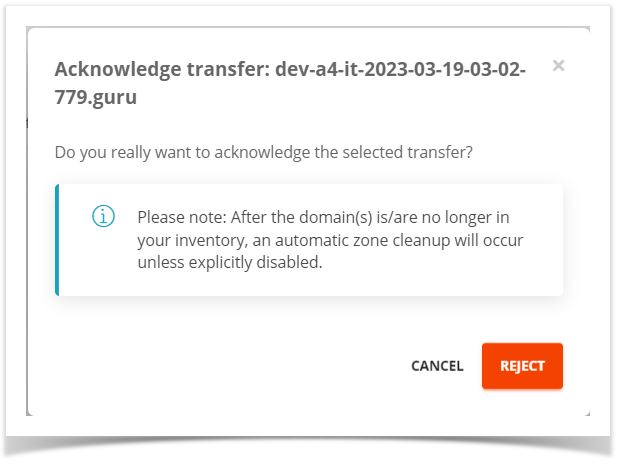
The automatic zone purge or cleanup deletes zones of domains if they have not been in the InterNetX inventory for 60 days. When cancelling or transferring the domain, the user is informed about the automatic deletion of the zone(s).
 ## The purge statuses
The statuses in AutoDNS are **AUTO**, **SCHEDULED** and **DISABLED**.
- AUTO:
When a domain is taken out of our InterNetX-inventory, 60 days later the associated zone(s) is/are automatically covered by the purge (default status).
- SCHEDULED:
As soon as the domain of a zone is taken out of our InterNetX-inventory, the status of the zone automatically changes to SCHEDULED and receives a purge date (60 days).
- DISABLED:
Zones are not purged, even if the associated domain is not or no longer in our inventory.
## Possible changes to the purge status
### Automatic status changes
AUTO → SCHEDULED= If a domain is removed from the inventory, the associated zones are automatically scheduled for deletion, set to SCHEDULED and given a deletion date.
SCHEDULED → AUTO= If a domain is subsequently added to the portfolio, then zones scheduled for deletion are set back to the default status AUTO.
### Possible status changes by the user
AUTO → DISABLED= The user can set the status from AUTO to DISABLED. This means that a zone is not purged even if the associated domain is no longer in our inventory.
DISABLED → AUTO= The user can set the status of the zone from DISABLED → AUTO again at any time.
SCHEDULED → DISABLED= The user can set the status of a zone which is scheduled for deletion to DISABLED to prevent its automatic deletion in general.
## Configuring Zone Purge in AutoDNS X3
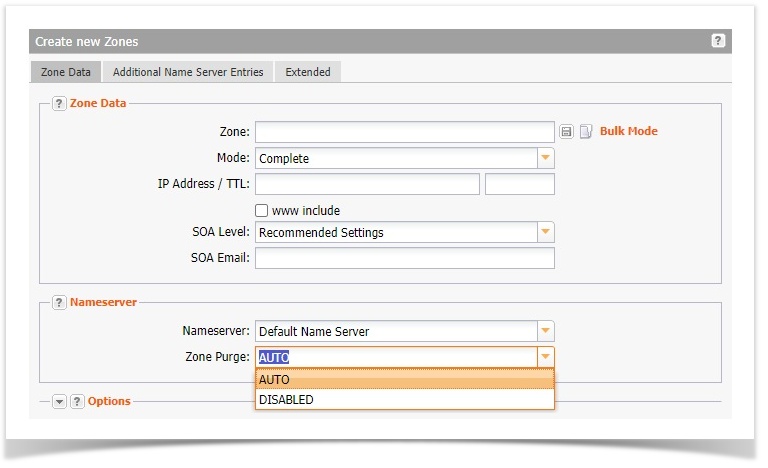
The zone purge status can be changed, when creating and editing zones. By default, it is set to AUTO .
Bulk jobs can only be carried out in AutoDNS Platform.
Create:
→ Zone Management → Create new Zones
Edit:
→ Zone Management → Select and double-click zone
## The purge statuses
The statuses in AutoDNS are **AUTO**, **SCHEDULED** and **DISABLED**.
- AUTO:
When a domain is taken out of our InterNetX-inventory, 60 days later the associated zone(s) is/are automatically covered by the purge (default status).
- SCHEDULED:
As soon as the domain of a zone is taken out of our InterNetX-inventory, the status of the zone automatically changes to SCHEDULED and receives a purge date (60 days).
- DISABLED:
Zones are not purged, even if the associated domain is not or no longer in our inventory.
## Possible changes to the purge status
### Automatic status changes
AUTO → SCHEDULED= If a domain is removed from the inventory, the associated zones are automatically scheduled for deletion, set to SCHEDULED and given a deletion date.
SCHEDULED → AUTO= If a domain is subsequently added to the portfolio, then zones scheduled for deletion are set back to the default status AUTO.
### Possible status changes by the user
AUTO → DISABLED= The user can set the status from AUTO to DISABLED. This means that a zone is not purged even if the associated domain is no longer in our inventory.
DISABLED → AUTO= The user can set the status of the zone from DISABLED → AUTO again at any time.
SCHEDULED → DISABLED= The user can set the status of a zone which is scheduled for deletion to DISABLED to prevent its automatic deletion in general.
## Configuring Zone Purge in AutoDNS X3
The zone purge status can be changed, when creating and editing zones. By default, it is set to AUTO .
Bulk jobs can only be carried out in AutoDNS Platform.
Create:
→ Zone Management → Create new Zones
Edit:
→ Zone Management → Select and double-click zone
 ## Configure Zone Purge in AutoDNS platform
### Display zones with a specific zone purge status
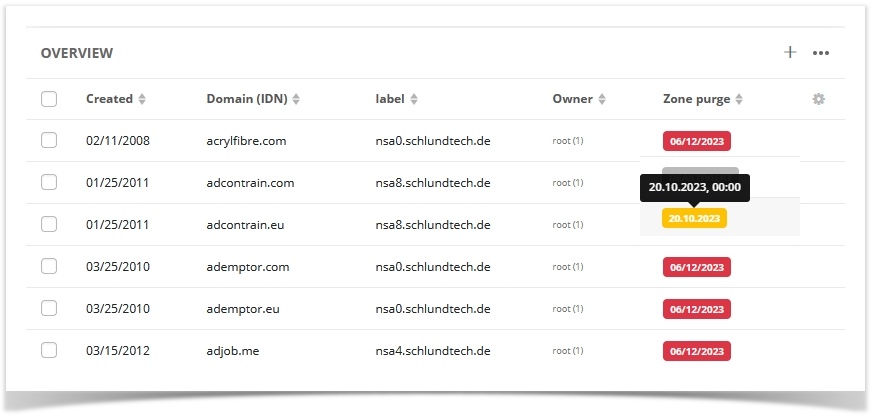
In the zone overview, domains with a specific zone purge status can be displayed via the filter. If the zone purge column is not visible, it can be displayed in the Settings. Click the cogwheel icon.
## Configure Zone Purge in AutoDNS platform
### Display zones with a specific zone purge status
In the zone overview, domains with a specific zone purge status can be displayed via the filter. If the zone purge column is not visible, it can be displayed in the Settings. Click the cogwheel icon.
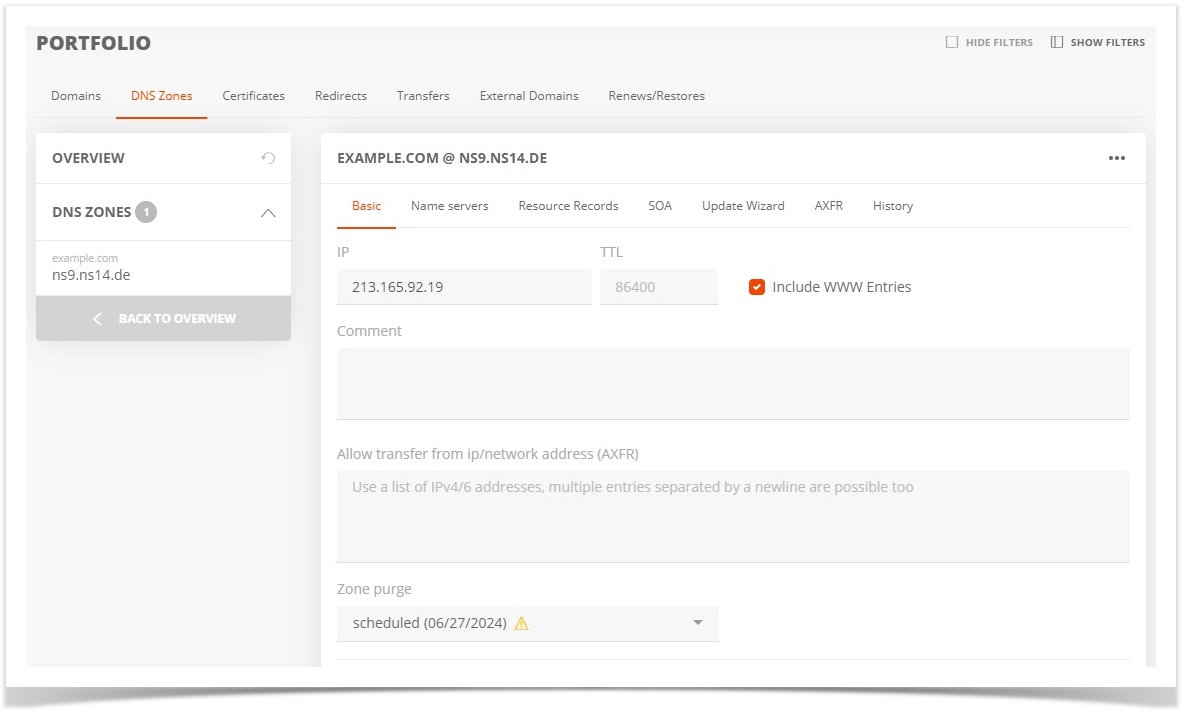
 ### Zone purge for a single zone
→ Domains → Portfolio → DNS zones → General → Select zone → Change the status in the **Zone purge** drop-down menu.
### Zone purge for a single zone
→ Domains → Portfolio → DNS zones → General → Select zone → Change the status in the **Zone purge** drop-down menu.
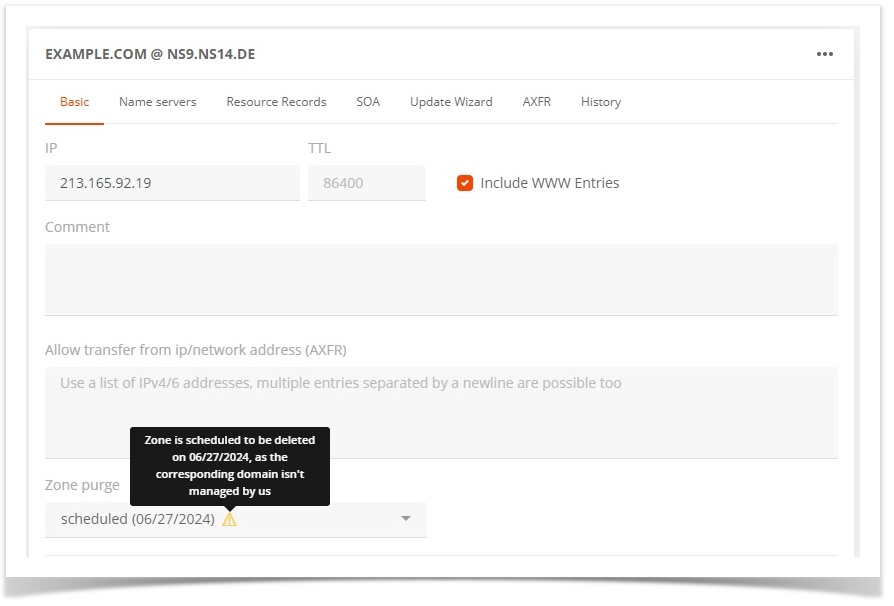
 > The planned purge or deletion date is displayed in a tooltip by the yellow info icon.
>
>
> The planned purge or deletion date is displayed in a tooltip by the yellow info icon.
>
>  ### Zone purge bulk order
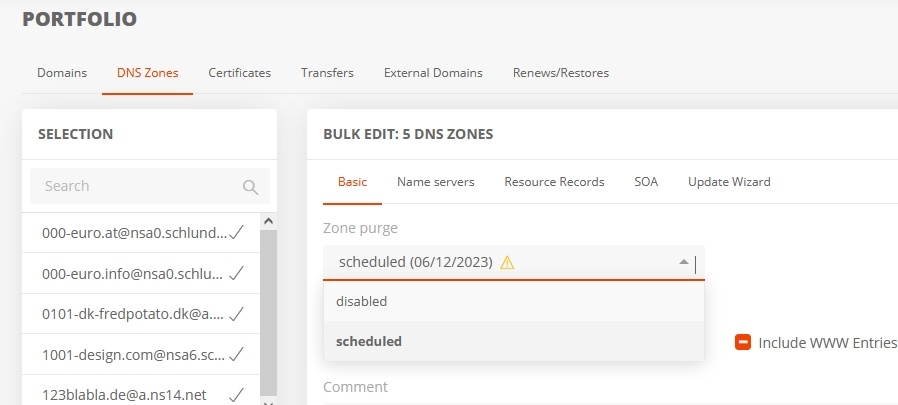
→ Domains → Portfolio → DNS Zones → General → Select several zones → Change the status in the **Zone purge** drop-down menu.
### Zone purge bulk order
→ Domains → Portfolio → DNS Zones → General → Select several zones → Change the status in the **Zone purge** drop-down menu.
 ## ACLs for zone purge
To change the zone purge statuses, appropriate rights (ACL) are required.
### Assigning ACLs in AutoDNS Platform
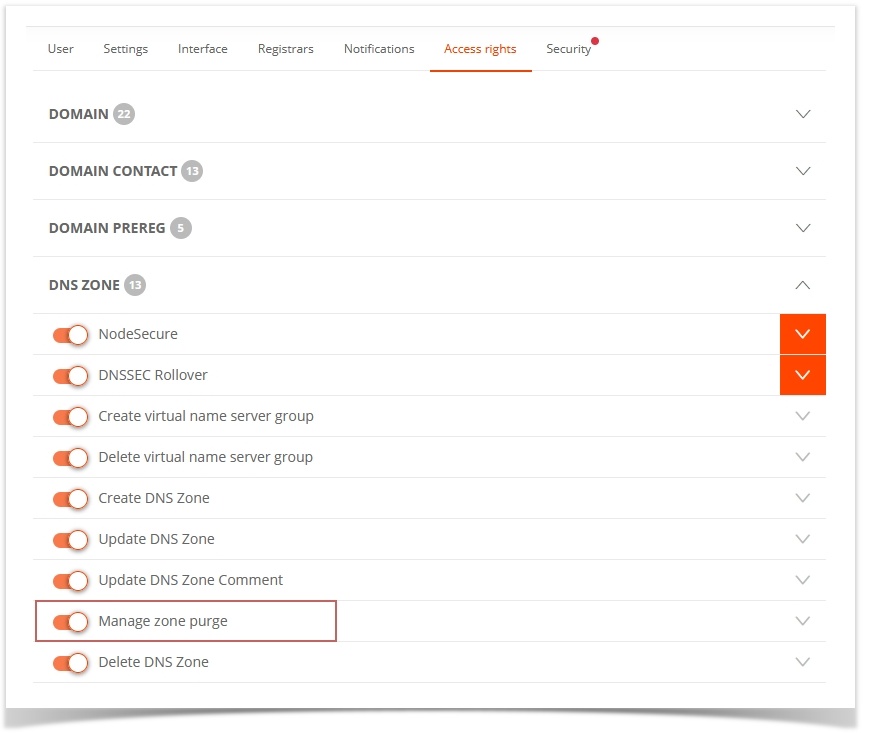
The ACLs for managing the zone purge can be assigned in the user administration.
→ User administration → **Access rights** tab → **DNS zone** group → Activate **Manage zone purge**
## ACLs for zone purge
To change the zone purge statuses, appropriate rights (ACL) are required.
### Assigning ACLs in AutoDNS Platform
The ACLs for managing the zone purge can be assigned in the user administration.
→ User administration → **Access rights** tab → **DNS zone** group → Activate **Manage zone purge**
 ### Assigning ACLs in AutoDNS X3
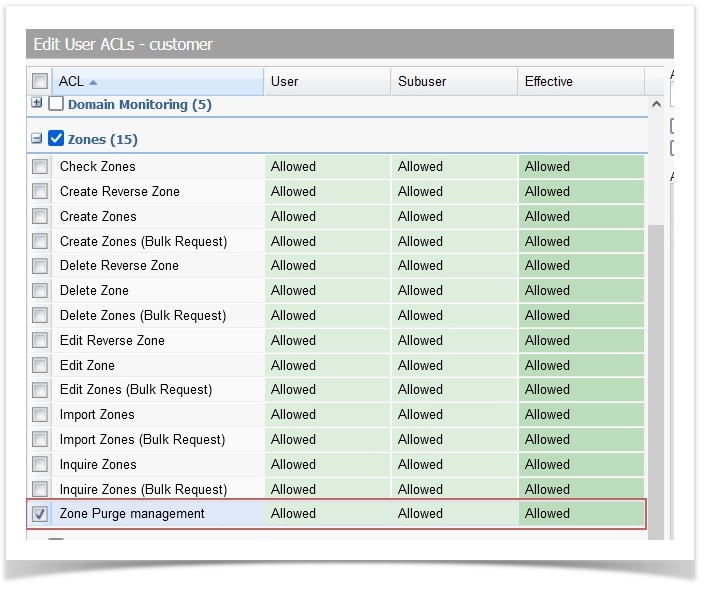
In the **User Administration** area the ACLs for managing Zone Purge can be assigned.
→ User Management → User Settings → User Rights (ACLs) → ACL Group **Zones** → Activate ACL **Manage Zone Purge Management**
### Assigning ACLs in AutoDNS X3
In the **User Administration** area the ACLs for managing Zone Purge can be assigned.
→ User Management → User Settings → User Rights (ACLs) → ACL Group **Zones** → Activate ACL **Manage Zone Purge Management**
 ## FAQ
### What happens if a zone is created without the associated domain being in the inventory?
The purge status of the zone is automatically set to SCHEDULED and thus marked for deletion after 60 days.
### What happens if the domain is subsequently transferred to us via transfer-in or CREATE, but the zone is already set to SCHEDULED?
In this case, the purge status is automatically set to AUTO. This prevents unwanted zone deletions, e.g. after a restore. This also works across customers, i.e. if a zone is located with a different user than the domain.
### On which days are zones deleted by the automatic zone purge?
Automatic zone purge takes place from Monday to Thursday. No zones are deleted on Friday, Saturday and Sunday. Zones are also not automatically purged between 15.12. and 15.01.
### How can I restore zones that were automatically deleted?
Restoration of deleted domains in the AutoDNS platform:
In the zone portfolio, deleted zones can be restored via the more menu.
→ Portfolio → DNS Zones→ More Menu → "Restore DNS zone"
## FAQ
### What happens if a zone is created without the associated domain being in the inventory?
The purge status of the zone is automatically set to SCHEDULED and thus marked for deletion after 60 days.
### What happens if the domain is subsequently transferred to us via transfer-in or CREATE, but the zone is already set to SCHEDULED?
In this case, the purge status is automatically set to AUTO. This prevents unwanted zone deletions, e.g. after a restore. This also works across customers, i.e. if a zone is located with a different user than the domain.
### On which days are zones deleted by the automatic zone purge?
Automatic zone purge takes place from Monday to Thursday. No zones are deleted on Friday, Saturday and Sunday. Zones are also not automatically purged between 15.12. and 15.01.
### How can I restore zones that were automatically deleted?
Restoration of deleted domains in the AutoDNS platform:
In the zone portfolio, deleted zones can be restored via the more menu.
→ Portfolio → DNS Zones→ More Menu → "Restore DNS zone"
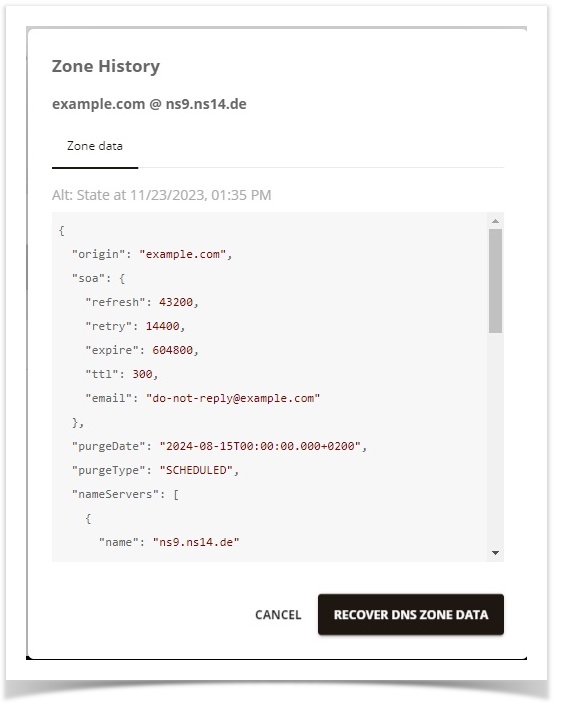
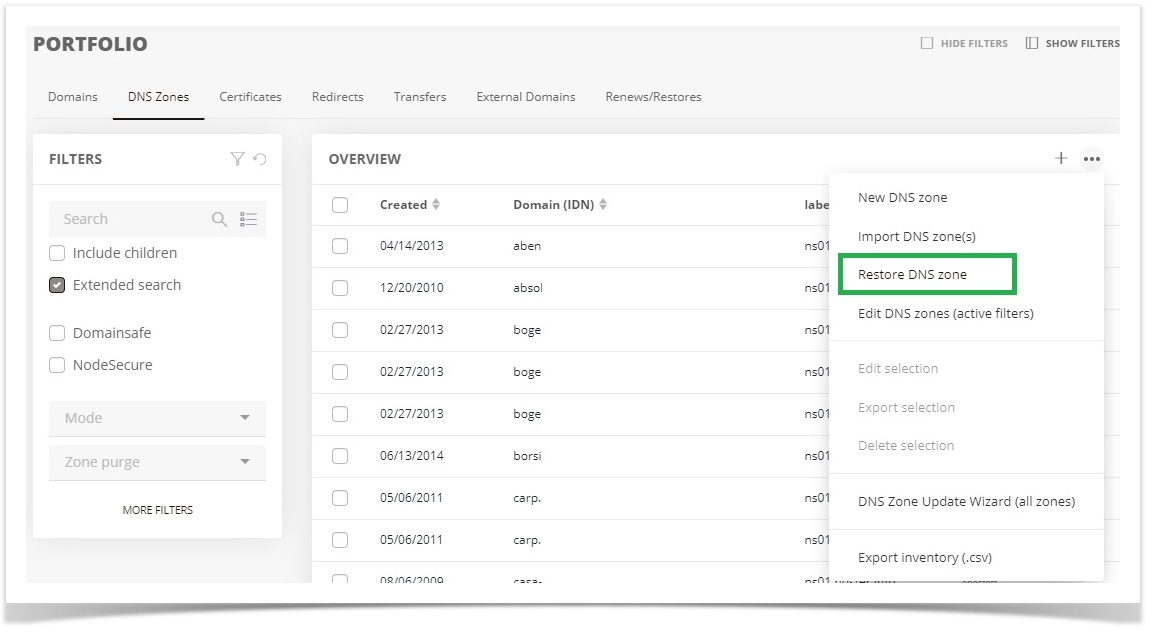 The desired zone for the restore can be selected in the zone overview.
 Restoring deleted domains in AutoDNS X3:
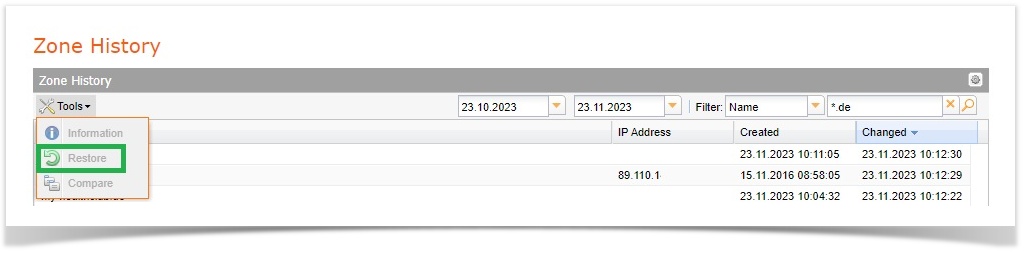
In zone management, deleted zones can be restored via the Zone History
→ Zonen Management→ Tools → Logs → Zone History
Restoring deleted domains in AutoDNS X3:
In zone management, deleted zones can be restored via the Zone History
→ Zonen Management→ Tools → Logs → Zone History
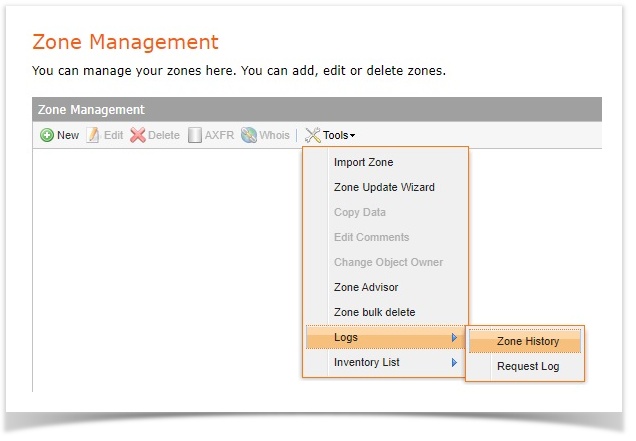 In the Zone History, select the desired zone and use "Tools" to restore the previous zone data.