---
title: "BackupMX"
url: "https://help.internetx.com/en/domains/backupmx/"
lang: "en"
section: "Domains"
---
# BackupMX
## What the BackupMX does
A BackupMX server is a temporary storage for emails that is used when the primary email server fails. During the downtime, the BackupMX server stores the emails for up to 14 days. The BackupMX checks at 5-minute intervals whether the primary mail server is available again and delivers the emails immediately if it is.A BackupMX server thus ensures that no emails are lost during a primary mail server downtime.
### These steps are required
1. Order. BackupMX is an optional service ordered through AutoDNS.
2. Create BackupMX record for the domain.
3. Enter MX records for the BackupMX servers in the zone file.
## Order BackupMX
- [**AutoDNS Plattform**](#2286824 "AutoDNS Plattform")
- [**AutoDNS X3**](#1145269217 "AutoDNS X3")
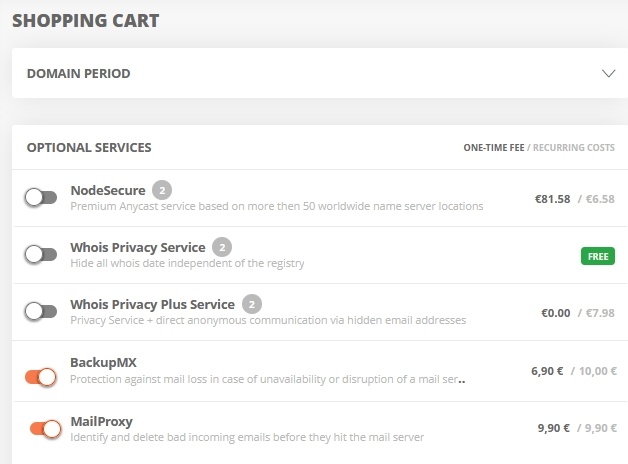
### Activate BackupMX when ordering a domain
→ add domain to shopping cart → activate BackupMX in optional services in shopping cart → complete ordering process
 #### Activate BackupMX retrospectively for a domain
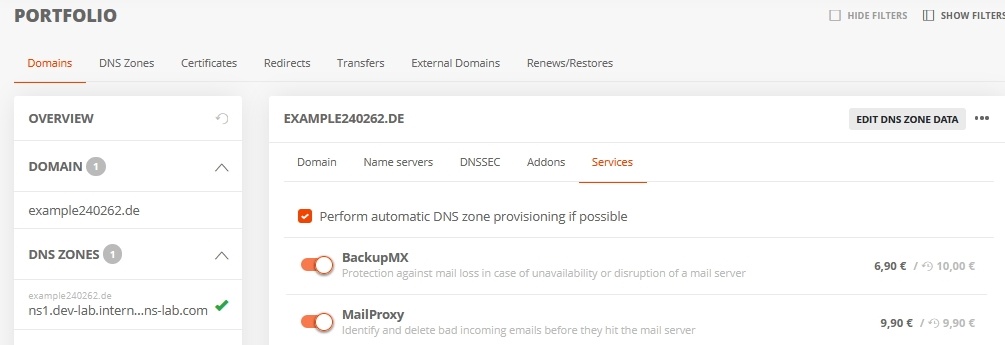
→ Portfolio → Domains → Services → activate BackupMX → complete order process
#### Activate BackupMX retrospectively for a domain
→ Portfolio → Domains → Services → activate BackupMX → complete order process
 #### Order BackupMX
In AutoDNSX3 BackupMX can be ordered as an optional service. During the ordering process, there is a switch to the AutoDNS platform interface.
→ Customer Center → Optional Services → Optional Services - Server → BackupMX→ order via AutoDNS Platform - log in to AutoDNS Platform with the same user data.
After the order, which is processed in AutoDNS Platform via the shopping cart, the BackupMX can be configured there or in AutoDNS X3.
## Create a BackupMX record for the domain
- [**AutoDNS Plattform**](#2286824 "AutoDNS Plattform")
- [**AutoDNS X3**](#1145269217 "AutoDNS X3")
In ADNS Plattform, the BackupMX entry for a domain can be made right at the time of ordering. See above.
### Order BackupMX
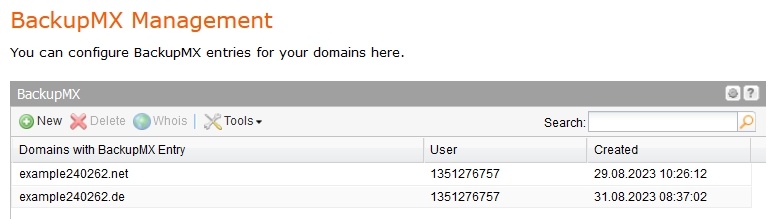
In AutoDNS X3, the BackupMX entry for a domain is entered manually.
→ Zones & Redirects → BackupMX Management → click + for new entry
#### Order BackupMX
In AutoDNSX3 BackupMX can be ordered as an optional service. During the ordering process, there is a switch to the AutoDNS platform interface.
→ Customer Center → Optional Services → Optional Services - Server → BackupMX→ order via AutoDNS Platform - log in to AutoDNS Platform with the same user data.
After the order, which is processed in AutoDNS Platform via the shopping cart, the BackupMX can be configured there or in AutoDNS X3.
## Create a BackupMX record for the domain
- [**AutoDNS Plattform**](#2286824 "AutoDNS Plattform")
- [**AutoDNS X3**](#1145269217 "AutoDNS X3")
In ADNS Plattform, the BackupMX entry for a domain can be made right at the time of ordering. See above.
### Order BackupMX
In AutoDNS X3, the BackupMX entry for a domain is entered manually.
→ Zones & Redirects → BackupMX Management → click + for new entry
 ## Add BackupMX server to the zone file
- [**AutoDNS Plattform**](#2286824 "AutoDNS Plattform")
- [**AutoDNS X3**](#1145269217 "AutoDNS X3")
In AutoDNS platform, there is usually an AutoProvisioning. Only for external domains in BackupMX MX records must be set. This also applies to MailProxy**.**
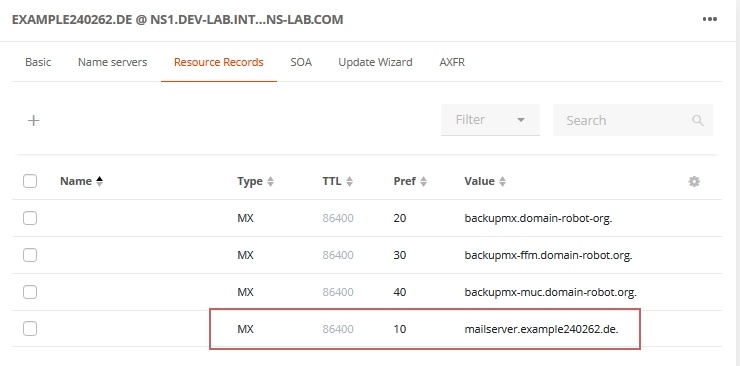
For the BackupMX, if all three available backup servers are to be used, three hostnames must be set as MX records with higher priority. If only one BackupMX server is used ([backupmx.domain-robot.org](http://backupmx.domain-robot.org)), it must be entered with MX 20.
The mail server of the domain has the priority value 10 for the MX record.
> The hostnames at "Value" must be entered with a terminating dot.
> Example:
>
> MX 10: mailsever.example240262.de.
> MX 20: backupmx.domain-robot.org.
> MX 30: backupmx-ffm.domain-robot.org.
> MX 40: backupmx-muc.domain-robot.org.
## Add BackupMX server to the zone file
- [**AutoDNS Plattform**](#2286824 "AutoDNS Plattform")
- [**AutoDNS X3**](#1145269217 "AutoDNS X3")
In AutoDNS platform, there is usually an AutoProvisioning. Only for external domains in BackupMX MX records must be set. This also applies to MailProxy**.**
For the BackupMX, if all three available backup servers are to be used, three hostnames must be set as MX records with higher priority. If only one BackupMX server is used ([backupmx.domain-robot.org](http://backupmx.domain-robot.org)), it must be entered with MX 20.
The mail server of the domain has the priority value 10 for the MX record.
> The hostnames at "Value" must be entered with a terminating dot.
> Example:
>
> MX 10: mailsever.example240262.de.
> MX 20: backupmx.domain-robot.org.
> MX 30: backupmx-ffm.domain-robot.org.
> MX 40: backupmx-muc.domain-robot.org.
 If MailProxy is used for the domain in addition to BackupMX, MaiiProxy must be set as the MX record instead of the domain's mail server.
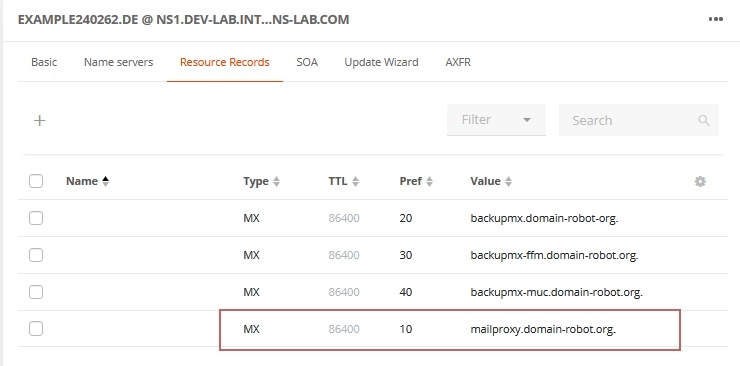 For further configuration of MailProxy see [HelpCenter page.](/en/domains/mailproxy/)
> The BackupMX and MailProxy services are standalone products. Domain, email server and DNS records can be outside our management to use the services.
### Im AutoDNS X3
For the BackupMX, if all three available backup servers are to be used, three hostnames must be set as MX records with higher priority. If only one BackupMX server is used ([backupmx.domain-robot.org](http://backupmx.domain-robot.org)), it must be entered with MX 20.
The mail server of the domain has the priority value 10 for the MX record.
> The hostnames at "Value" must be entered with a terminating dot.
→ Zones & Redirects → Zone Management →Additional Nameserver Entries tab → click + to add entry
> Example:
>
> MX 10: mailsever.example240262.de.
> MX 20: backupmx.domain-robot.org.
> MX 30: backupmx-ffm.domain-robot.org.
> MX 40: backupmx-muc.domain-robot.org.
For further configuration of MailProxy see [HelpCenter page.](/en/domains/mailproxy/)
> The BackupMX and MailProxy services are standalone products. Domain, email server and DNS records can be outside our management to use the services.
### Im AutoDNS X3
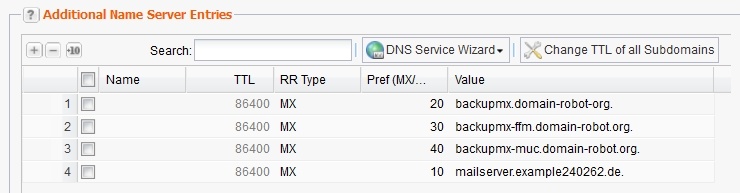
For the BackupMX, if all three available backup servers are to be used, three hostnames must be set as MX records with higher priority. If only one BackupMX server is used ([backupmx.domain-robot.org](http://backupmx.domain-robot.org)), it must be entered with MX 20.
The mail server of the domain has the priority value 10 for the MX record.
> The hostnames at "Value" must be entered with a terminating dot.
→ Zones & Redirects → Zone Management →Additional Nameserver Entries tab → click + to add entry
> Example:
>
> MX 10: mailsever.example240262.de.
> MX 20: backupmx.domain-robot.org.
> MX 30: backupmx-ffm.domain-robot.org.
> MX 40: backupmx-muc.domain-robot.org.
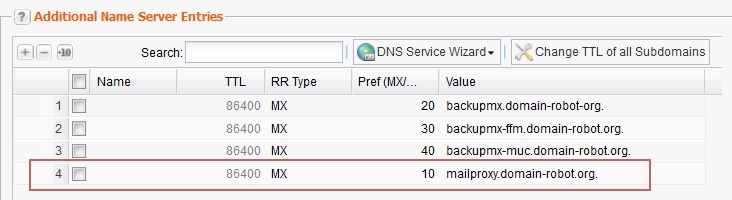
 If MailProxy is used for the domain in addition to BackupMX, MaiiProxy must be set as the MX record instead of the domain's mail server.
 ## JSON/XML API documentation for BackupMX
[Objekt BackupMX](/en/api/core-backupmx-object/)
[BackupMX Create](/en/api/core-backupmx-create/)
[BackupMX Delete](/en/api/core-backupmx-delete/)
[BackupMX Info](/en/api/core-backupmx-info/)
[BackupMX List](/en/api/core-backupmx-list/)
## JSON/XML API documentation for BackupMX
[Objekt BackupMX](/en/api/core-backupmx-object/)
[BackupMX Create](/en/api/core-backupmx-create/)
[BackupMX Delete](/en/api/core-backupmx-delete/)
[BackupMX Info](/en/api/core-backupmx-info/)
[BackupMX List](/en/api/core-backupmx-list/)