---
title: "Multi-year Plan: Order TLS/SSL certificates with multi-year validity periods"
url: "https://help.internetx.com/en/tls-ssl-smime/order-multi-year-plan-certificates/"
lang: "en"
section: "TLS/SSL & S/MIME"
---
# Multi-year Plan: Order TLS/SSL certificates with multi-year validity periods
With effect from September 19, 2020, web browsers declare all TLS/SSL certificates issued after this date with a validity period of more than 397 calendar days as untrusted. The certification authorities (CAs) have complied with this change and have since only issued certificates with a maximum validity period of 365 days. As before, TLS/SSL certificates can be renewed for another 365 days up to 90 days before expiry.
In theory, that means a certificate validity of up to 455 days is possible. However, this is significantly above the stipulations of the web browser developers. The CA DigiCert circumvents this discrepancy by issuing the new certificates with the maximum accepted validity period of 397 days and storing the remaining days of the extension and retrieving them later free of charge via reissue.
Certificates affected by this special case are automatically created by CA DigiCert as so-called "Multi-year Plan certificates".
## What Multi-year Plan offers
With the Multi-year Plan, it is possible to book TLS/SSL certificates with a maximum validity period of up to 60 months i.e. up to five years. The respectively issued certificate is always valid for 397 days. Depending on the booked period – 24, 36, 48, or 60 months – it is essential to perform a free reissue periodically – at least 90 days and by the latest one day before the validity period of 397 days expires and to exchange the newly generated TLS/SSL certificate on the server.
 ## Overview of runtimes by CA
The latest data (also regarding the duration of the certificates) can be found in the [Knowledge base](/en/tls-ssl-smime/knowledge-base-certificates/).
| Certificate Authority (CA) | Months |
| --- | --- |
| DigiCert | 36 |
| GeoTrust | 36 |
| Thawte | 36 |
| RapidSSL | 36 |
| Sectigo | 60 |
| PositiveSSL | 60 |
| InstantSSL | 60 |
| GlobalSign | 12 |
## Managing multi-year plan certificates in SSL Manager
- In order to use the maximum validity of booked Multi-year Plan certificates, reissues must be carried out regularly.
This can be done in SSL Manager as follows:
- Under the menu item **→ TLS/SSL Certificates → Certificate Management**, two additional columns have been inserted: **Multi-year Plan** and **Max. Validity**.
- Using the filter option “MULTI-YEAR PLAN”, you can look for Multi-year Plan certificates in your portfolio.
## Overview of runtimes by CA
The latest data (also regarding the duration of the certificates) can be found in the [Knowledge base](/en/tls-ssl-smime/knowledge-base-certificates/).
| Certificate Authority (CA) | Months |
| --- | --- |
| DigiCert | 36 |
| GeoTrust | 36 |
| Thawte | 36 |
| RapidSSL | 36 |
| Sectigo | 60 |
| PositiveSSL | 60 |
| InstantSSL | 60 |
| GlobalSign | 12 |
## Managing multi-year plan certificates in SSL Manager
- In order to use the maximum validity of booked Multi-year Plan certificates, reissues must be carried out regularly.
This can be done in SSL Manager as follows:
- Under the menu item **→ TLS/SSL Certificates → Certificate Management**, two additional columns have been inserted: **Multi-year Plan** and **Max. Validity**.
- Using the filter option “MULTI-YEAR PLAN”, you can look for Multi-year Plan certificates in your portfolio.
 - If a certificate holds the attribute “Multi-year” – because automatically set by the CA or directly ordered for a multi-year validity period – this is indicated with “Yes” in the column Multi-year Plan. Otherwise no entry is displayed here.
- The current validity of the issued and active certificate is listed in the column **Expire**.
- The column **Max. Validity** shows the final date on which a Multi-year Plan certificate will expire after all possible reissues have been carried out.
- If a certificate holds the attribute “Multi-year” – because automatically set by the CA or directly ordered for a multi-year validity period – this is indicated with “Yes” in the column Multi-year Plan. Otherwise no entry is displayed here.
- The current validity of the issued and active certificate is listed in the column **Expire**.
- The column **Max. Validity** shows the final date on which a Multi-year Plan certificate will expire after all possible reissues have been carried out.
 ## Managing Multi-year Plan certificates in AutoDNS
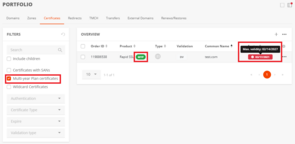
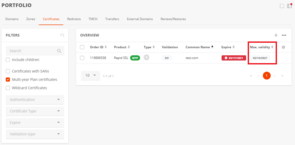
- The filter option Multi-Year Plan certificates can be found under the menu item **Certificates**.
- Multi-year Plan certificates are marked with a green **MYP** pill badge in the overview.
- For Multi-year Plan certificates, in the column **Expire** (=expire) showing the relevant expiry date, a mouseover shows an additional info icon with the **Max. validity** (= payable).
- Alternatively, the column **Max. validity** (= payable) can also be displayed separately.
## Managing Multi-year Plan certificates in AutoDNS
- The filter option Multi-Year Plan certificates can be found under the menu item **Certificates**.
- Multi-year Plan certificates are marked with a green **MYP** pill badge in the overview.
- For Multi-year Plan certificates, in the column **Expire** (=expire) showing the relevant expiry date, a mouseover shows an additional info icon with the **Max. validity** (= payable).
- Alternatively, the column **Max. validity** (= payable) can also be displayed separately.
 ## Examples
### TLS/SSL certificate: validity period 12 months
Every TLS/SSL certificate with a standard validity period of 365 days (incl. the extension possibility of 90 days) is automatically created as a Multi-year Plan certificate by the CA DigiCert. The following example demonstrates how this works (see Screenshot SSL Manager **Expire**):
- The date 04.04.2021 is shown as **Expire** date and the date 19.04.2021 as **Max. Validity**.
- So, for this TLS/SSL certificate, 15 days of remaining validity are still available.
- This remaining validity can now be added by carrying out a free reissue before the validity ends.
- The TLS/SSL certificate is valid until 19.04.2021.
### Multi-year Plan certificate: validity period 36 months
- On 01.03.2021, a TLS/SSL certificate with a maximum validity of 36 months was ordered. After the certificate is issued, the date 01.03.2024 is shown under **Max. Validity**, while 02.04.2022 is shown as the **Expire** date. The TLS/SSL certificate is therefore valid until 02.04.2022.
- In order to use the certificate for the purchased validity period of three years, a reissue must be carried out before each respective expiry date. The respectively newly generated TLS/SSL certificate then again has a validity period of 397 days.
- For the length of the booked **Max. Validity** a reissue must be carried out periodically before the certificate expires. In this example, two further reissues must be carried out before the final date of **Max. Validity** is reached.
- With the last possible reissue, the TLS/SSL certificate is only issued for the remaining validity period – in this example, up to 01.03.2024.
- The **Max. Validity** of 36 months is thereby fully used.
### Additional booking of SANs: What to keep in mind
With each reissue for a Multi-year Plan certificate, a new TLS/SSL certificate is issued with the maximum allowed validity period. Should a reissue be carried out in order to e.g. add further SANs, a TLS/SSL certificate is automatically issued with a new validity period of 397 days (unless the remaining period to the final date of **Max. Validity** is under 397 days), irrespective of when or how often the reissue is carried out during the validity period.
The Multi-year Plan is available for DV, OV and EV certificates from DigiCert, GeoTrust, Thawte, RapidSSL, Sectigo, PositiveSSL und InstantSSL at InterNetX. Multi-year Plan certificates can be ordered and managed via [SSL Manager](https://login.sslmanager.com/) or [AutoDNS](https://cloud.autodns.com/login).
**Information about validation**
According to the requirements of the CA/B Forum, certificates must be revalidated within the Multi-year Plans period. Depending on the level of security, different validation periods apply:
**DV**
A new validation is carried out using the selected DCV method with each reissue.
**OV/EV**
Certificate owners must be revalidated by the CA every 13 months. For reissues of an EV certificate – also before these 13 months end – the certificate owner must submit their approval, the so-called EV Certificate Approval. The validation process is carried out by the CA.
**Information about reissue**
A reissue can also be carried out free of charge after the validity period ends (technical validity period of the certificate) when the validity period of the Multi-year Plan (technical maximum validity) has not yet been reached.
## Examples
### TLS/SSL certificate: validity period 12 months
Every TLS/SSL certificate with a standard validity period of 365 days (incl. the extension possibility of 90 days) is automatically created as a Multi-year Plan certificate by the CA DigiCert. The following example demonstrates how this works (see Screenshot SSL Manager **Expire**):
- The date 04.04.2021 is shown as **Expire** date and the date 19.04.2021 as **Max. Validity**.
- So, for this TLS/SSL certificate, 15 days of remaining validity are still available.
- This remaining validity can now be added by carrying out a free reissue before the validity ends.
- The TLS/SSL certificate is valid until 19.04.2021.
### Multi-year Plan certificate: validity period 36 months
- On 01.03.2021, a TLS/SSL certificate with a maximum validity of 36 months was ordered. After the certificate is issued, the date 01.03.2024 is shown under **Max. Validity**, while 02.04.2022 is shown as the **Expire** date. The TLS/SSL certificate is therefore valid until 02.04.2022.
- In order to use the certificate for the purchased validity period of three years, a reissue must be carried out before each respective expiry date. The respectively newly generated TLS/SSL certificate then again has a validity period of 397 days.
- For the length of the booked **Max. Validity** a reissue must be carried out periodically before the certificate expires. In this example, two further reissues must be carried out before the final date of **Max. Validity** is reached.
- With the last possible reissue, the TLS/SSL certificate is only issued for the remaining validity period – in this example, up to 01.03.2024.
- The **Max. Validity** of 36 months is thereby fully used.
### Additional booking of SANs: What to keep in mind
With each reissue for a Multi-year Plan certificate, a new TLS/SSL certificate is issued with the maximum allowed validity period. Should a reissue be carried out in order to e.g. add further SANs, a TLS/SSL certificate is automatically issued with a new validity period of 397 days (unless the remaining period to the final date of **Max. Validity** is under 397 days), irrespective of when or how often the reissue is carried out during the validity period.
The Multi-year Plan is available for DV, OV and EV certificates from DigiCert, GeoTrust, Thawte, RapidSSL, Sectigo, PositiveSSL und InstantSSL at InterNetX. Multi-year Plan certificates can be ordered and managed via [SSL Manager](https://login.sslmanager.com/) or [AutoDNS](https://cloud.autodns.com/login).
**Information about validation**
According to the requirements of the CA/B Forum, certificates must be revalidated within the Multi-year Plans period. Depending on the level of security, different validation periods apply:
**DV**
A new validation is carried out using the selected DCV method with each reissue.
**OV/EV**
Certificate owners must be revalidated by the CA every 13 months. For reissues of an EV certificate – also before these 13 months end – the certificate owner must submit their approval, the so-called EV Certificate Approval. The validation process is carried out by the CA.
**Information about reissue**
A reissue can also be carried out free of charge after the validity period ends (technical validity period of the certificate) when the validity period of the Multi-year Plan (technical maximum validity) has not yet been reached.