---
title: "Verified Mark Certificate (VMC) - technical implementation and operation"
url: "https://help.internetx.com/en/tls-ssl-smime/verified-mark-certificate-vmc-technische-implementierung-und-durchfueh/"
lang: "en"
section: "TLS/SSL & S/MIME"
---
# Verified Mark Certificate (VMC) - technical implementation and operation
## VMC implementation in two steps
### Step 1 – Upload the VMC to your web server
Once you have successfully purchased a Verified Mark Certificate (VMC), it must be uploaded to your server. After your VMC is issued, you will receive an email from DigiCert containing your entity certificate Privacy Enhanced Mail (PEM) file
- Then upload your PEM file to your public web server and note the file’s URL. You will need it in the following step.
- Both files (SVG file and PEM file), retaining their original names, must be placed on a publicly accessible server and be accessible via https (http will result in failure).
**Important:** The SVG that is hosted and referenced in your BIMI record (BIMI = Brand Indicators for Message Identification, which enables inboxes to display a brand logo in authenticated emails), must **exactly** match the SVG file that was validated by DigiCert and is referenced in your PEM file. If there is a mismatch, the BIMI functionality will be inhibited.
### Step 2 – Add a BIMI TXT record to your domain
Next, create your Brand Indicator for Message Identification (BIMI) TXT record and add it to your DNS at your provider:
- Start by creating your BIMI record. You will need the PEM file URL you wrote down earlier and the location of your SVG logo file. Format your BIMI record as shown in this example:
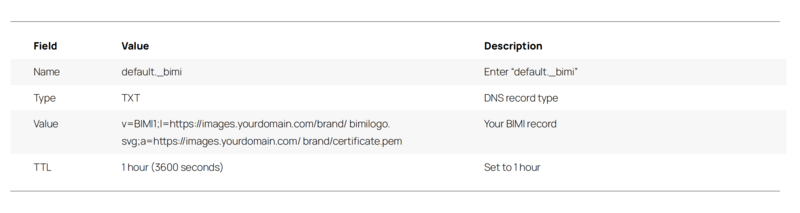
_v=BIMI1;l=https://images.yourdomain.com/brand/bimi-logo.svg;a=https://images.yourdomain.com/brand/certificate.pem_
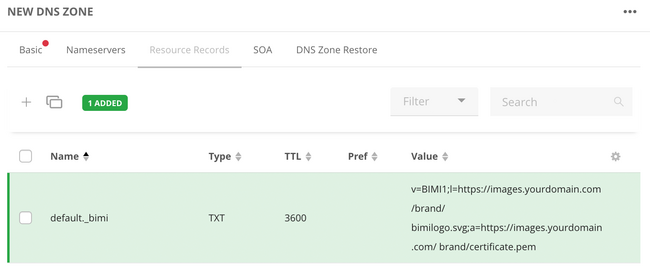
- Add your BIMI record as a DNS TXT record in the domain zone at your domain provider. Depending on your provider, the exact steps for this might vary, but the following values must be added:
 Allow up to 48 hours for your VMC logo to start being displayed via BIMI. You can also check your BIMI record with the [BIMI Group’s tool.](https://bimigroup.org/bimi-generator/)
Make sure that your VMC logo is being displayed properly by sending a test email.
[BIMI](https://bimigroup.org/bimi-infographic/ "BIMI infographic VMC support") shows in an infographic all providers that currently already support VMCs.
## How many VMCs do I need for my company?
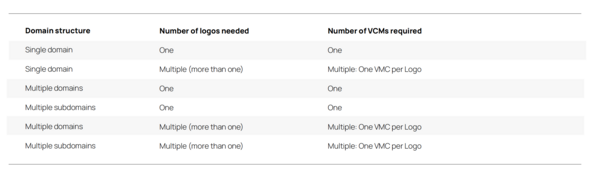
The following generally applies: The more logos you want to use, the more VMCs you require. If you want to use the same logo over multiple domains, one VMC is sufficient, but the relevant domains must each be specified as a SAN (for a fee) when ordering the VMC. Check the following overview to find out how many VMCs you require.
Allow up to 48 hours for your VMC logo to start being displayed via BIMI. You can also check your BIMI record with the [BIMI Group’s tool.](https://bimigroup.org/bimi-generator/)
Make sure that your VMC logo is being displayed properly by sending a test email.
[BIMI](https://bimigroup.org/bimi-infographic/ "BIMI infographic VMC support") shows in an infographic all providers that currently already support VMCs.
## How many VMCs do I need for my company?
The following generally applies: The more logos you want to use, the more VMCs you require. If you want to use the same logo over multiple domains, one VMC is sufficient, but the relevant domains must each be specified as a SAN (for a fee) when ordering the VMC. Check the following overview to find out how many VMCs you require.
 ## BIMI selector header - associating an email with a VMC
A practical aspect of VMC via BIMI (Brand Indicators for Message Identification) is the use of a “selector” to indicate which logo is used for a particular email address. Different numbers of selectors can be used for each domain. For most companies, one selector is sufficient. For more complex branding requirements, several selectors can be used; there is no limit to the number.
### Case study: One email sender domain, eight logos - seven regions
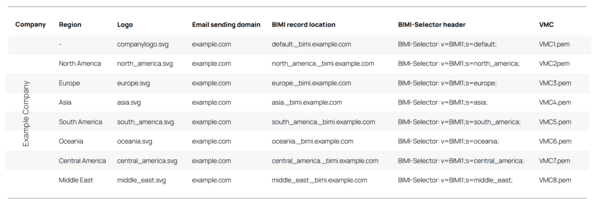
A company uses eight brands with different logos, but a common email sender domain. Separate VMC and BIMI entries are required for each logo. BIMI selectors can be used to determine which logo is displayed to the recipient, even though all emails originate from the same domain. This allows logos to be assigned flexibly depending on the recipient, message source, region or marketing requirements (e.g. seasonal campaigns).
The following table shows the eight different BIMI selectors:
## BIMI selector header - associating an email with a VMC
A practical aspect of VMC via BIMI (Brand Indicators for Message Identification) is the use of a “selector” to indicate which logo is used for a particular email address. Different numbers of selectors can be used for each domain. For most companies, one selector is sufficient. For more complex branding requirements, several selectors can be used; there is no limit to the number.
### Case study: One email sender domain, eight logos - seven regions
A company uses eight brands with different logos, but a common email sender domain. Separate VMC and BIMI entries are required for each logo. BIMI selectors can be used to determine which logo is displayed to the recipient, even though all emails originate from the same domain. This allows logos to be assigned flexibly depending on the recipient, message source, region or marketing requirements (e.g. seasonal campaigns).
The following table shows the eight different BIMI selectors:
 #### Explanation
The email header lets the recipient’s system know which BIMI record from the sender is the correct one and the relevant logo is displayed in the recipient’s inbox.
Using the above example, if the sender enters the BIMI-selector “BIMI-Selector: v=BIMI1; s=Europe;” in the email header, the Europe logo (VMC3.pem) is displayed to the email recipient. However, if the sender does not specify a BIMI-selector in the email header, the default selector is used by the recipient. The default BIMI-selector always points to the default BIMI record. In our example that is “default.\_bimi.example.com”, which displays the main company logo.
##### In short, BIMI-selectors might be very useful in the following scenarios:
- When multiple brands / logos are associated with one single sending domain.
- When a unique brand is associated with multiple logos and one or several domains.
##### Components of a BIMI-selector header
- Headername (required): BIMI-Selector
- v = Version (required): BIMI1
- s = Selector name: the value is what you have chosen to be your selector name (required)
_Example_**:** _BIMI-selector: v=BIMI1; s=example;_
**Safety Tip**
VMCs enable the company VMC logo to be displayed in the email recipient’s inbox. Depending on the company’s internal email structure, one or multiple S/MIME certificates are required to encrypt and sign emails!
## Example scenarios for the usage of VMCs
### Scenario 1: multiple domains, one shared logo
Scenario: Multiple email domains are used, but a single logo appears in all emails. Is a separate VMC required for each domain?
Example: @yourdomain.com, @landingpage.com
Answer: No, if the same logo is used across all domains, a single VMC is sufficient. However, the SAN (Subject Alternative Name) option is required to include additional domains. In the example above, the primary VMC would cover @yourdomain.com, and @landingpage.com would need to be added as a SAN. If each domain uses a different logo, a separate VMC must be obtained for each. In that case, each domain's BIMI record should reference its respective VMC.
### Scenario 2: multiple subdomains, shared logo
Scenario: Multiple email subdomains each use their own email addresses, but share the same logo. How many VMCs are required in this scenario?
Example: @domains.yourdomain.com; @support.yourdomain.com; @sales.yourdomain.com
Answer: Since all subdomains use the same logo, one VMC is sufficient for all of them. In this case, the BIMI selector header for each subdomain points to the same VMC record.
### Scenario 3: multiple subdomains, each with its own logo
Scenario: A company has a main domain, and its local subsidiaries use their own subdomains for email, each with a unique logo. How many VMCs are required?
Example: @company1.yourdomain.com, @company2.yourdomain.com
Answer: In this case, a separate VMC is required for each subsidiary’s subdomain, as each VMC is tied to a specific logo. The BIMI selector header for each subdomain points to its respective VMC record.
### Scenario 4: Second-level domain with several TLDs, one or more logos
Scenario: Multiple email accounts use the same second-level domain but different top-level domains (TLDs). This situation may apply to a global company that offers localized websites for different countries.
Example: @YourDomain.com, @YourDomain.org, @YourDomain.de
Answer: If all domains use the same logo, a single VMC can be used for all emails—provided the additional domains are included using the SAN (Subject Alternative Name) option. If each domain has its own logo, a separate VMC is required for each domain.
### Scenario 5: a single domain, changing logos
Scenario: A company uses a primary email address, but the logo is changed throughout the year—for example, to reflect holidays such as Christmas or Easter with seasonal variations.
Answer: It is possible to use multiple logos for a single domain. Each logo requires its own VMC and must be a registered trademark. The display of the VMC is triggered by the BIMI selector email header.
### Scenario 6: a single domain, several brands with own logos
Scenario: I have a single domain, which I also use for sending emails and multiple products with unique logos. How should I set up my emails so each product line has a unique logo?
_Example: email@yourdomain.com for product A AND product B_
Answer: BIMI-selector headers can be used to select the appropriate logo per sent email. You will need one VMC per logo.
#### Explanation
The email header lets the recipient’s system know which BIMI record from the sender is the correct one and the relevant logo is displayed in the recipient’s inbox.
Using the above example, if the sender enters the BIMI-selector “BIMI-Selector: v=BIMI1; s=Europe;” in the email header, the Europe logo (VMC3.pem) is displayed to the email recipient. However, if the sender does not specify a BIMI-selector in the email header, the default selector is used by the recipient. The default BIMI-selector always points to the default BIMI record. In our example that is “default.\_bimi.example.com”, which displays the main company logo.
##### In short, BIMI-selectors might be very useful in the following scenarios:
- When multiple brands / logos are associated with one single sending domain.
- When a unique brand is associated with multiple logos and one or several domains.
##### Components of a BIMI-selector header
- Headername (required): BIMI-Selector
- v = Version (required): BIMI1
- s = Selector name: the value is what you have chosen to be your selector name (required)
_Example_**:** _BIMI-selector: v=BIMI1; s=example;_
**Safety Tip**
VMCs enable the company VMC logo to be displayed in the email recipient’s inbox. Depending on the company’s internal email structure, one or multiple S/MIME certificates are required to encrypt and sign emails!
## Example scenarios for the usage of VMCs
### Scenario 1: multiple domains, one shared logo
Scenario: Multiple email domains are used, but a single logo appears in all emails. Is a separate VMC required for each domain?
Example: @yourdomain.com, @landingpage.com
Answer: No, if the same logo is used across all domains, a single VMC is sufficient. However, the SAN (Subject Alternative Name) option is required to include additional domains. In the example above, the primary VMC would cover @yourdomain.com, and @landingpage.com would need to be added as a SAN. If each domain uses a different logo, a separate VMC must be obtained for each. In that case, each domain's BIMI record should reference its respective VMC.
### Scenario 2: multiple subdomains, shared logo
Scenario: Multiple email subdomains each use their own email addresses, but share the same logo. How many VMCs are required in this scenario?
Example: @domains.yourdomain.com; @support.yourdomain.com; @sales.yourdomain.com
Answer: Since all subdomains use the same logo, one VMC is sufficient for all of them. In this case, the BIMI selector header for each subdomain points to the same VMC record.
### Scenario 3: multiple subdomains, each with its own logo
Scenario: A company has a main domain, and its local subsidiaries use their own subdomains for email, each with a unique logo. How many VMCs are required?
Example: @company1.yourdomain.com, @company2.yourdomain.com
Answer: In this case, a separate VMC is required for each subsidiary’s subdomain, as each VMC is tied to a specific logo. The BIMI selector header for each subdomain points to its respective VMC record.
### Scenario 4: Second-level domain with several TLDs, one or more logos
Scenario: Multiple email accounts use the same second-level domain but different top-level domains (TLDs). This situation may apply to a global company that offers localized websites for different countries.
Example: @YourDomain.com, @YourDomain.org, @YourDomain.de
Answer: If all domains use the same logo, a single VMC can be used for all emails—provided the additional domains are included using the SAN (Subject Alternative Name) option. If each domain has its own logo, a separate VMC is required for each domain.
### Scenario 5: a single domain, changing logos
Scenario: A company uses a primary email address, but the logo is changed throughout the year—for example, to reflect holidays such as Christmas or Easter with seasonal variations.
Answer: It is possible to use multiple logos for a single domain. Each logo requires its own VMC and must be a registered trademark. The display of the VMC is triggered by the BIMI selector email header.
### Scenario 6: a single domain, several brands with own logos
Scenario: I have a single domain, which I also use for sending emails and multiple products with unique logos. How should I set up my emails so each product line has a unique logo?
_Example: email@yourdomain.com for product A AND product B_
Answer: BIMI-selector headers can be used to select the appropriate logo per sent email. You will need one VMC per logo.