

- Home
- Email & glossary
- DMARC
DMARC
What is DMARC?
DMARC is a security protocol that helps verify the authenticity of emails and prevent spam emails and phishing attacks.
DMARC combines two existing technologies, SPF (Sender Policy Framework) and DKIM (DomainKeys Identified Mail), to verify that an email actually originates from an authorized server of the sender. Emails that do not comply with DMARC rules can be rejected by the recipient server or moved to the spam folder. DMARC also offers reporting features to inform domain owners of potential security issues.
See also DMARC
Setting up DMARC
Why DMARC?
DMARC implementation offers four key benefits:
- Security
Protection against spam, fraud and phishing by preventing the unauthorized use of the email domain. - Visibility
Detailed reports about who/what is sending emails using your domain. - DeliverabilityIncreased deliverability (5-10%) and emails no longer flagged as SPAM.
- Brand protection
Defend your brand against identity-targeted attacks.
What is a DMARC record?
A DMARC record is a TXT record stored in the DNS, allowing email recipients to check the authenticity of received mail. It fits into the existing inbound authentication process and helps email recipients determine whether a message “aligns” with the information the recipient knows about the email sender.
Organizations have three policy options to handle “non-aligned” messages:
- “p = none” = monitoring
- “p = quarantine”
- “p = reject”
For DMARC to work properly, the Sender Policy Framework (SPF) and DomainKeys Identified Mail (DKIM) protocols must be set up beforehand. A DMARC record can be checked by using existing internet based tools, such as DMARC Record Generator.
Setup DMARC monitoring mode
Set up DMARC to begin monitoring your current email traffic. This will give you a solid baseline for what is approved (and also for what will eventually be quarantined or rejected by DMARC).
Tipp
Taking the necessary time to monitor now will prevent important messages from getting lost or permanently deleted once DMARC is fully enabled.
→ Make sure that the SPF and DKIM records are set up correctly.
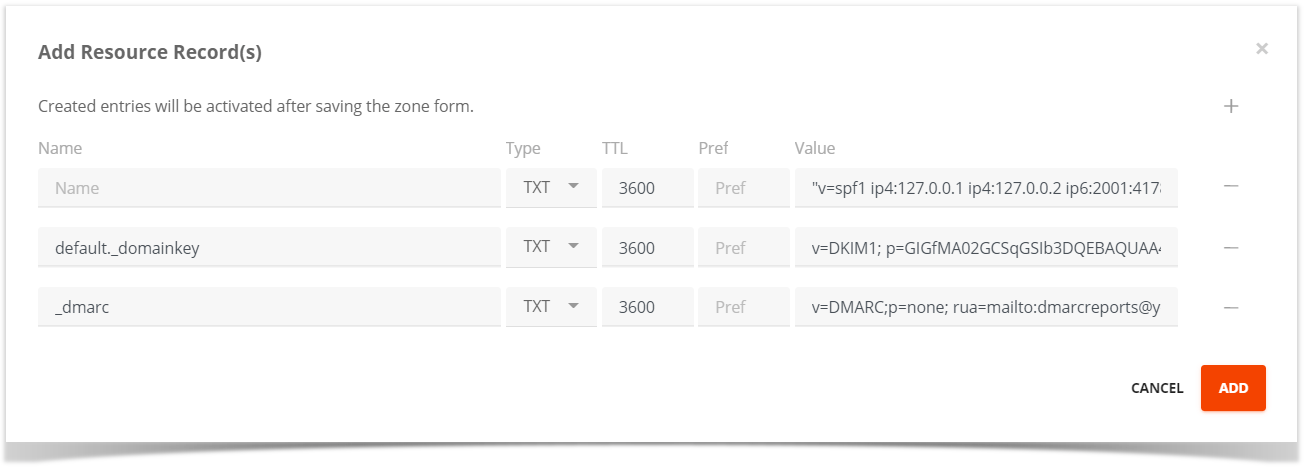
→ Create the DMARC record.
Name of sub = _dmarc
RR type = TXT
Value = v=DMARC;p=none; rua=mailto:dmarcreports@yourdomain.com
→ Test your DMARC record by using a DMARC test tool
Note
You usually have to wait 24-48 hours for replication. DMARC will now begin generating reports that will give you insight into the emails that are sent over your domain(s). This includes any messages that are flagged by SPF and DKIM.
Important: This is where you’ll find out if any legitimate senders appear in the report who weren’t previously included in your SPF record. If there are, make sure to update your record accordingly.
Tip
These reports are delivered in XML files, which are difficult to read. For this reason, we highly recommend using a DMARC report processor in order to facilitate reading and understanding the information.
Changing DMARC from monitoring to quarantine/reject
The DMARC entry should remain in monitoring mode until all errors / issues have been resolved or clarified. This process can take a considerable amount of time. However, this time is well worth investing. Finally, you can set the record to the next level “quarantine”.
→ Open the DMARC record and change the entry as follows:
“p=none” to “p=quarantine”
Example:
“v=DMARC;p=quarantine;pct=10;rua=mailto:dmarcreports@example.com”
→ Add the flag “pct” (% of messages subject to filtering). We suggest starting with 10%.
→ Incrementally increase the percentage of filtered messages to “pct=100” (100%) as you become more comfortable.
Important:
Once you’ve reached 100% filtering, you are ready to move to “p=reject,” the highest level of enforcement.
→ Open the DMARC record and change the entry as follows:
“p=quarantine” zu “p=reject”
Example:
“v=DMARC;p=reject;pct=100;rua=mailto:dmarcreports@example.com
→ Save the record.
Was this article helpful?
Thanks for the feedback.