

NIS-2 – Changes for domain holders
Changes for domain holders due to NIS-2
Due to new legal requirements (NIS-2), important changes for all holders of .de/.at domains will take effect from April 14, 2026. These new guidelines from the registry (DENIC/nic.at) affect how domains are registered in the future and the requirements that must be met for domains to remain permanently registered.
Overview of the most important changes
- Mandatory email verification
- Strict validation of address data for domain contacts. Postbox addresses are no longer allowed
- Identity checks by the registry (DENIC)
- Trustee service for .de domains
Mandatory email verification
Email verification is mandatory for all domains in all TLDs.
-
For domains registered or transferred
- An automatic verification of the domain holder will take place following the established procedure for gTLDs.
- If a requested verification is not completed within 15 days,
- For nic.at/.at: the domain will be deactivated by the registrar if email verification has not been successfully completed. Once the domain has been deactivated, it can only be reactivated after the domain owner has been verified. After further 30 days: Automatic revocation of the domwin contract by the registry. Automatic deletion after 8 weeks without an RGP if the verification has not been completed.
- For DENIC/.de: after 7 additional days the domain will be deactivated by DENIC if email verification has not been successfully completed. Once the domain has been deactivated, it can only be reactivated after the domain owner has been verified. After further 90 days: Automatic deletion without an RGP if the verification has not been completed.
Email verification without cause
- DENIC may request email verification at any time without a specific reason.
- Upon successful verification, the status is automatically reported to DENIC.
- For domains without existing verification, we will trigger the process automatically; the domain holder then has 30 days to confirm the email address.
Information regarding existing or initiated email verifications is provided as usual via system notifications (email, polling, push). No costs are incurred for the email verification of domain holders.
Examples of “verification start” system notifications
XML PollMessage
<?xml version="1.0" encoding="UTF-8" standalone="no"?>
<response>
    <result>
        <data>
            <summary>1</summary>
            <message>
                <id>11111</id>
                <owner>
                    <user>customer</user>
                    <context>4</context>
                </owner>
                <notify>
                    <contact_verification_contact>
                        <handle>
                            <email>customer@example.com</email>
                            <verification>PENDING</verification>
                            <id>23670729</id>
                        </handle>
                        <owner>
                            <user>customer</user>
                            <context>4</context>
                        </owner>
                        <updater>
                            <user>customer</user>
                            <context>1</context>
                        </updater>
                        <created>2026-04-01 22:55:38</created>
                        <updated>2026-04-01 22:55:38</updated>
                    </contact_verification_contact>
                    <type>verification_start</type>
                    <status>
                        <code>S0371</code>
                        <type>success</type>
                    </status>
                    <created>2026-04-01 22:59:29</created>
                </notify>
                <created>2026-04-01 22:59:29</created>
            </message>
        </data>
        <status>
            <code>S0905</code>
            <text>The notification was polled successfully.</text>
            <type>success</type>
            <object>
                <type>message</type>
                <value>11111</value>
            </object>
        </status>
    </result>
    <stid>20260407-appf415401-dev-622</stid>
</response>
JSON PollMessage
{
    "stid": "20260407-appf415401-dev-631",
    "status": {
        "code": "S0905",
        "text": "The notification was polled successfully.",
        "type": "SUCCESS"
    },
    "object": {
        "type": "Message",
        "value": "11111",
        "summary": 1
    },
    "data": [
        {
            "id": 11111,
            "notify": {
                "type": "verification_start"
            },
            "object": {
                "type": "CaseVerification",
                "value": "23670729",
                "data": {
                    "created": "2026-04-01T22:55:38.000+0200",
                    "updated": "2026-04-01T22:55:38.000+0200",
                    "owner": {
                        "context": 4,
                        "user": "customer"
                    },
                    "updater": {
                        "context": 1,
                        "user": "customer"
                    },
                    "contact": {
                        "id": 23670729,
                        "email": "customer@example.com",
                        "verification": "PENDING"
                    }
                }
            }
        }
    ]
}
EPP PollMessage
<epp>
    <response>
        <result code="1301">
            <msg lang="en">Command completed successfully; ack to dequeue</msg>
        </result>
        <msgQ count="2" id="11111">
            <qDate>2026-04-07T07:44:35.000Z</qDate>
        </msgQ>
        <resData>
            <domainrobot:miscData>
                <domainrobot:message code="S0371" level="INFO">
                    <domainrobot:text>S0371</domainrobot:text>
                    <domainrobot:argument type="contact">23670729</domainrobot:argument>
                </domainrobot:message>
            </domainrobot:miscData>
        </resData>
        <extension>
            <domainrobot:job>
                <domainrobot:jobType>verification_start</domainrobot:jobType>
                <domainrobot:jobObject>23670729</domainrobot:jobObject>
            </domainrobot:job>
        </extension>
        <trID>
            <clTRID>ABC-12345</clTRID>
        </trID>
    </response>
</epp>
Check email verifications and start verification manually
Viewing verifications in the AutoDNS platform
In the portfolio, the overview can be filtered according to the status of the domain holder verification:
→ DOMAINS → Portfolio → Domain tab → Filter OwnerC verification
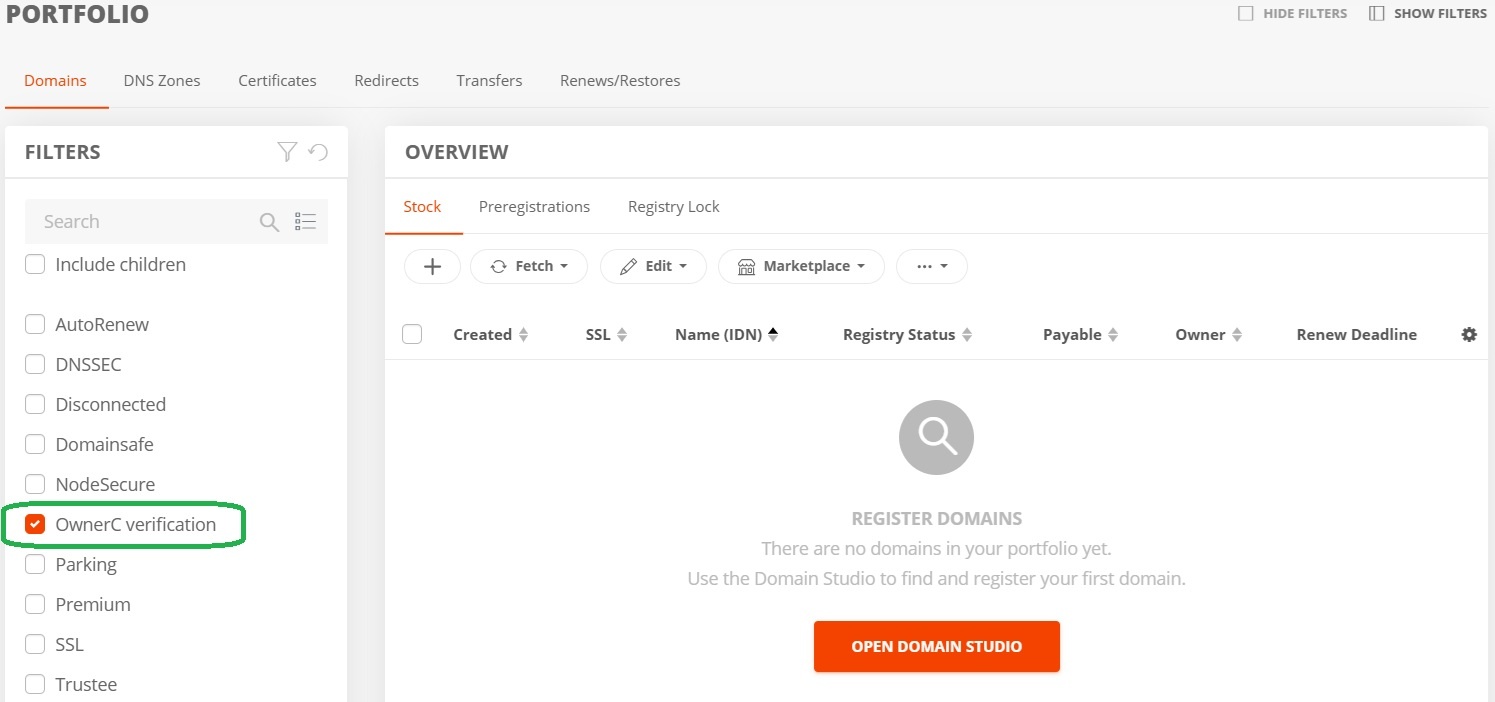
Displaying verification requests in the portfolio
The status of the verification can be viewed in the contact management section:
→ DOMAINS → Domain contacts tab → Filter OwnerC verification → Column OwnerC verification
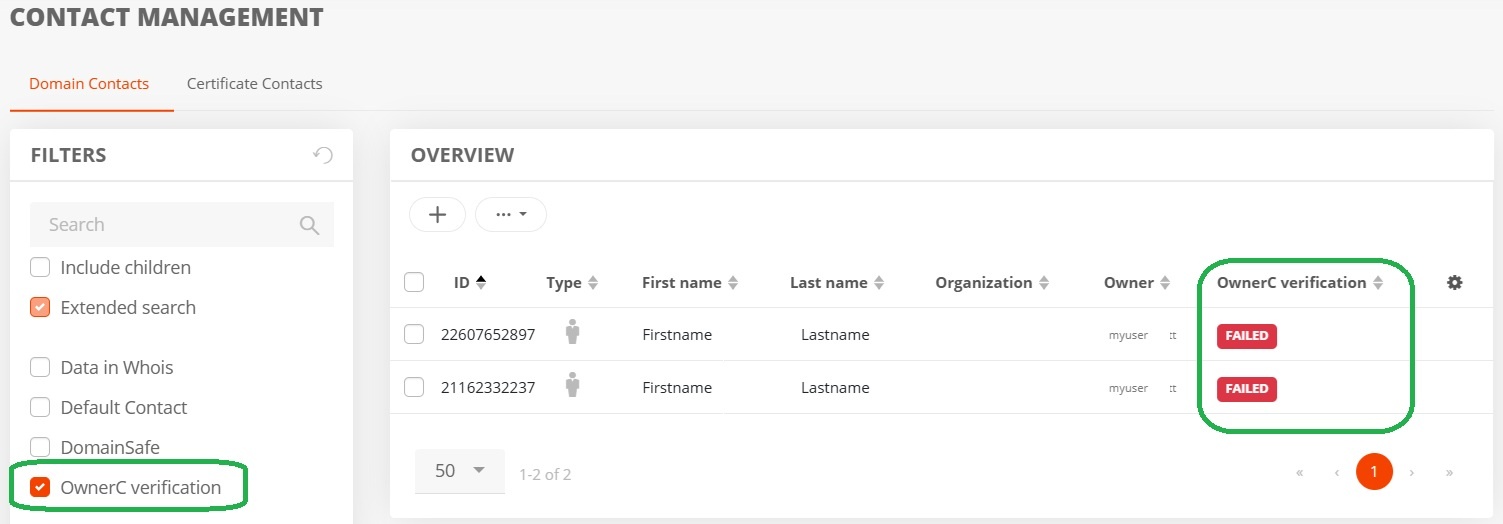 Displaying verification requests in the domain contacts overview
Starting the verification of a contact
Verification for a contact can be initiated manually at any time in the contact management section.
→ DOMAINS → Contact management → Click Contact → More menu → Start verification
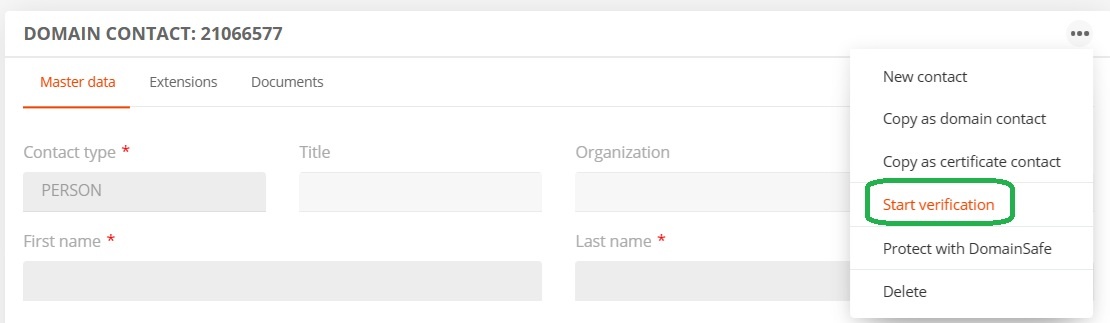
Start verification
Resend the verification email
In the contact management section, you can resend the verification email at any time, regardless of whether a domain order is in progress.
→ DOMAINS → Domain contacts tab → OwnerC verification filter → More menu→ Resend verification mail
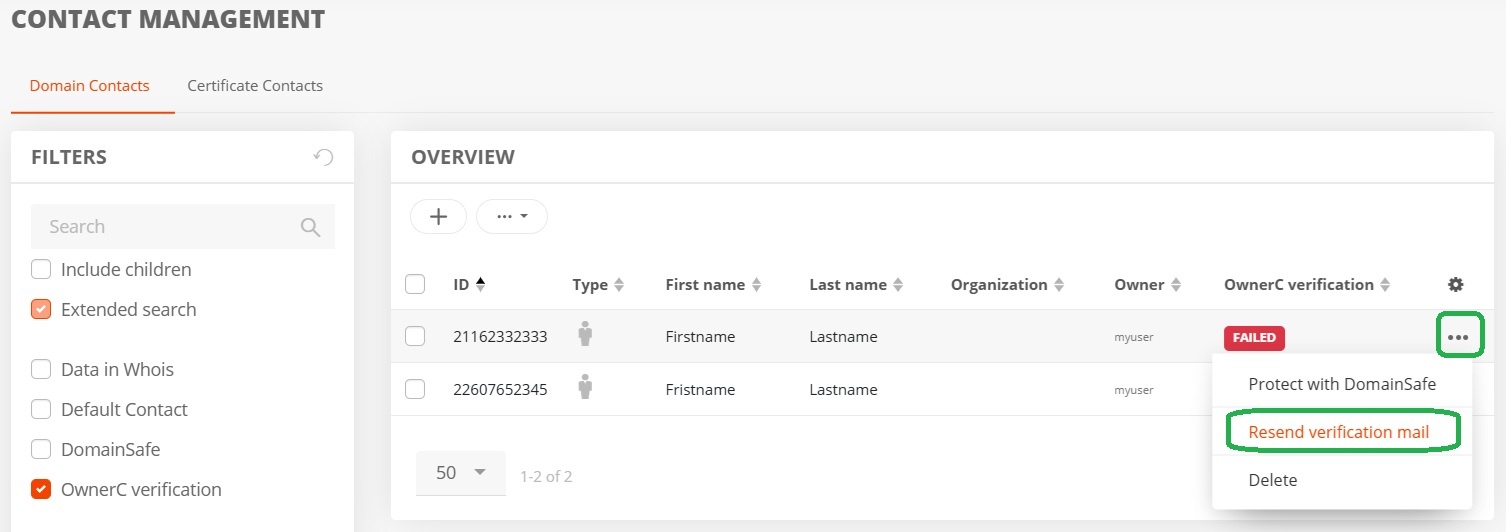
Resending verification email
Example of the verification emails sent to the domain owner
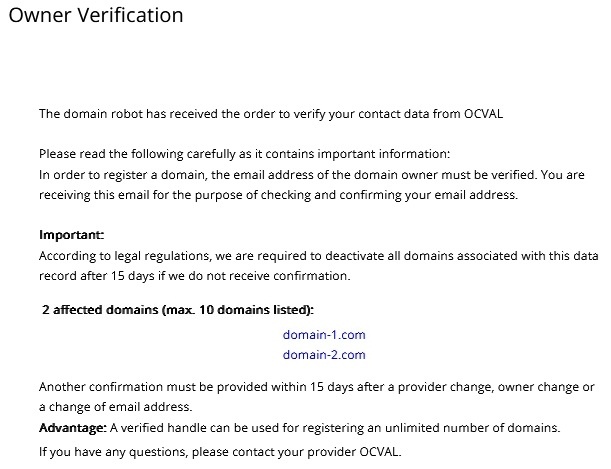
Email to the domain owner
For API users
The documentation for the contact verification tasks you can find here.
Strict validation of address data for domain contacts
There is an obligation to verify address data for accuracy and consistency during all transactions involving domain contacts – both for new registrations and updates to existing data. If the provided address data is identified as inconsistent or incorrect, the creation or modification of the contact will be rejected by AutoDNS. In the event of such a rejection, the create or update task can still be performed following an explicit confirmation via the user interface or API.
In the case of manual confirmation of incorrect or incomplete data, DENIC/nic.at may send a formal request to verify the address data.
For API users
The address data is validated during ContactCreate and ContactUpdate.
Validation during ContactCreate
The result of this check is stored in the contact data and output in values from A to E.
In the event of a D or E result, the contact creation fails with error code EF01152. To ignore the validation result and create the contact anyway, the key ignoreAddressQuality can be specified via the query parameter keys[].
?keys[]=ignoreAddressQuality
Validation during ContactUpdate
The address data is validated when the contact is updated and address data has changed. The validation results in values from A to E. If the validation result is D or E, the contact update fails with the error code EF01152 . It is possible to ignore the validation result and create the contact anyway.
To do this, the key ignoreAddressQuality can be specified using the query parameter keys[]. If the quality is D or E, you can trigger another check with the parameter recheckAddressQuality.
If the quality is still D or E, the update will fail with the error code EF01152.
If the quality is improved to A, B or C, the update will be successful.
For API users
The documentation for the contact verification tasks you can find in the HelpCenter.
For AutoDNS Platform users
In the Contact Overview, the quality of the contact is displayed in the Address Quality column after the check has been performed.
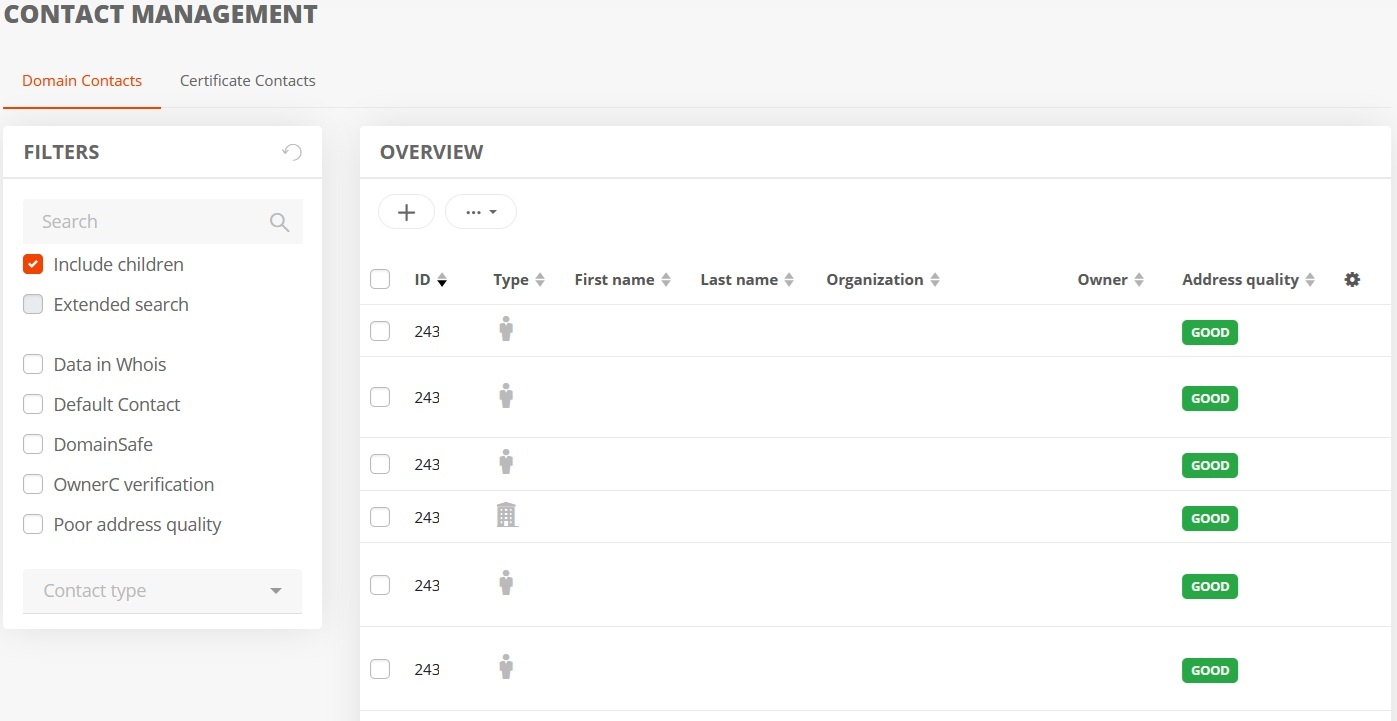
Displaying address quality in the contact overview
In the contact form for each contact, the contact quality is displayed next to the “Address” field.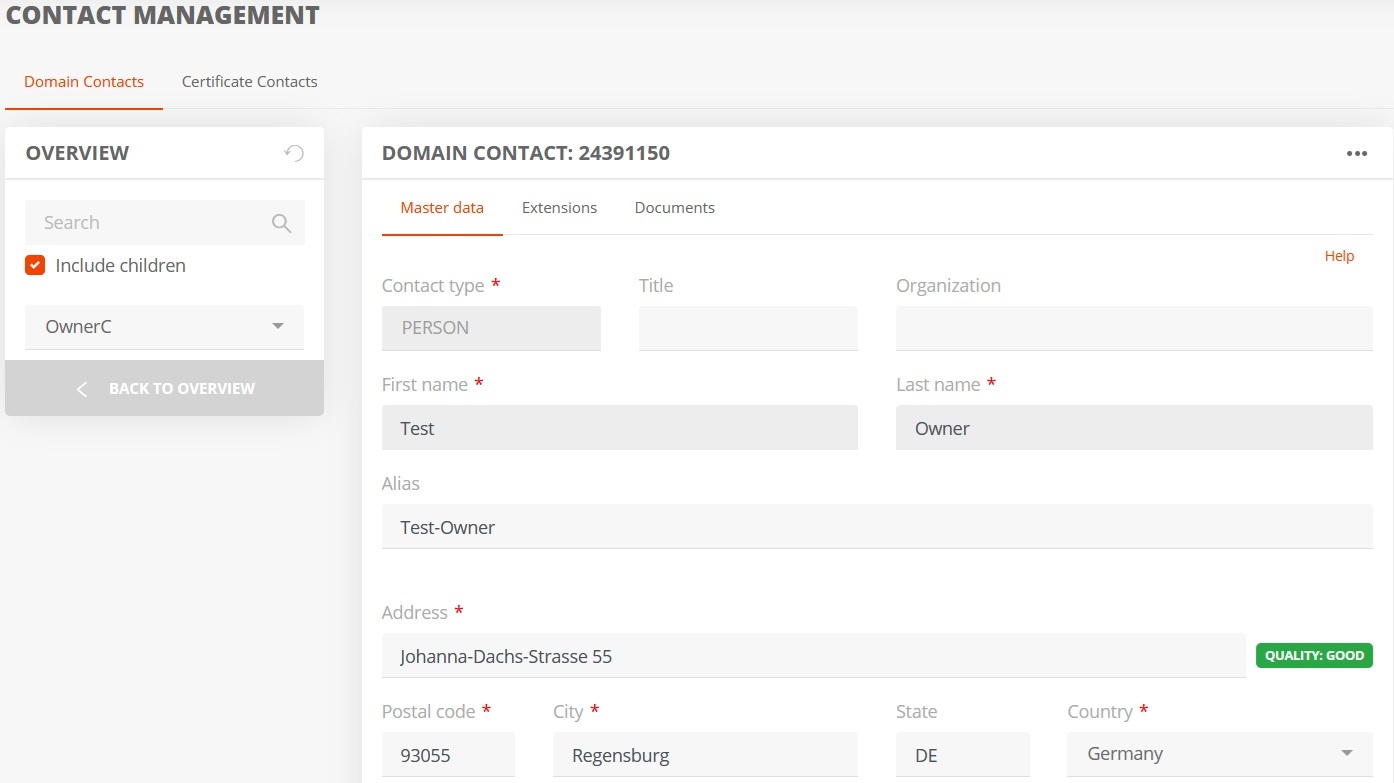
Displaying address quality in the contact form
Users of the AutoDNS platform can still create the contact—even if the address verification fails—by simply clicking the “Confirm Address” button in the pop-up window.
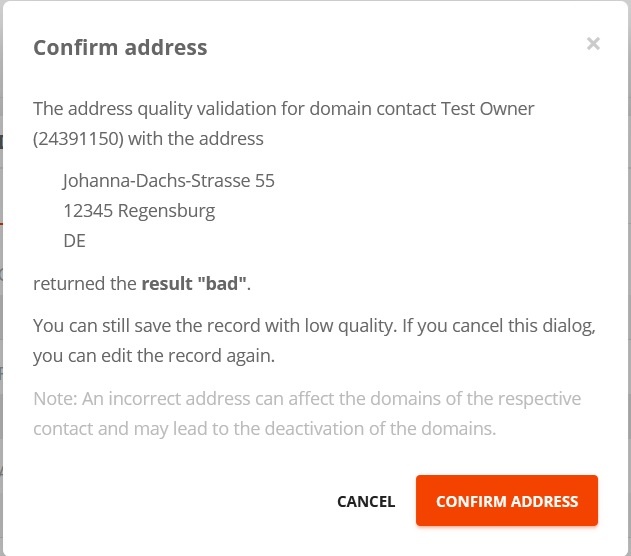
Pop-up for manual confirmation of incorrect addresses
For AutoDNS X3 users
Users of AutoDNS X3 can create the contact even if the address validation fails.
In the contact overview, the contact’s quality is displayed in the Address quality column after the validation.
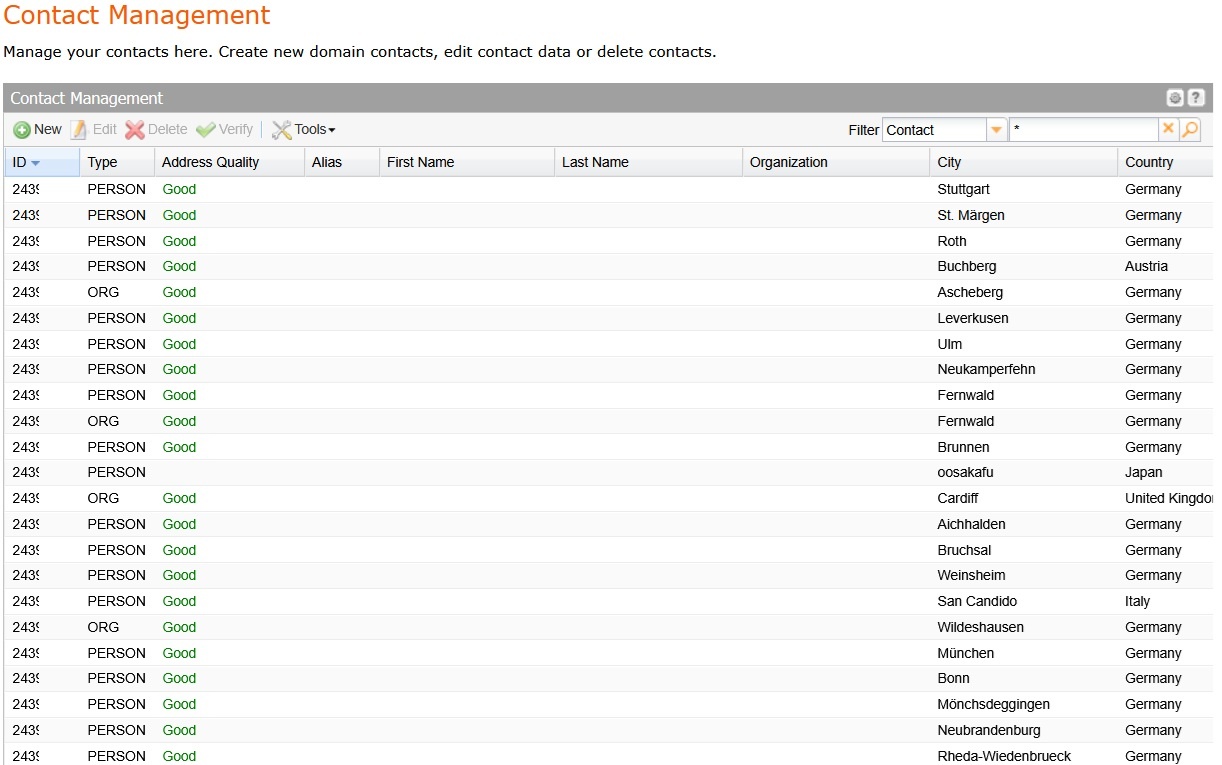
Displaying address quality in the contact overview
In the contact form for each contact, a note regarding contact quality is displayed above the Address field.
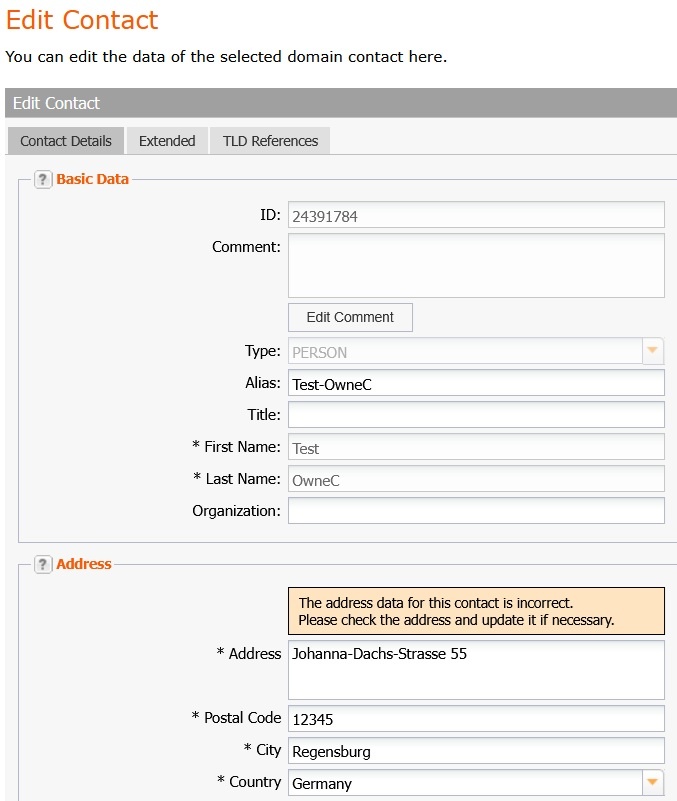
Displaying address quality in the contact form.
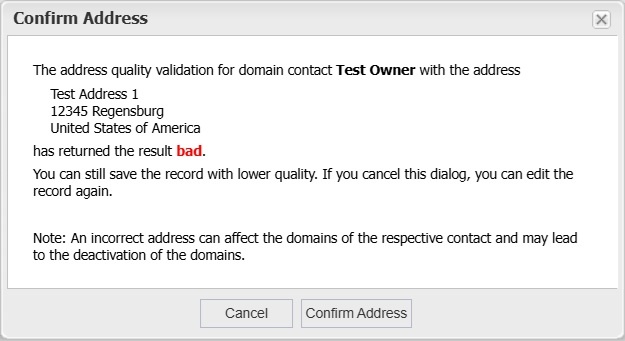
Pop-up for manual confirmation of incorrect addresses
Pending identity checks by DENIC and nic.at
DENIC and nic.at request the verification of a domain holder based on specific triggers or random sampling. In such cases, the domain holder will be contacted and asked to provide identification via an automated verification service.
The verification service is currently a free service; InterNetX covers the costs for successful verifications. Changes to the cost structure are explicitly reserved for the future.
The following rules apply to these so-called pending identity checks:
- A 30-day deadline for DENIC/.de for verification
- The OwnerC will receive a reminder email for open identity checks every 3 days from us
- On day 21 DENIC will also send a reminder email directly to the OwnerC 7 days before the verification window ends
- The Reseller will receive a reminder email 5 days before the deadline
- A 21-day deadline for nic.at/.at for verification
- The OwnerC will receive a reminder email for open identity checks every 3 days from us
- On day 14 nic.at will also send a reminder email directly to the OwnerC 7 days before the verification window ends
- The Reseller will receive a reminder email 5 days before the deadline
- If the domain holder does not respond, the domain enters quarantine (status “server hold”) and goes offline
- Following this, the final deletion of the domain occurs without an RGP phase
The automatic email to the OwnerC and the website for the verification service are currently available in German, English, Spanish, Dutch and Polish. The emails use the same design as the existing ICANN emails. The email sender is do-not-reply@domain-robot.org.
The external verification service provider IDnow currently offers the following languages: English, German, French, Spanish, and Portuguese. The provider automatically adapts to the user’s browser language.
For AutoDNS Platform users
In the Domain Overview, the Contact Verification cases can be filtered and are highlighted with a different background color. Additional columns in the overview can be added in the settings.
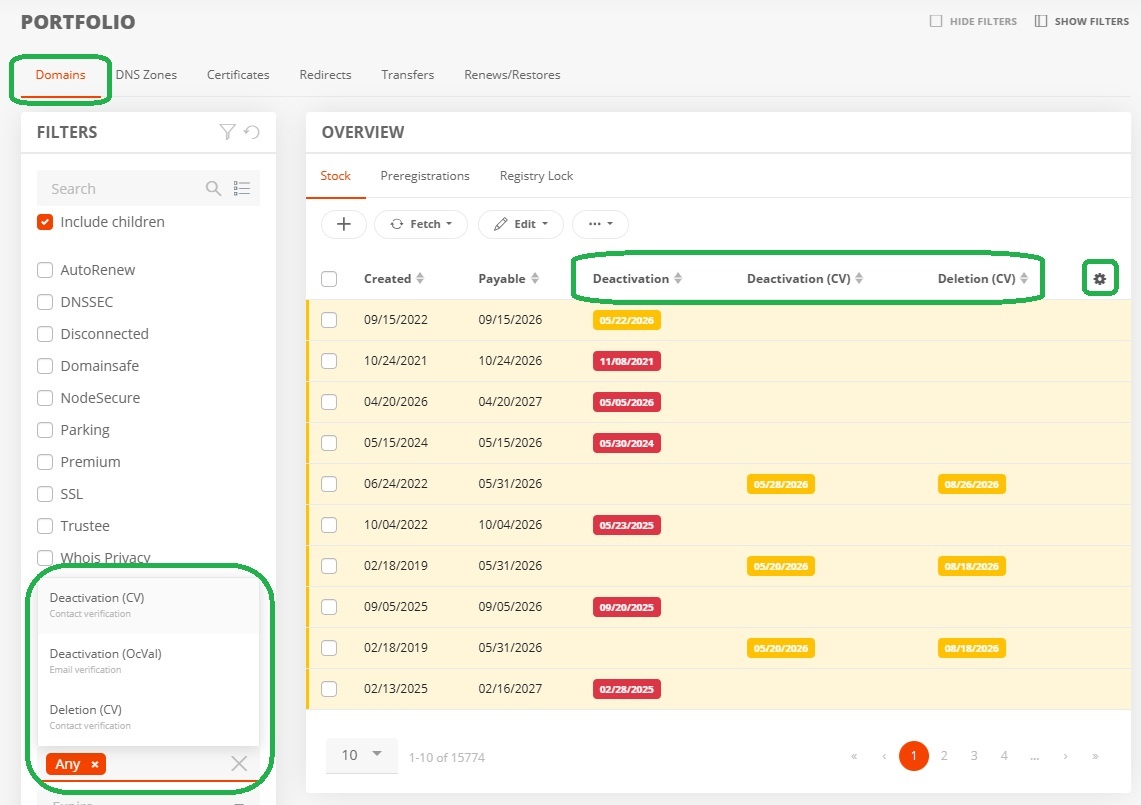
Displaying contact verification cases in the domain overview
In the Contact Overview, the Contact Verification cases can be filtered. Additional columns in the overview can be added in the settings.
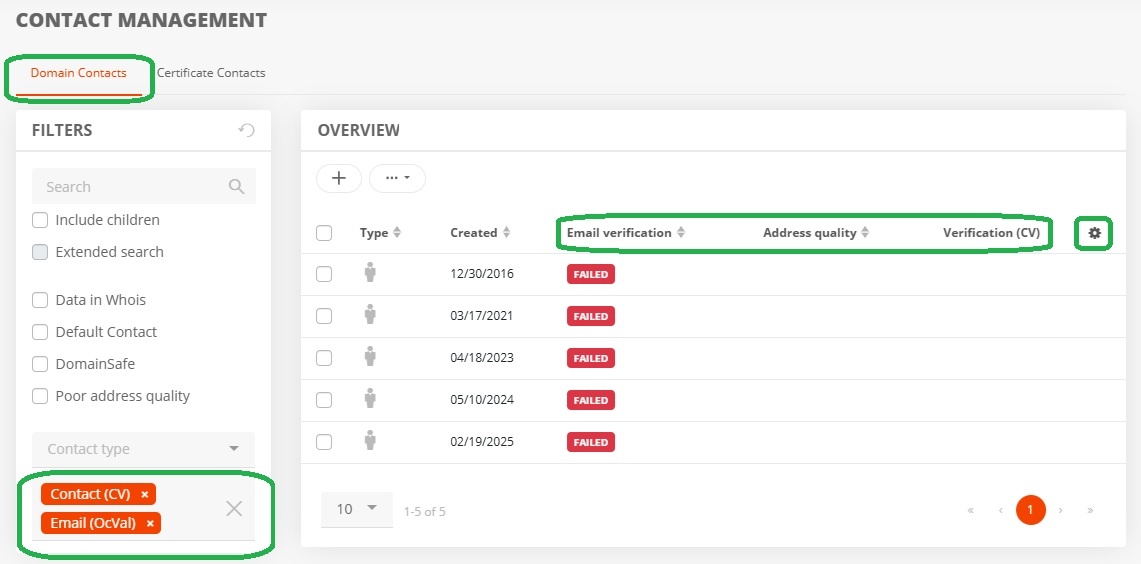
Displaying contact verification cases in the contact overview
In the contact form for each contact a failed or missing verification is additionally displayed.
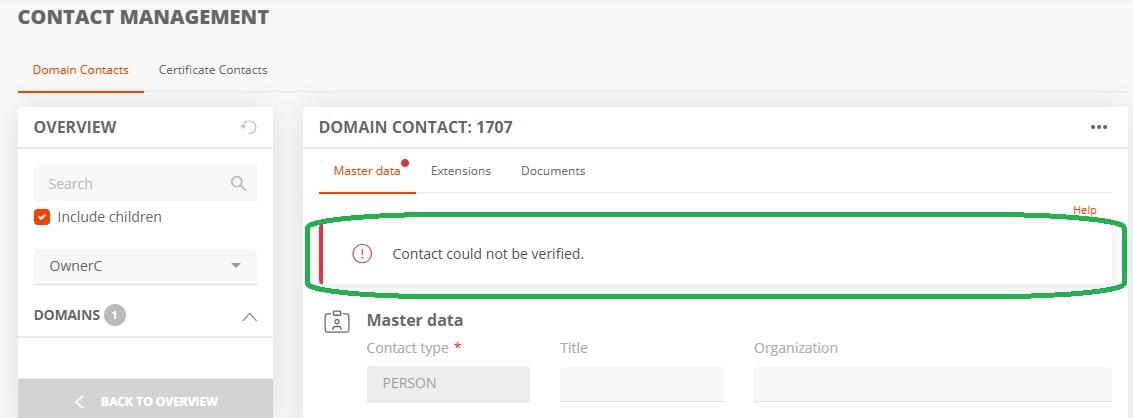
Displaying missing/failed verification in the contact form
Domain Owner Verification Process
Step 1 - Automatic email to the OwnerC - Request for verification of the domain owner
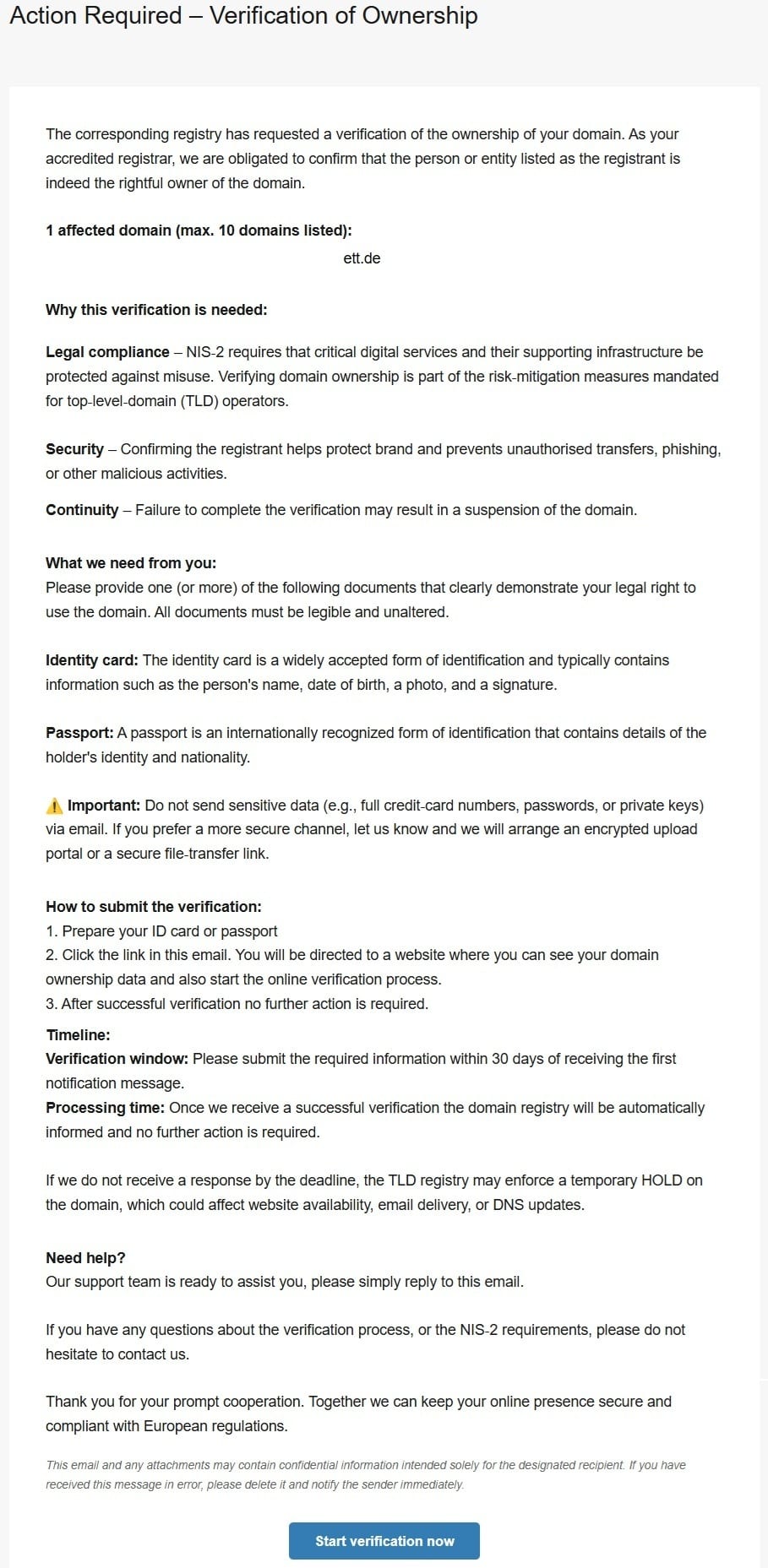
E-Mail Action required - Verification of Ownership
Step 2 - Open the verification service homepage by clicking the “Start verification now” button at the bottom of the email.
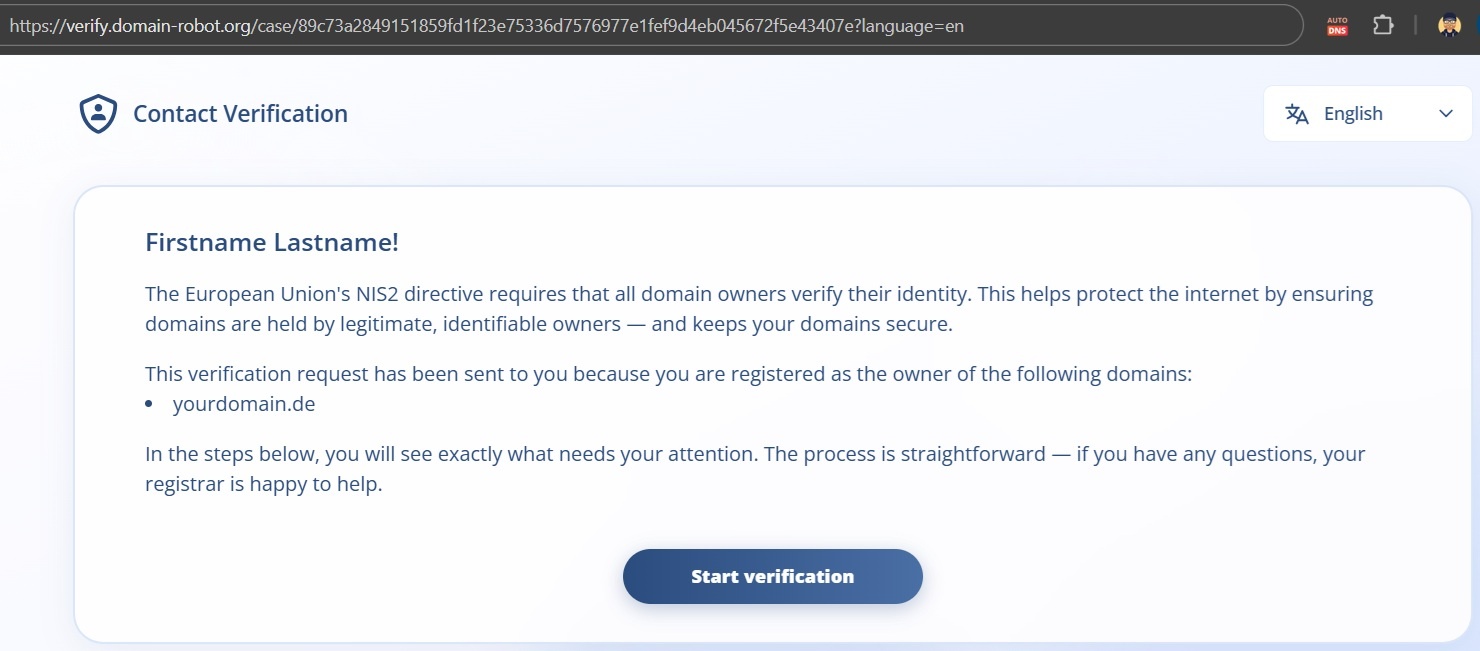
Verification website
Step 3 - Start the verification process by clicking the Start verification button.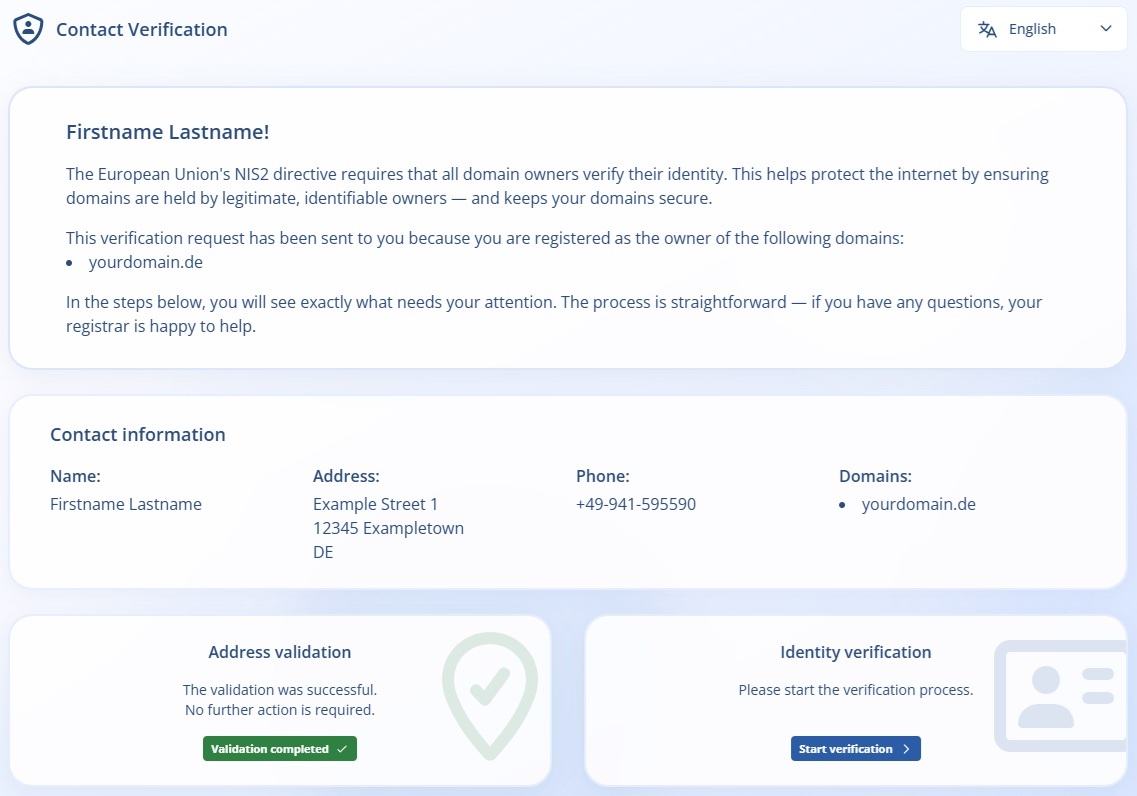
Start contact verification
Step 4 - Verification via the IDnow web app.
You can upload photos of your ID card or passport via the app. The easiest way to do this is to scan the QR code with your smartphone, as this allows you to access the camera to take photos of your ID documents.
Once verification is complete, the link to the verification page is no longer valid, and the process is finished for the domain owner.
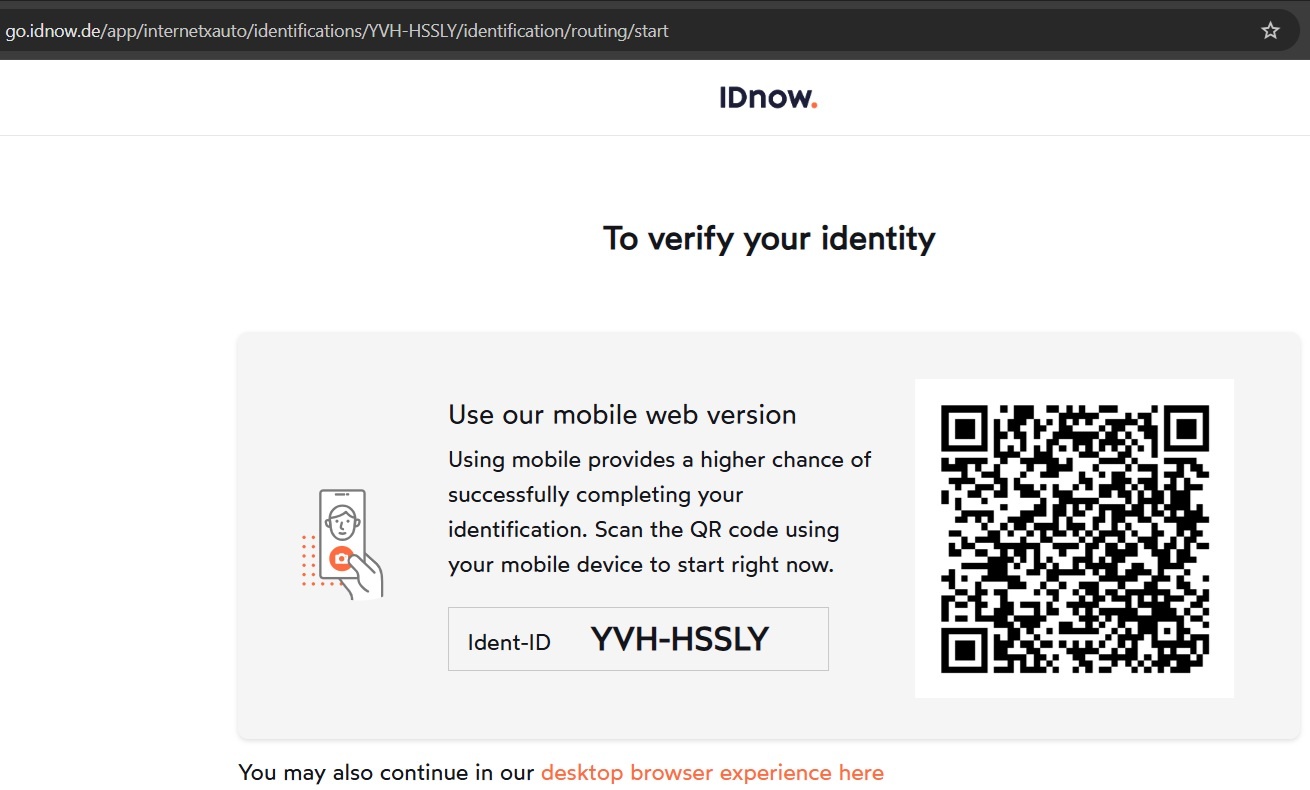
IDnow - Verify identity
Step 5 - The system sends notification emails both when verification is successful and when it fails.
Confirmation email upon successful verification
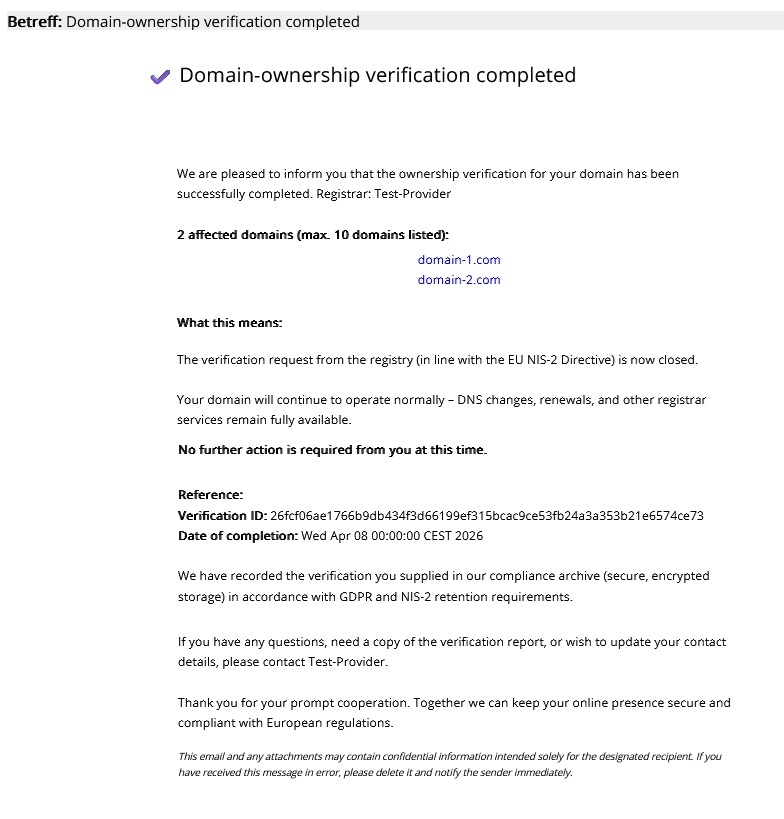
Domain-ownership verification completed
Response email in case of failed verification
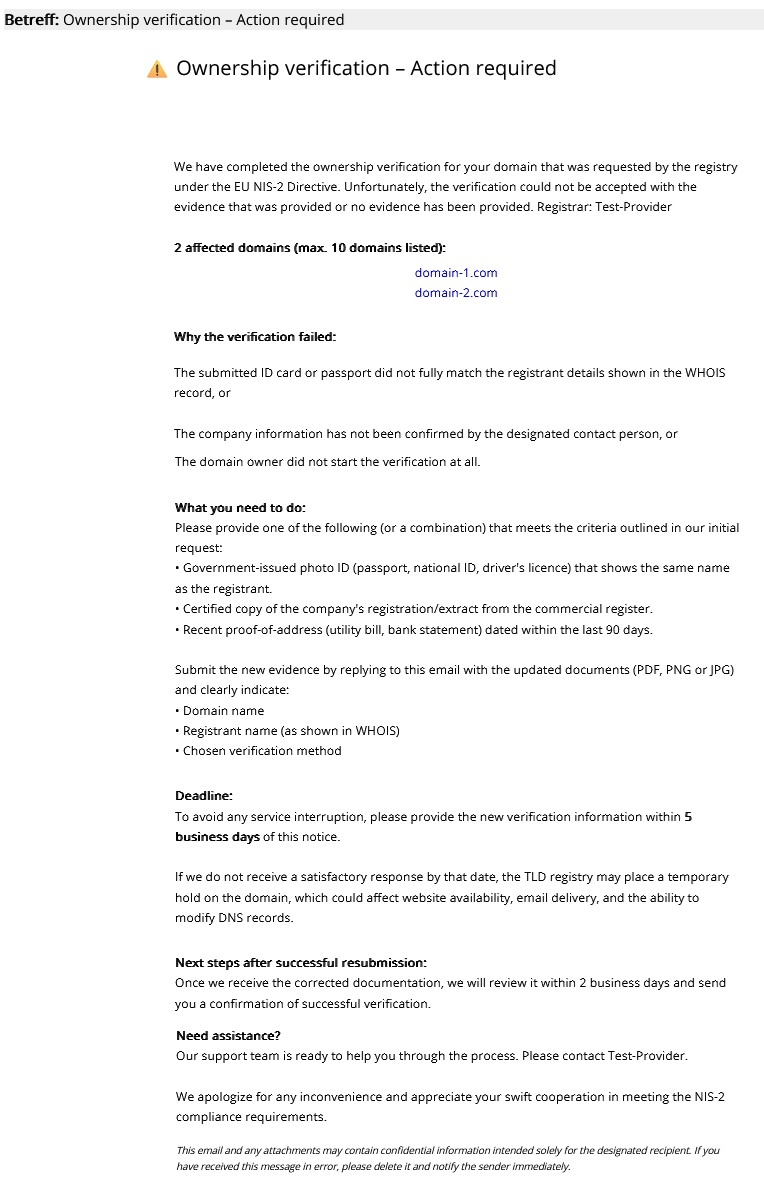
Ownership verification - Action required
For Domain holders with the contact type “ORG”
Domain holders with the contact type “ORG” (organization) can designate a natural person to perform the verification during the process.
Once the person has been successfully verified, they must confirm the conformity of the data of the organization that is the domain holder.
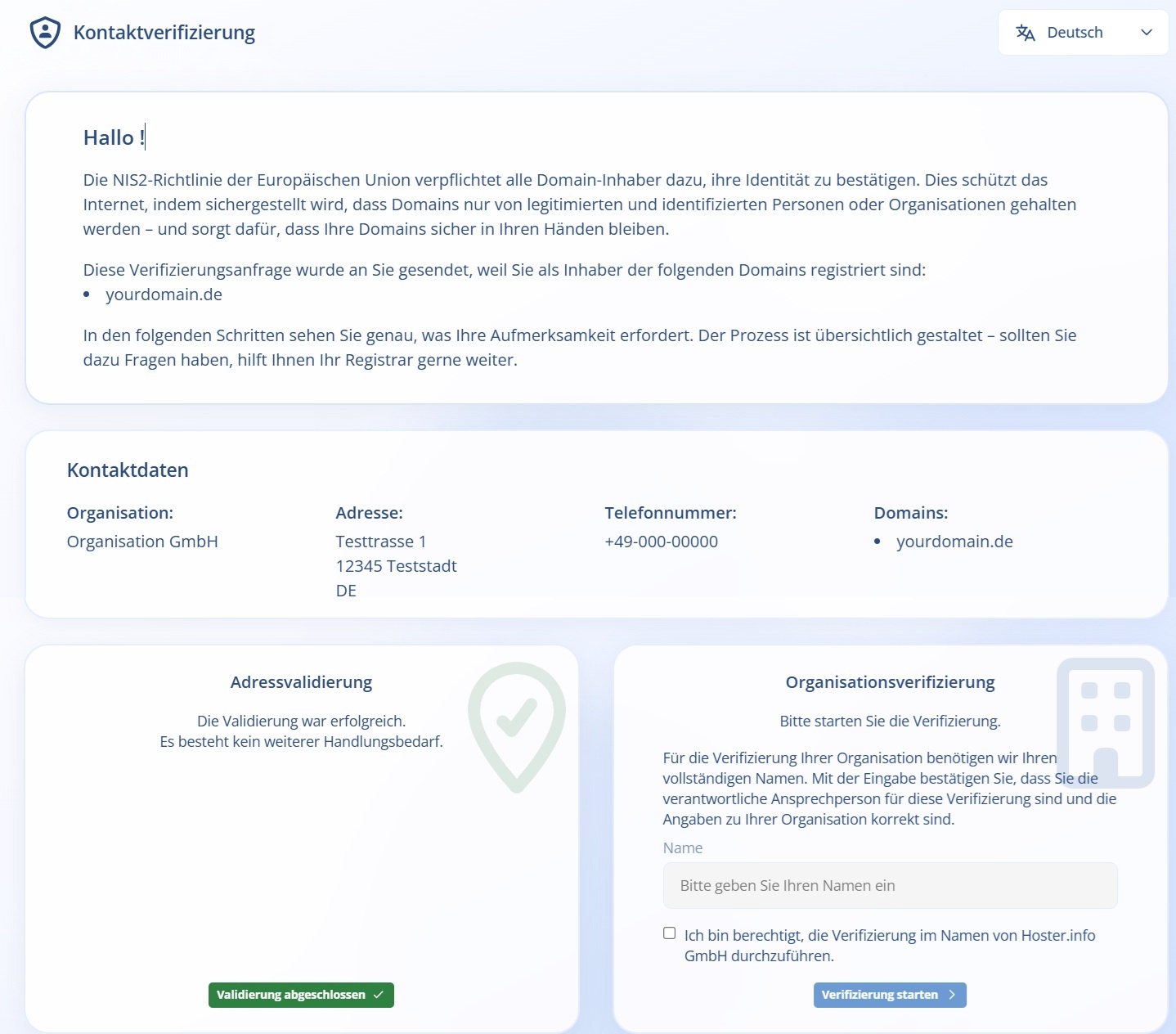
Organization verification
Domain owner verification via API
Retrieving verifications via the API
List verification cases (0375)
Request
<?xml version="1.0" encoding="utf-8"?>
<request>
    <auth>
        <user>customer</user>
        <context>1</context>
        <password>test</password>
    </auth>
    <task>
        <code>0375</code>
        <view>
            <offset>0</offset>
            <limit>10</limit>
            <children>1</children>
        </view>
        <where>
            <key>handle.id</key>
            <operator>like</operator>
            <value>23674202</value>
        </where>
    </task>
</request>
Response
<?xml version="1.0" encoding="UTF-8" standalone="no"?>
<response>
    <result>
        <data>
            <summary>1</summary>
            <case_verification_contact>
                <verification>
                    <verify>
                        <id>c8a5ba62e4c2</id>
                    </verify>
                    <status>PENDING</status>
                    <claim>
                        <claim_type>ADDRESS</claim_type>
                        <claim_status>PENDING</claim_status>
                    </claim>
                    <claim>
                        <claim_type>IDENTITY</claim_type>
                        <claim_status>NOT_STARTED</claim_status>
                    </claim>
                    <tenant>example</tenant>
                    <id>621</id>
                    <created>2026-04-09 15:12:13</created>
                    <updated>2026-04-09 15:12:13</updated>
                </verification>
                <handle>
                    <alias>PDAA1</alias>
                    <id>23674202</id>
                </handle>
                <message_sent>2026-04-09 15:12:25</message_sent>
                <created>2026-04-09 15:12:13</created>
                <updated>2026-04-09 15:12:28</updated>
            </case_verification_contact>
        </data>
        <status>
            <code>S0375</code>
            <text>The data of the verification cases for the domain contact was inquired successfully.</text>
            <type>success</type>
        </status>
    </result>
    <stid>20260409-appf415410-dev-231</stid>
</response>
Inquire verification case (0374)
Request
<?xml version="1.0" encoding="utf-8"?>
<request>
    <auth>
        <user>customer</user>
        <context>1</context>
        <password>test</password>
    </auth>
    <task>
        <code>0374</code>
        <case_verification_contact>
            <handle>
                <id>23674202</id>
            </handle>
        </case_verification_contact>
    </task>
</request>
Response
<?xml version="1.0" encoding="UTF-8" standalone="no"?>
<response>
    <result>
        <data>
            <case_verification_contact>
                <verification>
                    <verify>
                        <id>c8a5ba62e4c2c7e41</id>
                    </verify>
                    <status>PENDING</status>
                    <claim>
                        <claim_type>ADDRESS</claim_type>
                        <claim_status>PENDING</claim_status>
                    </claim>
                    <claim>
                        <claim_type>IDENTITY</claim_type>
                        <claim_status>NOT_STARTED</claim_status>
                    </claim>
                    <tenant>example</tenant>
                    <id>621</id>
                    <created>2026-04-09 15:12:13</created>
                    <updated>2026-04-09 15:12:13</updated>
                </verification>
                <handle>
                    <alias>PDAA1</alias>
                    <type>ORG</type>
                    <fname>OWNERCNISs</fname>
                    <lname>llnameee</lname>
                    <organization>PDAA</organization>
                    <title/>
                    <address>exampleaddress/address>
                    <pcode>00000</pcode>
                    <city>examplecity</city>
                    <country>DE</country>
                    <state>examplestate</state>
                    <phone>+49-12345-12345</phone>
                    <fax>+49-12346-12346</fax>
                    <email>customer@example.com</email>
                    <protection>B</protection>
                    <sip/>
                    <extension/>
                    <domainsafe>false</domainsafe>
                    <owner>
                        <user>customer</user>
                        <context>1</context>
                    </owner>
                    <updater>
                        <user>customer</user>
                        <context>1</context>
                    </updater>
                    <id>23674202</id>
                    <created>2026-04-09 15:10:54</created>
                    <updated>2026-04-09 15:10:54</updated>
                </handle>
                <status>PENDING</status>
                <action>CREATE</action>
                <message_sent>2026-04-09 15:12:25</message_sent>
                <verification_mail>
                    <mail>
                        <id>6881511</id>
                    </mail>
                    <status>SUCCESS</status>
                    <last_response>250 2.0.0 Ok: queued as 6787220A6EE8</last_response>
                    <id>510</id>
                    <created>2026-04-09 15:12:28</created>
                    <updated>2026-04-09 15:12:28</updated>
                </verification_mail>
                <owner>
                    <user>customer</user>
                    <context>1</context>
                </owner>
                <updater>
                    <user>customer</user>
                    <context>1</context>
                </updater>
                <created>2026-04-09 15:12:13</created>
                <updated>2026-04-09 15:12:28</updated>
            </case_verification_contact>
        </data>
        <status>
            <code>S0374</code>
            <text>The data of the verification case for the domain contact was inquired successfully.</text>
            <type>success</type>
            <object>
                <type>case_verification_contact</type>
                <value>23674202</value>
            </object>
        </status>
    </result>
    <stid>20260409-appf415410-dev-229</stid>
</response>
System messages for verification start
AutoDNS users are informed about incoming identity checks via the familiar AutoDNS message channels (email, push, polling).
Messages from AutoDNS
More information will be available soon!
Elimination of the trustee requirement for .de domains
In the future, a domain holder or AdminC based in Germany will no longer be required for the registration of .de domains. This means that a trustee is no longer necessary for private individuals living abroad or companies that do not have a registered branch or permanent establishment in Germany.
Therefore, new .de domains should no longer be registered via trustees, and existing domains should be updated to the actual domain holders.
A failed email verification can, under certain circumstances, lead to the deactivation of all domains belonging to the same trustee, thereby posing a risk to the continuous operation of those domains. External trustees should therefore be informed about the new DENIC verification requirements.
Required checks and updates
The following checks within the user management areas are now required. All data must be up-to-date, accurate, and complete. This needs to be checked:
-
Are the email addresses of the domain holders current and accessible?
-
Is the postal address complete and correct?
-
Is the provided phone number valid?
-
Do the notification settings in the user profile need to be updated (Reply-To address)?
→ Profile picture → Username → Settings tab → Email notifications menu → Domain contact verification settings → Reply-To Address
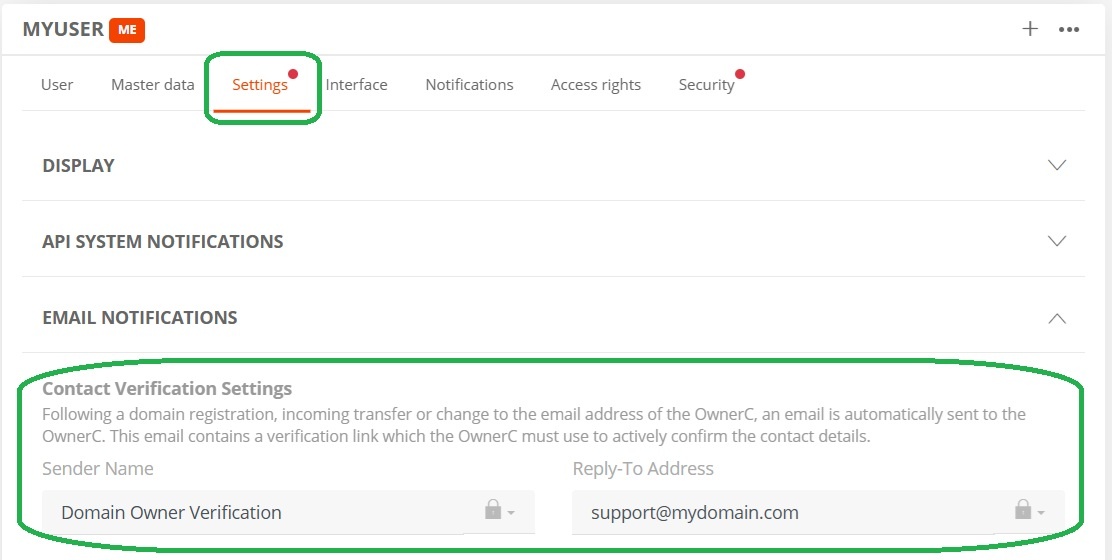
Settings for domain contact verification
Was this article helpful?
Thanks for the feedback.