

- Home
- Server & Cloud
- ISAC - ACTION menu
ISAC - ACTION menu
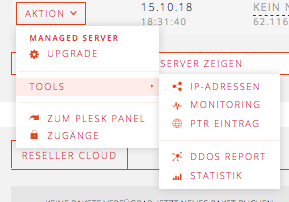
To manage the servers you will find useful options in the ACTION menu.
By clicking on ACTION next to the respective server overview (DASHBOARD / MY SERVER) the ACTION menu opens. Depending on the booked package, the overview may differ.
- TOOLS: IP addresses, monitoring, PTR entry, DDoS report, statistics
- TO PLESK PANEL: Link to the Plesk Administration Interface (IP:8443)
- ACCESSES: Login name and password to SSH, Plesk, FTP, iDRAC etc.
Managed servers
There are additional fields in the managed service menu, e.g. UPGRADE. Some fields are hidden. For e.g. restart please contact the support team.
Unmanaged servers
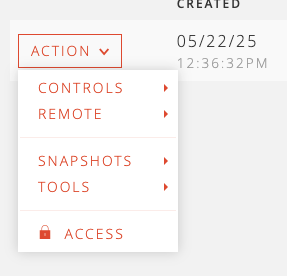
CONTROL: Customize (Cloud Server), start, stop, reboot, reinstall, mount ISO (only if operating system is ISO)
REMOTE: SSH or VNC console opens in a separate window. The access data for SSH can be found under “Accesses” (port 2222).
DESKTOP: Creating and restoring snapshots
Individual server and projects
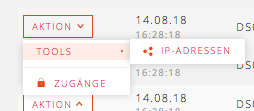
An overview of the dedicated servers can be found under CLOUD & SERVER / PROJECTS / MY SERVER.
TOOLS: In the list of IP addresses you can see the respective traffic statistics
ACCESSES: Login name and password to iDRAC etc. The link opens by clicking on the displayed IP address.
Was this article helpful?
Thanks for the feedback.