

Name server migration to new DNS infrastructure
Background and deadlines
InterNetX is modernizing its technical DNS infrastructure. As part of this modernization, the existing legacy nameservers, whose hardware and software are outdated, will be decommissioned.
Since the new InterNetX DNS infrastructure is already available, the necessary adjustments to point your domains to the new DNS nameservers can be made effective immediately.
Important deadlines:
- Effective immediately: Migration to the new DNS nameservers is possible at any time.
- November 30, 2026: Provisioning for the old legacy DNS infrastructure will be shut down. After this date, creating new zones and modifying existing zones will no longer be possible. Existing zones will continue to function technically. However, to make any changes, they must be migrated to the new nameservers.
- April 30, 2027: Complete shutdown of the old legacy DNS infrastructure. From this point on, domains using the old legacy nameservers will no longer be accessible.
Take action! If no adjustments have been made by November 30, 2026, existing zones can no longer be modified, and new zones can no longer be created as usual. As of April 30, 2027, all domains connected to the legacy nameservers will become inactive and will no longer resolve in the DNS.
Overview: Old and new nameserver infrastructure
The old IP addresses of the nameservers listed here must be replaced by the new ones.
Since the old and new infrastructure are currently operated in parallel, zone imports to the new infrastructure and subsequent domain updates are possible at any time without downtime.
| Nameserver | State | Host | IPv4 | IPv6 |
|---|---|---|---|---|
| Primary | OLD | ns9.ns14.de (Virtual Nameserver Host) | 62.116.129.0/2462.116.130.0/24 | — |
| Primary | NEW | a.ns14.net | 217.160.80.161 | 2001:8d8:fe:53:217:160:80:161 |
| Secondary 1 | OLD | ns10.ns14.de (Virtual Nameserver Host) | 62.116.162.0/2462.116.163.0/24 | — |
| Secondary 1 | NEW | b.ns14.net | 217.160.81.161 | 2001:8d8:fe:53:217:160:81:161 |
| Secondary 2 | NEW | c.ns14.net | 185.132.35.161 | 2607:f1c0:fe:53:185:132:35:161 |
| Secondary 3 | NEW | d.ns14.net | 185.132.34.161 | 2607:f1c0:fe:53:185:132:34:161 |
Step 1: Identify affected zones
The AutoDNS zone inventory list can be used to identify all currently used nameserver hostnames and affected zones. Lists of zones including hostnames are also sent directly by email to affected customers.
Step 2: Import zones to the new infrastructure
For a smooth migration without downtime, it is recommended to use the “Zone Import” function. This duplicates the zones and keeps them available in parallel on both the old and new DNS infrastructure.
A “Zone Update” to the new nameserver hostnames would also be technically possible, but would result in a temporary outage of the domains.
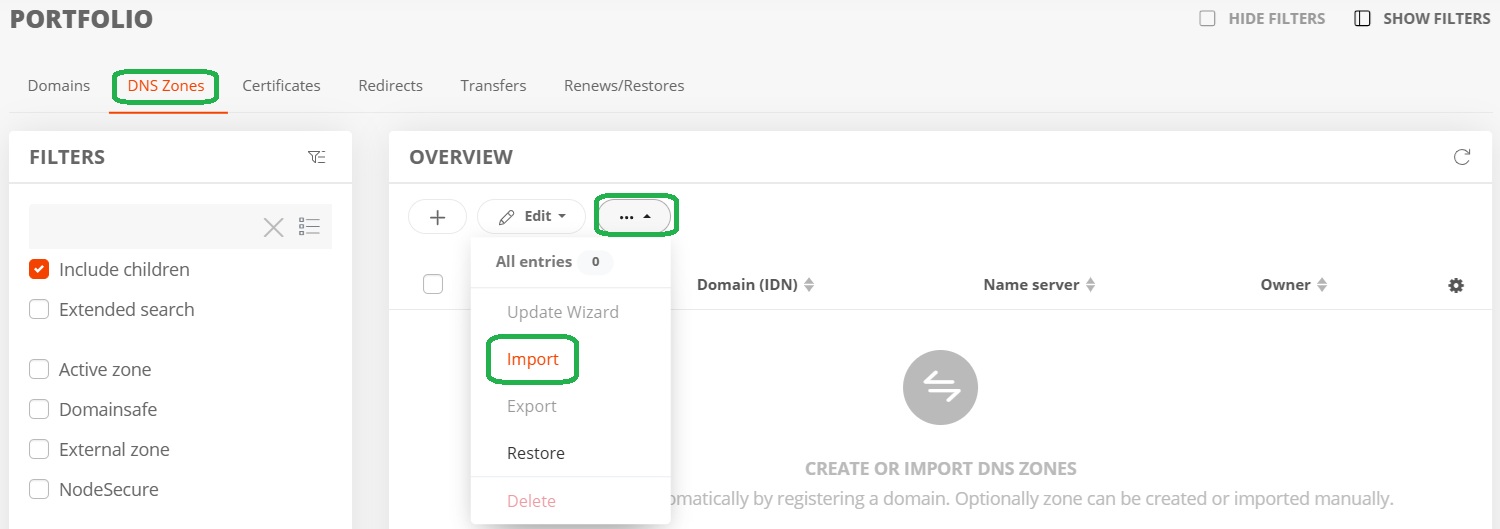
- Open Zone Management in your Portfolio via the DNS Zones tab.
- In the More menu, select the Import entry.
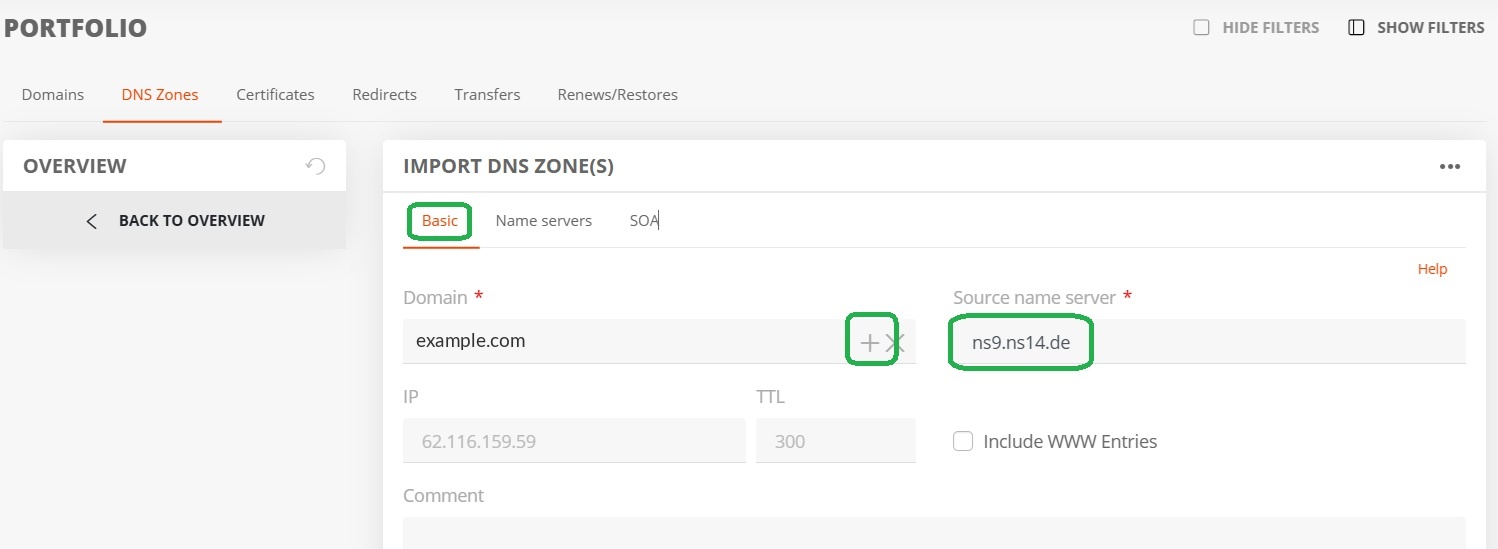
- In the Domain field, enter the domain or use + to add a domain list for a bulk import.
- In the General tab, enter the previous server ns9.ns14.de as the source nameserver.
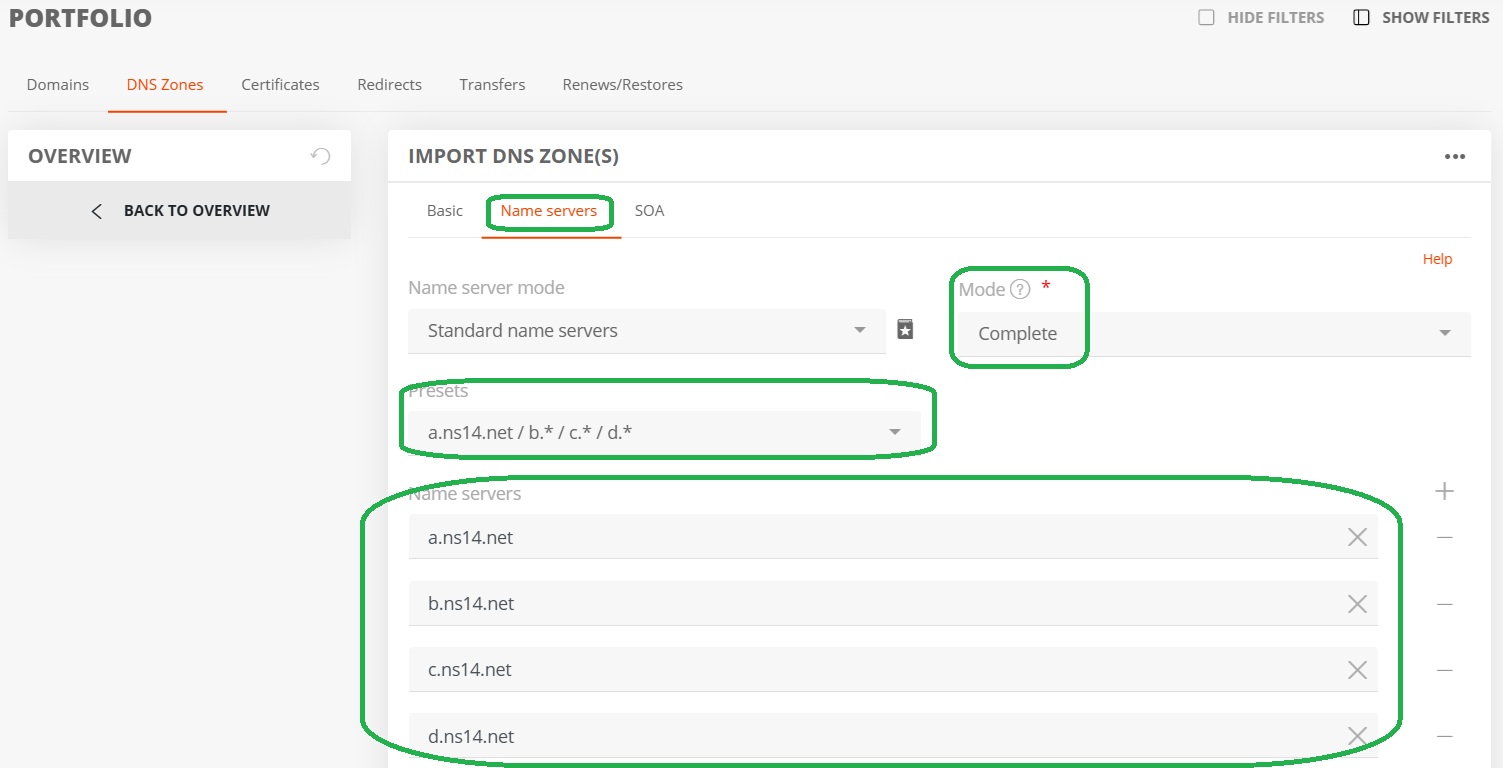
- In the Nameserver Mode tab, set “Standard Nameservers” and mode Complete. The new nameservers are pre-selected.
Step 3: Domain bulk update to the new nameserver hostnames
- Use the list search in the domain portfolio to identify and select all affected domains for a bulk update.
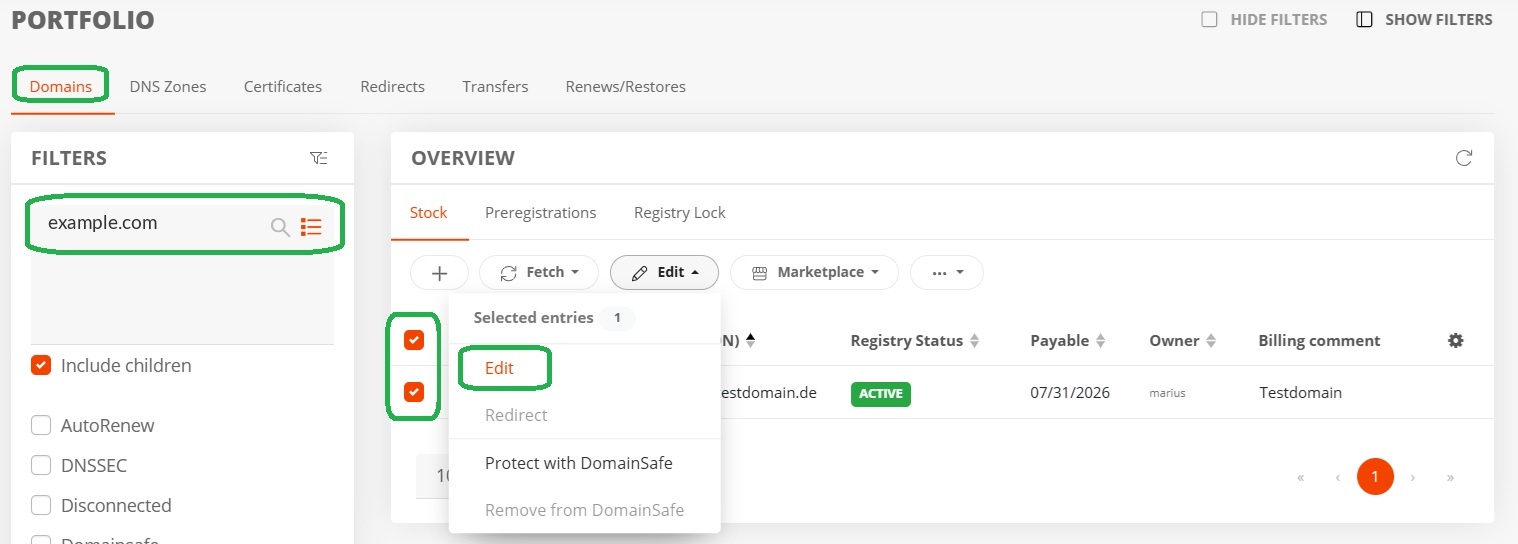
- Select Edit and use a.ns14.net, b.ns14.net, c.ns14.net, and d.ns14.net as the new nameservers in the Nameserver tab.
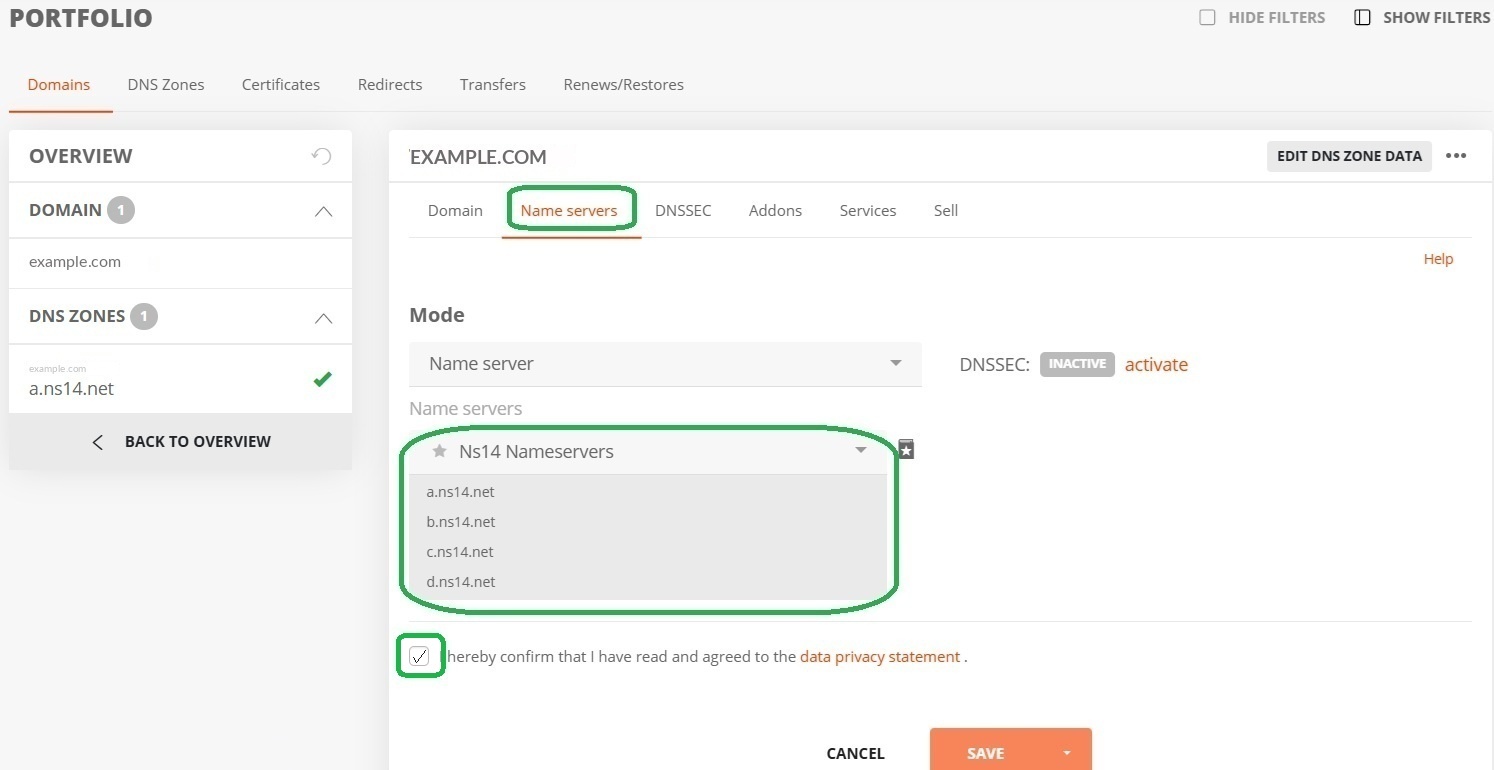
Possible issues when updating domains to new nameservers
Due to policy changes at many registries, updating a domain to new nameservers may cause side effects or issues. Since NIS-2 has changed domain handling for most TLDs, it is possible that
- missing data such as an OwnerC phone number/email address must be added during the domain update, or
- verification of the OwnerC email address may be required during the domain or contact update, if this has not already been done.
Using virtual nameservers on the new infrastructure
Previously used virtual nameservers will no longer be available in their usual form. However, it is possible to order new virtual nameservers for the current DNS infrastructure via the AutoDNS platform. These can be used directly for migration.
Notes for customers with primary setup
Primary Setup = The customer uses our primary nameserver and their own secondary nameservers.
The following secondary nameservers are available: b.ns14.net, c.ns14.net, and d.ns14.net.
External nameservers
When combining the new DNS infrastructure with external secondary nameservers, the primary IP for notifies (217.160.80.161) must be configured.
Zones can be additionally created on the new DNS infrastructure to ensure an uninterrupted transition.
Notes for customers with secondary setup
Secondary Setup = The customer uses their own primary nameserver and our secondary nameservers.
The primary nameserver available is a.ns14.net.
Zone transfers are handled via the AXFR gateway (62.116.132.5); zone imports in AutoDNS use 62.116.129.216.
The primary server must be configured to send notifications (notifies) to the IP addresses of the nameservers. Zones can be additionally created on the new DNS infrastructure to ensure an uninterrupted transition.
Support and contact
For questions about the process or assistance with DNS adjustments, our Domain Services Team is happy to help.
Email: domains@internetx.com
Was this article helpful?
Thanks for the feedback.